Hello!
I am in need of a custom field that allows table formatting to capture employee information for our Training & Development Team.
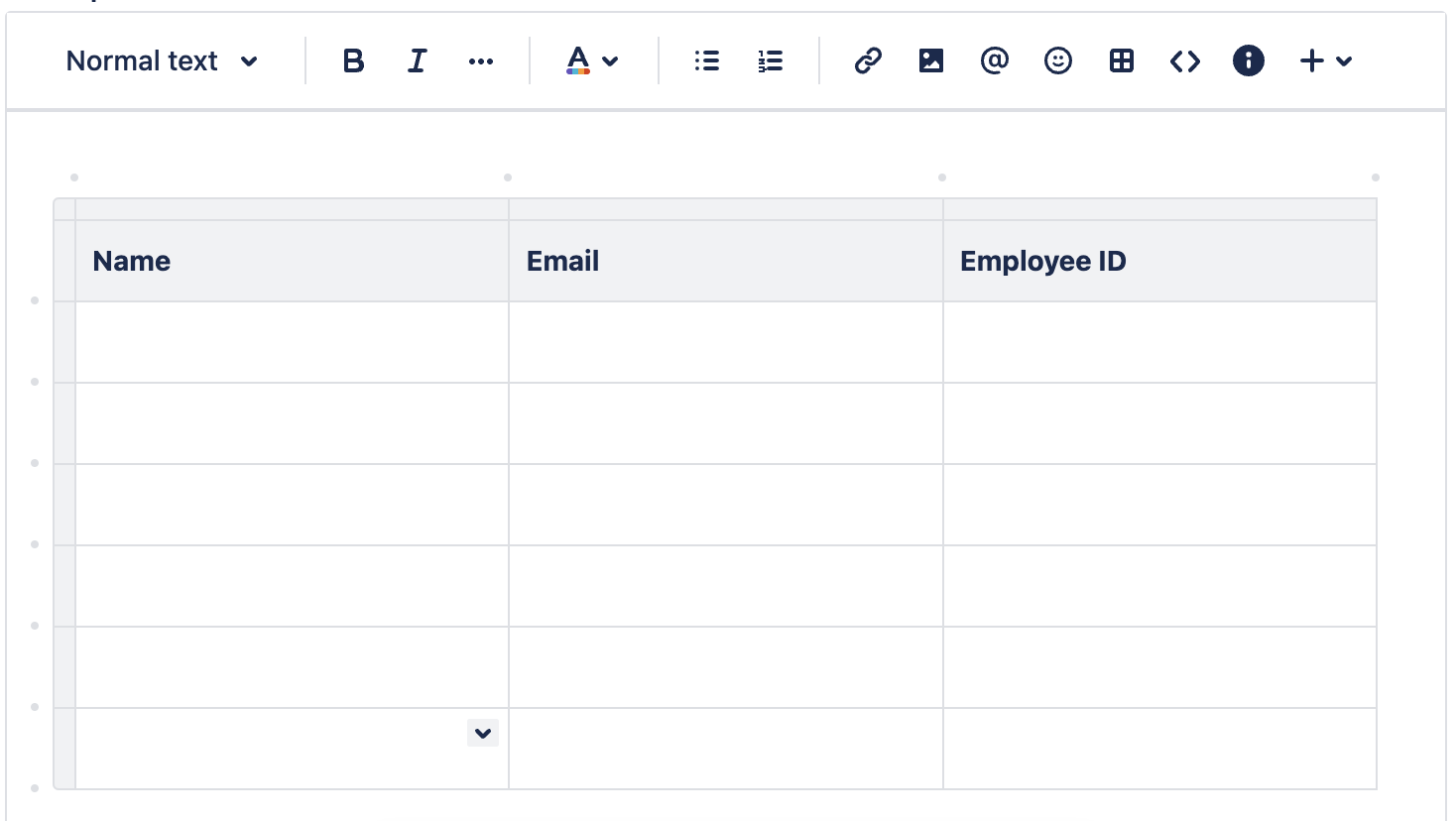
For context, we use a custom issue type that is at the task level and leverage forms for our customers to capture the information we need for each training request. Majority of the fields on our forms are linked to custom fields because we need to export the data for reporting purposes. I currently have a custom field (multi-line, supporting rich text) titled "Agent Roster" that prompts the reporter to provide Agent Name, Email, and Employee ID. This presents a problem because reporters enter this information in a variety of formats and makes extracting data difficult. I would like to add a table with headers "Agent Name" "Email" and "Employee ID" so the reporter can fill this out for the number of employees in need of training. Here are some things I've found through my research:
- Table formatting is only available at the sub-task level and is not available via the service center
- This does not work as our issue is at the task level and we need reporters to fill this out at the point of submission.
- There is a table option within forms that requires individual fields within each cell
- This does not work as I can only link one custom field per form and I need to extract this data for reporting. This also means number of rows need to be predefined, and I would like reporters to be able to add more rows dependent upon class size.
Here is an image of what I'm looking for to reference - please let me know if this is possible given the circumstances explained above. Any guidance is greatly appreciated!