I have rules that create set subtasks for issues when certain Issue Types are created. The subtasks generate with unique due dates based on the due date of the parent task. I also need the subtasks to auto-assign to a member of a role within the department.
I can see that I can use the "Assign Issue" component to do this but that is triggeriung on the parent task that is created - not the subtask that was created. I want to do this without setting up a hundred more automation rules for "Issue Type Equals Subtask" AND "Issue Summary Equals <subtask name>". I am trying to convince my marketing team to use your product but at this point they want to go with ClickUp because its easier to set up and - in their eyes - works better as well.
Help me help them.
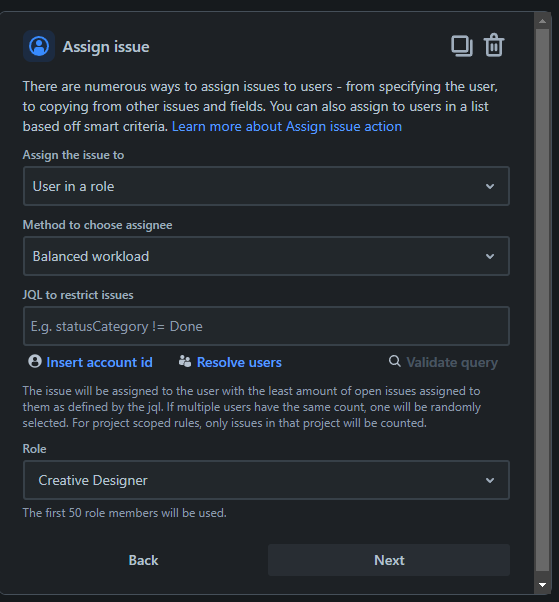
This is the type of interface I want to assign the subtasks, this is directly from the "Assingn Issue" rule component.
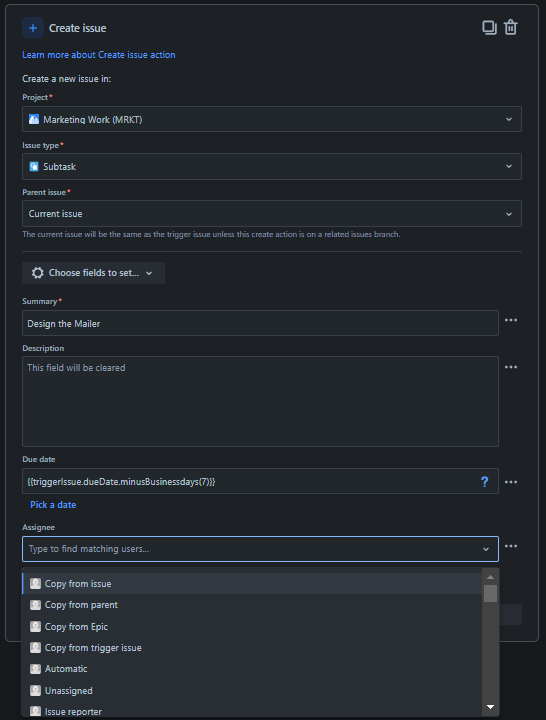
This is what I am stuck with; the options in the drop down are: "Copy from Issue", "Copy from Parent", "Copy from Epic", "Copy from Trigger Issue", "Automatic", "Unassigned", "Issue Reporter", "Issue Creator", "User who triggered the event", followed by any individual user in the organization.