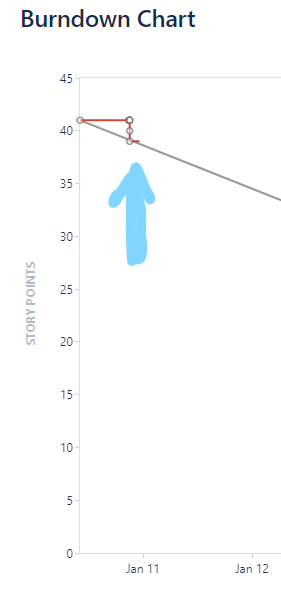
When we start a sprint, for Duration, we use "custom" and regardless of what time we change the Start date/time or End date/time to, the date time is not retained. Any assistance would be greatly appreciated.
Steps to Reproduce:
- Prior to starting the sprint (no active sprint) make changes to the commitment.
- Select Start Sprint
- In Duration field, select custom
- Adjust Start date and time to current time and date
- Adjust End date and time to desired time and date
- Select Start
Expected Result:
Sprint start date and time is retained and captured in Reports
Actual Result:
Sprint start date and time is not retained and a default value is used in its place. Note in the attached image, where there was a drop in the work, this is where the sprint actually started not the earlier point. I witnessed the time revert back between the time the Start button was selected and the window closed.
Note:
We are based in EST time-zone and our instance is set for GMT and the person who started the sprint is based in PST. I'm not sure if that is relative or not but thought to add it as a note. However, it does not seem to matter who (what time-zone) starts the sprint. It does this behavior all the time.