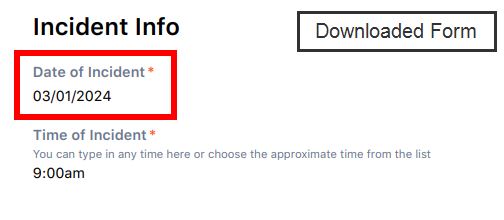
JSM Forms are using the incorrect Date Formats for the online form attached to the ticket and then a different incorrect date format for the downloaded form version.
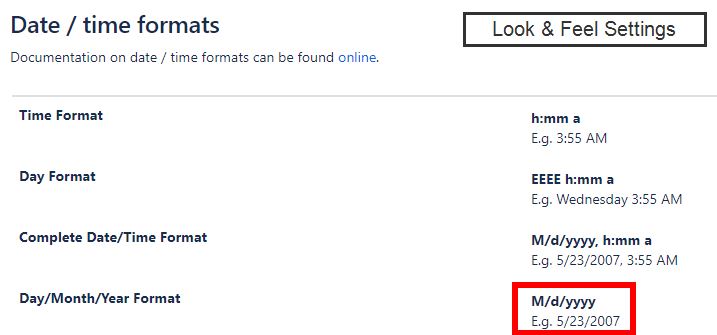
Our Look and Feel Setting are set for a US Date format as such:
M/d/yyyy / E.g. 1/3/2024
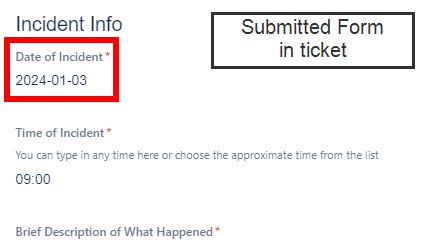
Once the form is submitted, the submitted date format shows inside the form
as: 2024-01-03 (Not great but still understandable for the American market.
The big issue is that once the form is downloaded, the date format shows
as 03/01/2024
Searching the KB I found these instructions.
How to change Forms / ProForma Due Date formats | Jira | Atlassian Documentation
However changing the language did not make a difference for either date.
To summarize:
Look Setting and Feel setting is 1/2/2024
Submitted Form shows: 2024-01-03 (with dashes as shown, not slashes)
Download Form shows: 03/01/2024
Thank you for any help.
As I attached the screenshots, I am noticing the time ignoring Look and Feel settings but that's a whole different issue.
This date is in a readable format but has dash for some reason. We have no dates setup with dashes that I could find.
This should read January 3rd, 2024. Americans will be confused when looking up this form months later, especially since every other document at the organization would show the month first, not day first.