We have multiple projects set up identically with the same simple filter:
- Company-managed
- Scrum Board
- Same workflow, issues schema, etc.
In existing projects, we have both "To Do" and "Backlog" statuses mapped to the 1st column of the active sprint's Board, labeled "To Do". When I create a new issue, it automatically places it into the Backlog, with the status "Backlog". It does not display on the active sprint's Board in the 1st column despite being mapped there (see screenshot). This is how I've always used Jira for probably over a decade.
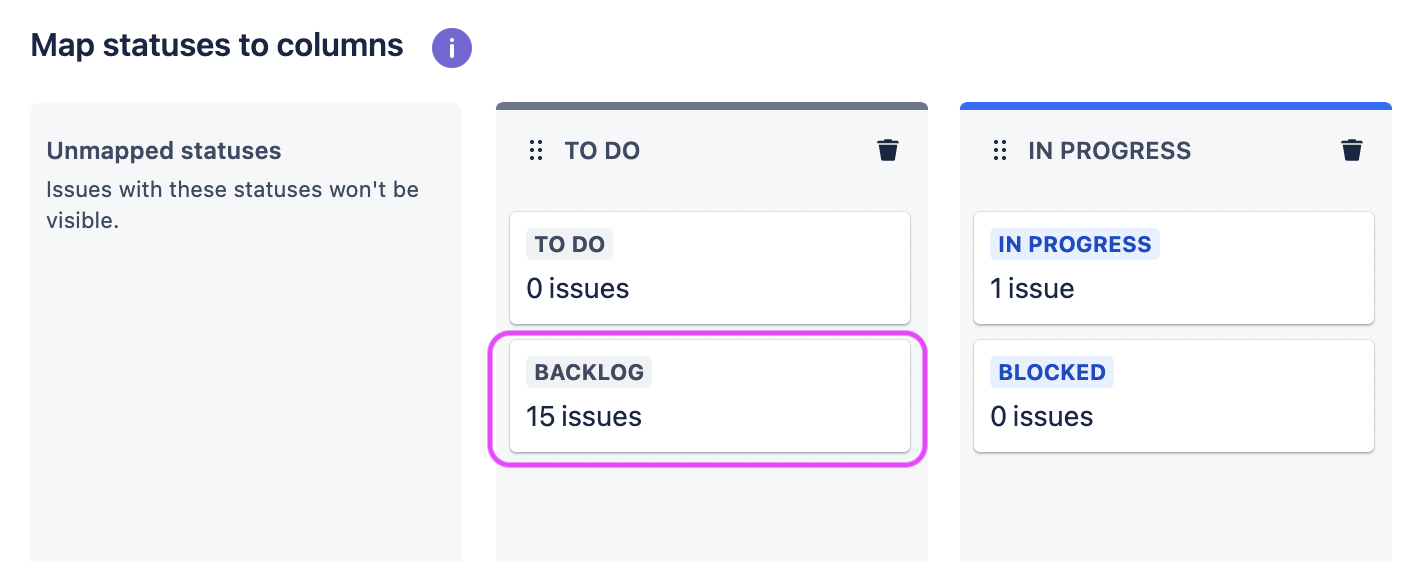
In our new project with identical Project and Board Settings, when I create a new issue, it automatically places it into the Backlog with status "Backlog" — but it visually displays on the active sprint's Board in the 1st column, together with the "To Do" status issues. "To Do" status (for us) indicates budget is approved & assignee is allowed to start working on the task.
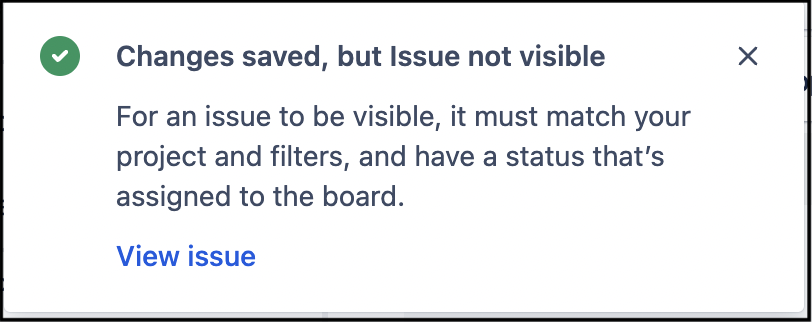
If I un-map the "Backlog" status so that it's not mapped to the 1st column, creating new issues will say (error) that I've successfully created a new issue but that it's not visible (see screenshot).
How can we get the Backlog to operate the way it does in all our other Scrum Board projects? I'd prefer not to add another column for "Backlog", and also don't want to change this Board to Kanban so that we can plan out Sprints (I also don't agree KBs should ever have Backlogs if they're following true Kanban methodology, but that's a discussion for another day...).
Thanks in advance!


