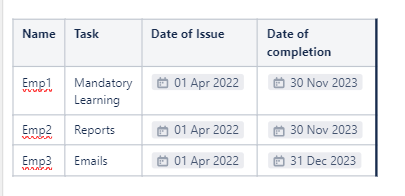
@Katerina Kovriga _Stiltsoft_ this is in continuation to the solution you provided here Solved: Conditional Formatting for Confluence tables (atlassian.com)
I was able to apply that in my project and to worked very well. However, I wanted to further fine tune it for another type of report.
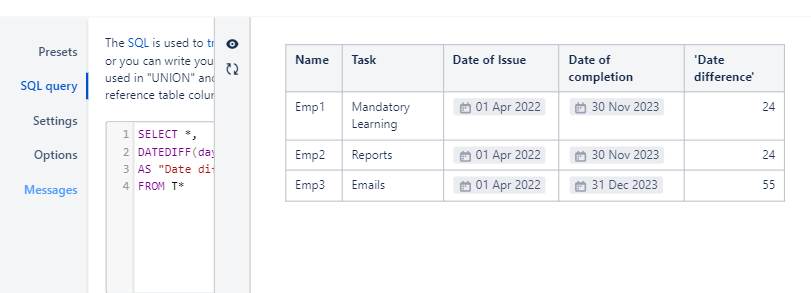
In my below sample table, I have this code that gives me the difference between today and the date in the column 'Date of Completion'. The Date difference column would ideally be the number of days left for me to follow up. However, I found out that this code doesn't add another column (not visible in editing mode but only when published). I would like to know if it's possible to do 2 things here:
1-output the results in an existing column (or if I have manually added a new one-say, named 'Days left for Follow up'). I am ok if this is not a possibility, as long as colour coding the results works, if should be manageable.
2- And colour code the range in 'Date of Completion' /or 'Days left to follow up (my manually added column) based on the below condition
If days left to follow up is:
*>=30, show Green
*>=15 and <=29, show Amber
*>=1 and <=14, show Red
3- Is it possible to further give a special condition/customize only to a specific row, say for the Emp3, I can show Green even if the value is between 1-29
SELECT *,
DATEDIFF(day,T1.'Date of completion',"today")
AS "Date difference"
FROM T*