
(Image Credit: https://www.volacci.com/blog/drupal-module-redirect)
[Big thanks to my old colleague @Ed Bukoski from Netflix, who did pioneering work in developing a redirector they used for their successful migration to Confluence Cloud.]
Picture it: you're almost at the finish line. After weeks of planning, testing, and more re-testing, you've figured out how to migrate your on-prem Confluence to the Cloud. All of the pesky apps are set to migrate properly, and you are ready.
But then your VP asks, "Hey Darryl, what's going to happen to old Confluence page links in emails or Word docs? Those are still going to work, right?"
You break into a cold sweat, thinking about those potentially broken links. They're everywhere: emails, docs, spreadsheets, presentations. And oh, what about integrated tools like Testrail, Salesforce, Zendesk? Internal apps? Oh no….
"Darryl? Hey Darryl, are you ok? You zoned out for a minute."
You reply, "Ah yeah, no, those will keep working. We're going to put in a redirector."
What's a redirector?
A redirector is when you configure your old site (or spin up a much smaller instance) to have something like NGINX or Apache accept requests for the old URL, and then redirect them to the new URL.
When you migrate from on-prem to Confluence Cloud, the URL of your site will change from something like
https://confluence.YOURCOMPANY.com to
https://YOURCOMPANY.atlassian.net/wiki
UPDATE: Per MIG-507 , you can now get a mapping file directly from Atlassian Support (post-migration) that contains a map of on-prem Confluence page IDs/short URLs -> corresponding URLs in Cloud. So you can skip ahead to "Putting the mapping table into use with Apache RewriteMap"
"Magic Redirector™"
Way back in 2019, @Ramona Scripcaru from Atlassian mentioned an undocumented feature of Confluence Cloud that I am calling the "Confluence Page Title Magic Redirector™", or "Magic Redirector™" for short.
On Confluence Cloud every page URL includes the page Id, one that does NOT match what you had on-prem:
https://YOURCOMPANY.atlassian.net/wiki/spaces/INFO/pages/8721/Simple+Page+Title
But Ramona revealed that you can actually use a special URL that will get automatically redirected to that URL. Notably, it is a URL that does not contain a page Id:
https://YOURCOMPANY.atlassian.net/wiki/display/SPACEKEY/Page+Title
If you look closely, you'll see the format matches the same pattern as a non-pageId URL on Server/DC:
https://confluence.YOURCOMPANY.com/display/SPACEKEY/Page+Title
So then, it seems like all we need to do is ask NGINX or Apache point at the new host, with an extra /wiki/ added into the URL. Here's what those rules would look like:
NGINX
return 301 $scheme://YOURCOMPANY.atlassian.net/wiki$request_uri;
Apache
RedirectMatch 301 "^(.*)$" "https://YOURCOMPANY.atlassian.net/wiki$1"
But wait, you're not done.
You have to consider Page Ids
On Confluence Server/DC if a page title has certain punctuation marks in it (%&?/\;"§+:), then the page's URL looks like this, with a page Id:
https://confluence.YOURCOMPANY.com/pages/viewpage.action?pageId=123456
Otherwise, it looks like this, with the title right there in the URL:
https://confluence.YOURCOMPANY.com/display/INFO/Simple+Page+Title
This is all explained in Atlassian's documentation:
The upshot is that if you have page titles with those characters, the URL for that page does not include the SPACEKEY and Page Title that the "Magic Redirector™" could use to then send users to the correct page. URLs for these pages just have a pageId.
Lookup page Ids
So what Ed figured out is that you can create a lookup table (using data extracted from SQL) to map a pageId to its SPACEKEY and Page Title, and then "Magic Redirector™" can do its thing.
Now Ed has amazing developers to write their own lookup tool+redirector in Java.
Mere mortals like me have to rely on existing tools, and luckily there is a handy Apache feature called RewriteMap that works perfectly for this.
Making a mapping table
So then, let's get into it. If you want to make a mapping table, you'll need the space keys, page Ids and titles from your Confluence Server/DC instance.
SQL script to get data
The fastest way to get this data is by connecting to the database directly. Here's a MySQL command that lets you get it or a specific space (great for testing):
|
SELECT CONTENTID, SPACEKEY, TITLE FROM CONTENT JOIN SPACES S on CONTENT.SPACEID = S.SPACEID WHERE CONTENTTYPE = 'PAGE' AND PREVVER IS NULL AND CONTENT_STATUS = 'current' AND S.SPACEKEY='INFO';
|
If you pipe that to a file, you should get something like this:
CONTENTID       SPACEKEY     TITLE
172376419       INFO         Slusho
176902673       INFO         Do Androids Dream of Electric Sheep?
176903761       INFO         Relocation Policy/Process
176903794       INFO         Story of Your Life
186251233       INFO         "Imagine If" Discovery Sessions
199307491       INFO         Talking Points
199308234       INFO         Eats; Shoots; Leaves
209349090       INFO         This + That
|
So you need to turn that into a mapping table that looks like this:
|
176902673 /wiki/display/INFO/Do%2BAndroids%2BDream%2Bof%2BElectric%2BSheep%3F
199308234 /wiki/display/INFO/Eats%3B%2BShoots%3B%2BLeaves
|
PageId Mapping table script
I wrote a small Perl script to create the mapping table. To make the table smaller (which should make it faster), I omit pages whose titles do not have any punctuation marks, because their URLs should not require a lookup. (No page Id.) That's why the list gets shorter.
Script: https://github.com/darryllee/confredir/blob/main/pageidmap.pl
"Magic Redirector™" limitations and workaround
Oh, but there's one other hitch. The "Magic Redirector™" still doesn't like certain characters. In testing, I found that Confluence Cloud still does not like the following character in titles: & / + %
So a URL like this will NOT get properly redirected:
https://YOURCOMPANY.atlassian.net/wiki/display/INFO/Page+With+This&That+or+This/That
While one option would be go back to your Server/DC instance and rewrite all those titles to remove or replace the offending characters, I found another workaround - redirecting to a Search page with the title already entered. The URL (with encoding) ends up looking like this:
https://YOURCOMPANY.atlassian.net/wiki/search?text=Page%20With%20This%20%26%20That%20or%20This%2FThat
And so the user ends up on a page like this, which yes, requires a second click, but hopefully lands them on the right page:
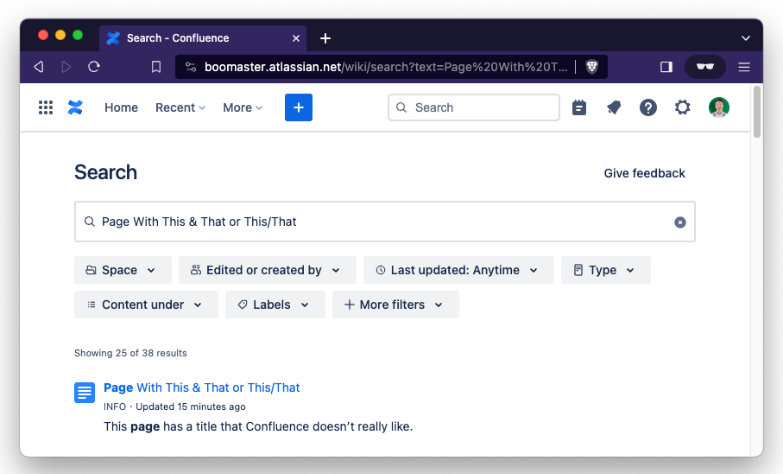
So my Perl script also looks for & / + % in titles, and if found, redirects users to the Search page for that title. So they look like this:
176903761 /wiki/search?text=Relocation%20Policy%2FProcess
209349090 /wiki/search?text=This%20%2B%20That
|
Putting the mapping table into use with Apache RewriteMap
Here's the Apache rule that does the page Id to title mapping, using our table:
|
RewriteMap pageids "txt:/etc/httpd/pageids.txt"
RewriteCond %{REQUEST_URI} "^/pages/viewpage.action$"
RewriteCond %{QUERY_STRING} pageId=(.*)
RewriteRule . ${cloudhost}${pageids:%1|/wiki/spaces/TEST/pages/44073006/Migrated+Confluence+Page+Not+Found}? [L,R=301,NE]
|
RewriteMap defines your pageids lookup table and its location.
The first RewriteCond makes sure the original URL is actually looking trying to view a page by Id.
The second RewriteCond checks that there is a pageId specified, and stores it
The RewriteRule (which should all be on one line) replaces the original request with what is found when searching the lookup table. I created an alternative page, "Migrated Confluence Page Not Found", to catch any pages that may have been missed.
- L = Last rule, don't process any other ones after this one.
- R=301 means redirect this link permanently
- NE = No Escape - we are already encoding special characters in the lookup table, so we should not double-escape them.
Tiny Links
One last fun bit. Confluence has a thing called Tiny Links. The allow you to have "shorter" URLs that can be shared, that look like this:
https://confluence.YOURCOMPANY.com/x/Y0FGCg
Unfortunately, these links also change when you migrate from Server/DC to Cloud, so if you want old links to automatically redirect… you guessed it, you will need a redirector.
We basically use the same data as above, but we generate a mapping file for every page, because Tiny Links could be used for potentially any page. But how to generate Tiny Links? Well, Atlassian has a script for that: How to programmatically generate the tiny link of a Confluence page
I adapted their script to read from the MySQL data, and then convert it using Atlassian's algorithm to produce a table like this (accounting for the characters that that "Magic Redirector™" cannot handle):
Y0FGCg /wiki/display/INFO/Slusho
EVKLCg /wiki/display/INFO/Do%2BAndroids%2BDream%2Bof%2BElectric%2BSheep%3F
UVaLCg /wiki/search?text=Relocation%20Policy%2FProcess
claLCg /wiki/display/INFO/Story%2Bof%2BYour%2BLife
4fcZCw /wiki/display/INFO/%22Imagine%2BIf%22%2BDiscovery%2BSessions
4zDhCw /wiki/display/INFO/Talking%2BPoints
yjPhCw /wiki/display/INFO/Eats%3B%2BShoots%3B%2BLeaves
4ml6DA /wiki/search?text=This%20%2B%20That
|
Script: https://github.com/darryllee/confredir/blob/main/tinylinkmap.pl
The Future
Well, last week, this bug was resolved:
Comment from 02/Oct/2023:
"URL mappings before and after migration to cloud, including pageId changes can now be requested via Atlassian support as part of post migraiton link fixing: Links broken after Server to Cloud or Cloud to Cloud migration | Confluence | Atlassian Documentation"
Well that's pretty cool. So you could write a rewrite rule that maps every old link to the exact new link, based on a mapping table you would construct from the CSV data from Atlassian support. The mappings would just be a lot more accurate and you would not have to worry about the undocumented and tricky nature of the Magic Redirector™.
What about Jira?
On Jira, issue keys stay the same, so the rules would be much simpler (especially since Jira Cloud does not require anything after the hostname like Confluence Cloud's /wiki/)
NGINX
return 301 $scheme://YOURCOMPANY.atlassian.net$request_uri;
Apache
RedirectMatch 301 "^(.*)$" "https://YOURCOMPANY.atlassian.net/$1"
These rules would automatically redirect somebody going to an old Jira Server/DC link:
https://jira.YOURCOMPANY.com/browse/BUG-123
To the shiny new cloud site:
https://YOURCOMPANY.atlassian.net/browse/BUG-123
Nice, right? But wait, will this work for links to filters? What about boards?
Welp, all of the IDs for filters and boards change during migration, so old links like https://jira.YOURCOMPANY.com/secure/RapidBoard.jspa?rapidView=1157 will NOT work when translated to https://YOURCOMPANY.atlassian.net/secure/RapidBoard.jspa?rapidView=1157
Because the board that had an id of 1157 on Server/DC may now have an id of 38 on Cloud. Bummer.
Now it turns out that filter names are unique, so post-migration you could use the API to dump all the filter names and new IDs from the Cloud and use that to construct a mapping file, and maybe you can do this with boards too (although board names are NOT unique).
Reference:
Previous Discussions
Documentation on Confluence URL formats/Tiny Links


