Hello Folks!
I have several Jira Product Discovery (JPD) projects set up, and when you create a field in that product, behind the scenes a custom field is created in Jira that can be queried via Filters/Issue Search.
Across my projects, I've used the same name for several fields, so that PMs moving between projects have consistency. For example, there's a "Product Strategy" field that exists across 3 different JPD projects. This in turn creates 3 separate custom fields, that look something like this:
- cf[123] = "*Project Strategy" in Project #1
- cf[456] = "*Project Strategy" in Project #2
- cf[789] = "*Project Strategy" in Project #3
The tricky part is that when you go to select a column in Filters/Issue search, it appears that Jira collapses these 3 separate custom fields into one selectable entry:
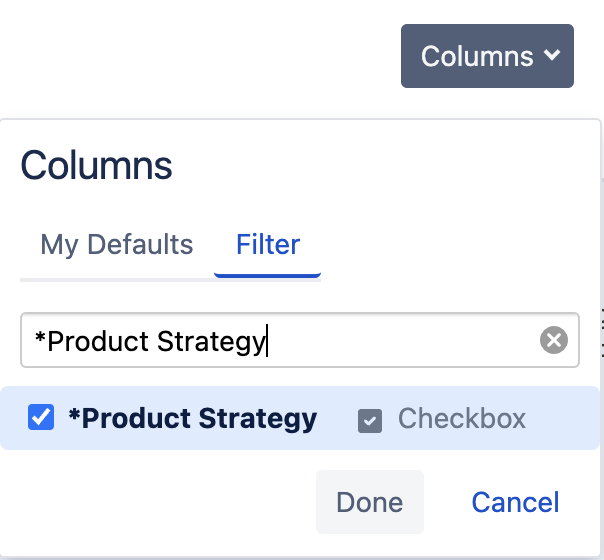
I assume this is done to hide from users the fact that the "*Product Strategy" column is really 3 separate custom fields.
This causes 2 issues:
- Sorting: Say that you try to sort the "*Project Strategy" column in the issues table. Behind the scenes, Jira will only sort on one of these custom fields (I'm not sure what logic is used to select the custom field that's used for sorting). So say Jira uses cf[123] to sort, if I'm searching for the issues in Project #2, the column doesn't sort because Project #2 uses cf[456] for "*Project Strategy".
- Exporting: Similar to sorting, if choose the "Export CSV (filter fields)", Jira ends up exporting all 3 of the "*Project Strategy" fields in the CSV (whereas if I'm working with Project #2, I just want to have cf[456] be exported).
As a result, I'm wondering if there's any way to select the specific custom field as a column in the table in Filter/Issue Search?
Thanks!
Andy

