When you place the URL in the iFrame macro, please ensure it has embedded properties. Example:
For Google Drive, video play/access URLs will not have embedded properties.
You must navigate to "embed items" to get the correct URL.
Exact steps:
- Open Google Drive
- Find the Video file
- Set Share Setting to Public on Web
- Click to Open.
- Click the "More Actions" icon (3 vertical Dots) upper right corner
- Select "Open in New Window"
- Click "More Actions" and Select Embed item

- Copy source URL i.e. src="COPYME"
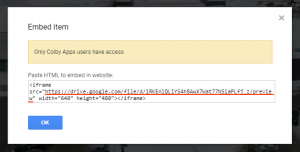
- Use the URL in your iFrame macro.
Also, if you are using a video from any other platform like YouTube, dropbox, etc., make sure you use the URL with embed properties.
