When viewing an attachment in a Jira ticket, the doc opens at a "size-to-window" instead of 100% view size. The result is that if you are using Jira with a browser that is 3/4 of your screen or full screen, when you view the Jira attachment it displays the doc at a zoomed-in view of 150%-200%+ depending on your screen size and/or the size of your open browser window.
A 187% view zoom is very annoying because the user has to immediately hit the minus button at the bottom of the window to shrink the doc to 100% or somewhere around normal size for comfortable reading.
MS Word has a toggle under "view" to zoom with size of window.
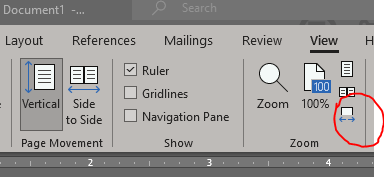
Jira attachments seem to open/view at "size-to-window" by default.
Is there a way to turn-off the "size-to-window" view in Jira?
We would like 100% view by default. This auto-stretch wastes time & productivity.
If there is a simple fix, please tell me because our IT guys don't know how to do it and this feature as implemented makes me hate Jira, because I have to look at Jira attachments all day every day.
help.


