Background
I have been using one of the built-in Automation templates to automatically link issues that are mentioned in comments. Default settings are below:
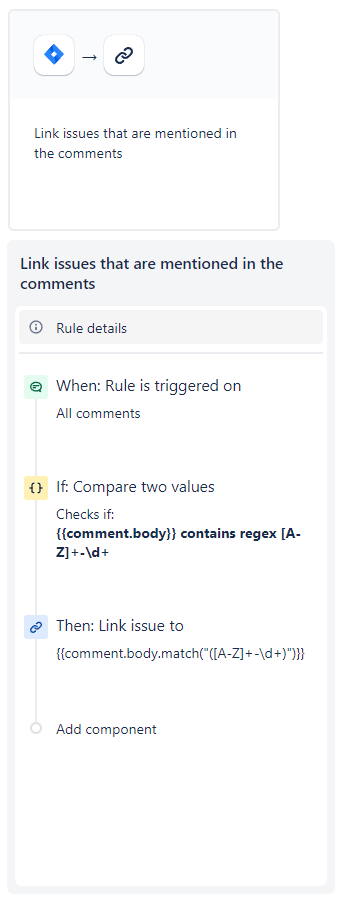
This little rule works pretty well and can be run per project to reduce global rule executions.
However, some of my users started pasting data tables into comments with strings that matched the expression but were not Jira keys. This resulted in a number of emails to my inbox about the rule failing.
Potential Fix
I tried to reduce the number of false alerts by making the rule a little more complex. The idea was to verify that a string was an actual Jira issue, in my instance, before trying to link to it.
After the compare block, I added a Lookup issues block with the same expression from above as a smart value in the JQL query. This accurately searches the instance for those items. I can then return the results in a follow-up compare block as a list of matching keys.
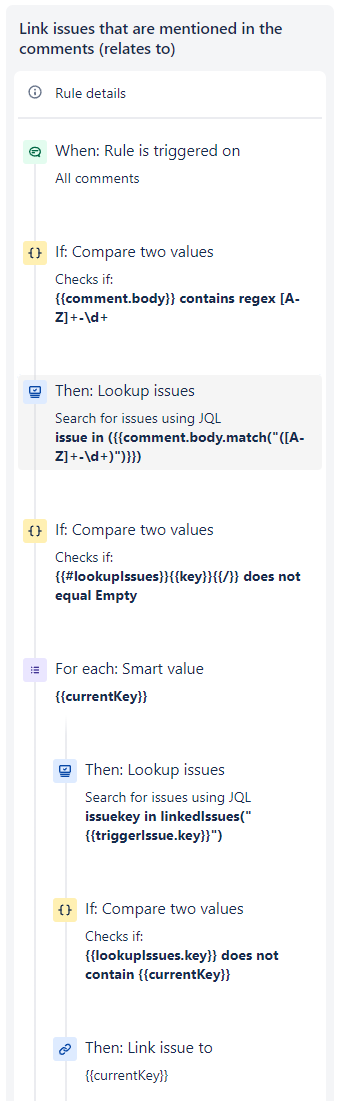
If the list of keys is empty, my rule stops, as expected.
If the original string was a partial match to any actual keys, the Lookup issues will only return the matching keys and the rule can continue as planned.
However, if none of the values in the comment matched any Jira issue keys, I still get an error in my inbox. The rule is working as planned, but the Lookup issues failed because there was no match.
There was an error executing a search during custom value definition: .
Custom Smart Value JQL Search: "issue in (HD-3000)" - Issue does not exist or you do not have permission to see it.
Question
Is there a better way to validate if a string matches an issue key that won't treat a false result as an error?
Also, this rule has to be treated as global unlike the original so that the Lookup issues can work correctly. I don't suppose I can get around that.


