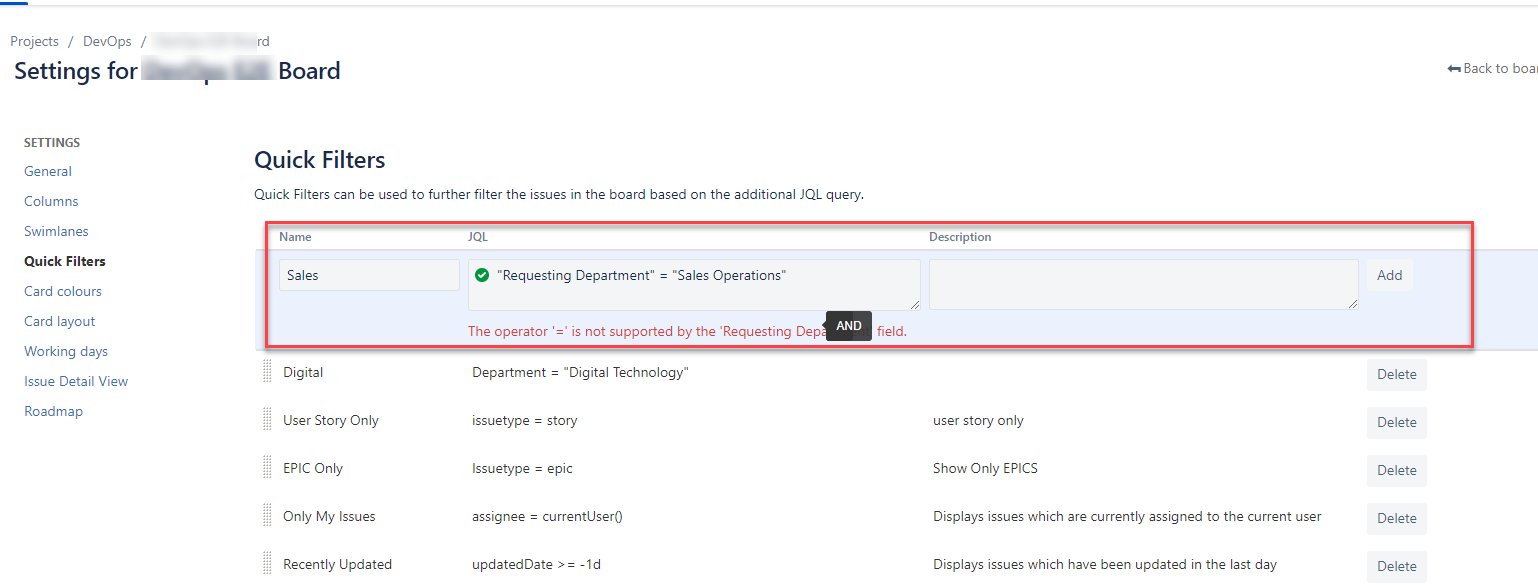
Hello, need help please. I am working with a company-managed scrum style project. I have created a custom free text field called "Requesting Department" to identify where issues originated, how many by department and so on. My project has a Kanban board to show issues by status.
What I would like to do (and have done on a Teams-Managed project) is use Quick filters to filter by Requesting Department. The difference being that I am using a free text field for my company-managed project (previously using a list of values in my teams-managed project). Reason being, we have designed a Microsoft Form, for the business users to submit requests which feed in to Jira, and one of those fields is "Requesting Department". We chose a free text field in Jira, to allow Forms to push any value rather than be restricted to pre-defined LOVs. Forms looks at the Outlook Department name essentially and pushes it to Jira, depending on who raised the request. This works fine, but...
In short, Jira will not allow me to apply quick filter rules to the "Requesting Department" free text field. I can add values manually
I am using "Requesting Department" = "Sales Operations" (and various other departments) but I get a message as per screenshot, "The operator '=' is not supported by the field".
I have tried with Quotations and without, as well as other operators. I
As a note, I have created another field called simply "Department" as a list of value type field and testing if that works. But this seems unnecessary and I don't really want to have to maintain all the values within, but rather use what is pushed to it and quick-filter that.
Advice welcome.