I'm trying to setup a new Project Role and/or group with 'browse-only' permissions. These are internal company users who have Jira accounts, but they are separate departments. I need them to see the JSM queue and individual tickets, but I cannot give them full Service Desk Team access. I do not want to take up the licensing spots and I do not want them to have full, complete access to the JSM project.
I've read through tons of posts about this already but nothing I do seems to work for this. This is what I've done so far:
1) Setup a new Project Role named 'Collaborator'.
2) Setup a new group called 'guest-group'.
3) Went to Edit Permissions and added both the 'Collaborator' Project Role and the 'guest-group' group to 'Browse Projects'. Note that this is the ONLY place where this project role and group are being used. It is setup like this:
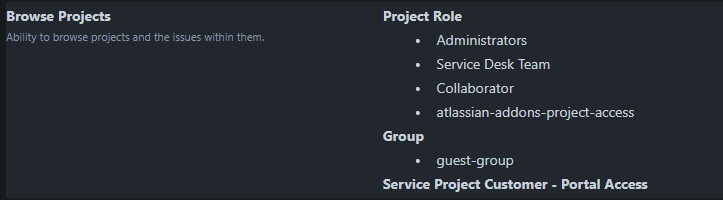
4) I went to 'People' in JSM and added a user to JSM by giving them the 'Collaborator' project role.
5) I added the same user to the 'guest-group' group.
6) I checked the 'Permissions Helper' to see if there were any obvious issues. All green check marks.
However, the user still cannot access an issue if I provide them with a link to the ticket. Instead, it just takes them directly to the portal page as if they do not have access to see the queue or the ticket.
Am I missing something? I'm sure there's a way to do this but I've tried everything I can think of.
Thanks!


