Hey,
we have Slack workflow built to create a Jira ticket, which is working flawlessly.
I have 2 questions:
1. How to include Slack message link in Jira ticket?
As we receive many requests, it can be challenging to locate the original Slack message while working within Jira. Currently, we manually add the link to the Slack message created by this workflow to the Jira ticket.
Is it possible to automatically include the link to the message either during ticket creation or after the Jira ticket has been created?
2. How to post Jira ticket link in Slack under message which created that ticket?
We appreciate the integration of the Jira app in our Slack channel, as it allows us to quickly assign a person to handle a ticket, change its status, or directly access Jira by clicking on a link.
I have already created a Zap that triggers when a Jira ticket is created, filtering out those created from the Slack integration. The Zap posts a message with a link to the Jira ticket in a thread for the last message generated by the Slack Workflow.
I am encountering two problems:
- The step in Zapier where I search for the Slack message is not optimal, as if multiple requests come in a short period of time, the next Zap run will post all messages into one (the last Slack message that created the Jira ticket).
- When I use my user account as the posting person in Slack, the Jira link is expanded and I can perform actions such as assigning and changing the status. However, this results in me being notified of all comments under all requests in Slack. To resolve this, I switched to using a bot, but this causes the links to not be expanded.
My user:
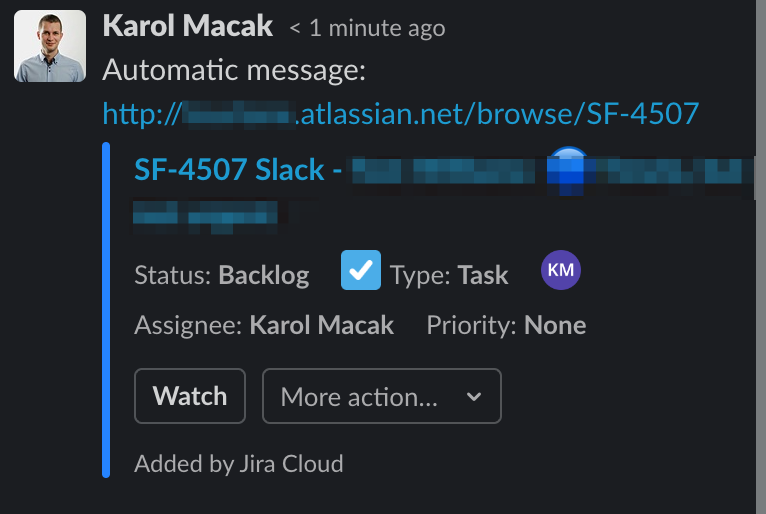
Bot:

I would love to know if this is possible and will appreciate your help.


