Given that we are new to the Jira platform, I thought it prudent to put these questions out there, so we might be able to avoid mistakes that require our starting over from scratch...
An example of our potential Service Desk structure:
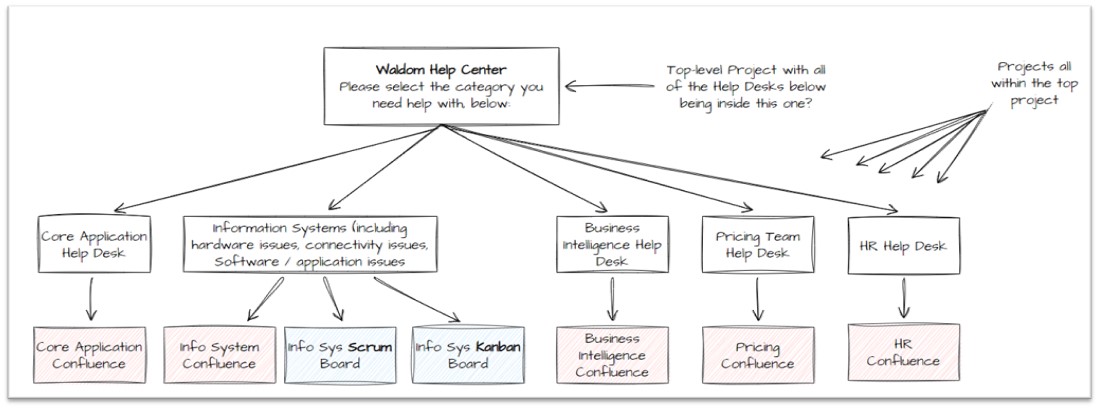
- Does this structure of Projects (i.e. Service Desks) work so tickets can be easily reassigned from one Project to another (from one Service Desk to another)?
- How to create a separate instance of Confluence for each Service Desk Project (or is that automatic)?
- If someone clicks on the top-level Service Project that all the other company Help Desks are under, and the person does a search for answers, will that automatically search in all of the Confluence pages associated with each of the sub-Projects?
- How does the association happen between each Service Desk Project and its own Kanban or Scrum board, or would each Service Desk Project only be associated with its own Backlog (which would then feed into its own Kanban or Scrum board)?
- Are there any “Gotcha’s” in terms of the sequence of setting things up that might cause us to have to delete what we’ve done and start from scratch? (An example would be if we used Team-Managed Projects instead of Co-Managed Projects. Another example I could imagine is if we did not have a top-level Project and just created a set of 5 separate Service Desk Projects, then we might decide later that it would have been better to have the top-level Project so we can ask the user a few questions to guide them to the correct Service Desk.)
I found this for a suggested sequence online:
From: https://iwconnect.com/the-basic-customization-of-jira-service-desk/
- Request Groups. A Group is simply a category you can assign to each Request Type. In the customer portal, your Request Types are organized in vertical tabs based on your groups. To add Request Groups, go to Settings > Request types. You should see your Groups in the sidebar and select + Add Group. A preliminary list of request groups is needed to start the customization process.
- Issue Types: The default Service Desk Issue Types are: Service Request, Service Request with Approval, Change, Incident, Problem, Task and Sub-task. If needed, new Issue Types can be defined and used.
- Fields: Only certain fields are included in every Request Type, and this is something to be determined before creating the Types). There is a list of existing predefined fields, but we can create as many custom fields as needed depending on our needs. To add or edit fields, go to Settings > Fields.
- Request Types. In each of the [Request] Groups we can add different Request Types. But before doing that, we need to determine all the Issue Types that are needed since every Request Type is a kind of Issue Type. To add a Request Type, go to Settings > Request types. You should see your requests in the sidebar and select Create request type.
- Screens: There is a possibility to have different screens for the customers (ones who create the requests) – Create Screen, and for the service desk agents (who work on resolving the requests) – Edit/View screen. To add or edit screens, go to Settings > Screens.
- Workflow: All the default Jira Service Desk Issue Types mentioned above have their own defined Workflows. If we create a new Issue Types or need to make changes to the existing processes, we can always create new Workflows. A Jira workflow is a set of Statuses and Transitions that an Issue moves through during its lifecycle, and typically represents a process within your organization. Workflows can be associated with particular Projects and, optionally, specific Issue Types by using a Workflow scheme. To add or edit Workflow, go to Settings > Workflows.
- Permission and Notification Schemes: Defining the Permission and Notification Schemes is also very important, but it can be considered as a second phase of customization (after all the previously mentioned things are defined).
- To edit Permission Schema, go to Settings > Permissions.
- To edit a Notification Schema, go to Settings > Notifications.
- Groups and Roles: It is possible to define different Groups and Roles in Service Desk to help you restrict the permissions and notification, as well as give different access to groups of people that do not have license. Collaborators are not an official role, but you can bring in non-agents in Jira to work with agents on JSD projects. Simply add them to the Jira Service Desk Team role in a Project, and they can view issues, be @mentioned, and make internal comments without using an Agent license. To add or edit groups and roles of the users, go to Settings > Users and Roles.
Thank you all for your wonderful help! Very appreciated...
Cole


