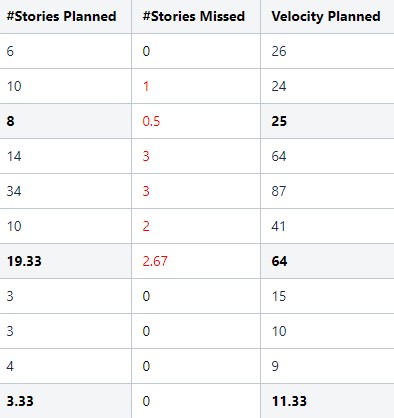
I have a a series of pages with tables of sprint metrics, with an auto-calculated average row. I am combining those with Table Excerpt Include, then using Table Transformer to flag #Stories Missed values more than 0 in red text using this SQL:
SELECT *,
FORMATWIKI("{cell:textColor=" +
CASE
WHEN '#Stories Missed' >0 THEN "Red"
ELSE "Black"
END
+ "}" + '#Stories Missed' + "{cell}")
AS '#Stories Missed',
FROM T*
This produces the table below. The auto-calculated average rows' formatting with gray shading and bold text are overridden by the SQL. Is there any way to exclude the calculated rows from the SQL formatting changes, or better still, leave the gray shading and bold formatting but make the average value red if > 0?
I am very new to SQL coding, so I suspect this is possible but may not be so within the Confluence/Stiltsoft macros currently available.