Hello fellow Atlassians,
I'm trying to implement a substitute regulation in case the assignee or approver of an issue is out-of-office and would therefore like to change the assignee of an issue via a scheduled Automation which JQL-selects issues that haven't been updated in the last three business days.
Since we're doing this escalation along the hierarchy, we're using Assets to use the referencing of deputy/substitute or manager of our users. Every user is represented by an object which is imported from the AD. During import, we're matching the CN to fill in the Jira user attribute of each object/user.
Not being able to use {{lookupObjects}} in Automation (we're on DC) got me to using an Assets custom field, which gets auto-populated with the referenced (user-)object of the current assignees Assets object via assign issue scope. Let's call this field "Manager of assignee" or "customfield_11301". The (user-)object displayed in the field "Manager of assignee" also has its corresponding Jira user filled in as attribute "JiraUser" like any other user with Jira account too.
The Automation will run scheduled and check a JQL statement as described. Then it should edit the issues assignee via a smart value, but I cannot figure out how to do so.
Result is, that the issue gets unassigned and the "Manager of assignee" field cleared respectively.
I tried different smart values, the most logical to me is {{customfield_11301.JiraUser}}
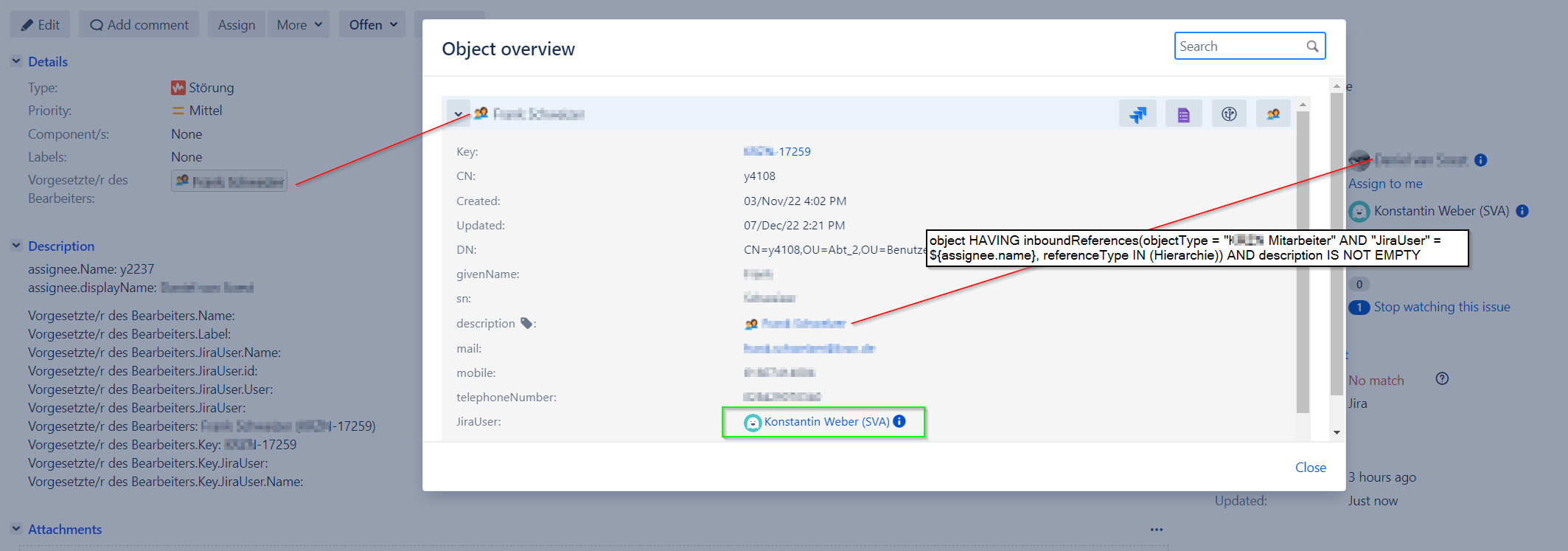
I tested the automation with two accounts which do have admin permissions in the project, because we're also using an issue security scheme within the project. One account is deputy of the other one, who is assignee of the ticket. But still no success. The Automation rule states SUCCESS and does not give any information on why it is not working.
Is there an attribute missing in the Assets dot-notation or do you see any other mistake I made? Maybe someone even implemented a substitution automation in another way...
Best regards
Konstantin