By creating great Jira tickets, developers can improve their team’s productivity and workflow. In addition to necessary information that should be included in your ticket – the answers to why, what, and how questions – this guide highlights how you can ensure your tickets are useful. Feel free to use any of these proposals that you think will help your team!
The problem
The following are problems that reduce developer productivity when working with Jira tickets to organize software development work:
- The necessary information to complete the work is not present in the ticket
- The ticket is ambiguous about work that needs to be done
- Ticket blockers and dependencies are not known or identified in the ticket when the work begins
- The ticket is not organized in terms of its internal content or how it relates to its external project context
- It’s not clear how the customer will use the work outlined in the ticket
- Developers aren’t aware of Jira’s useful features while creating the ticket
These problems can waste valuable developer time. For example, if the project is unclear, a developer can waste time making the wrong thing, clarifying requirements, switching to work on blocking tasks, and gathering information needed to complete the ticket.
The following are simple recommendations for creating useful Jira tickets.
A brief overview of Jira Software
Historically, transferring knowledge between people has been a problem of access and discoverability. Atlassian’s Jira tickets attempt to solve some of these problems by providing a place to collect information about a task and organizing work into doable chunks. Developers use Jira tickets to manage workflows, often tied to creating software.
Ten ways to create a useful Jira ticket
The following tips will help you to create a useful Jira ticket. They have helped my teams at numerous organizations create software.
1 - Use a template
When starting a new Jira ticket, developers might get a form of writer’s block. Even after creating a ticket, necessary information may be missing. By using a checklist template (like the one below) you can avoid this problem.
Here is a template in markdown I use to create scope for new Jira tickets:
# TO SCOPE THIS TICKET:

[] create a descriptive title

[] complete TBDs below

[] assign epic to this ticket

[] create relevant linking relations

[] delete this section

# DELETE ME AND ABOVE!


## 🧑 Story

We need to TBDTASK from TBDRESOURCE in order for TBDUSER to TBDACTION


## 🔨 Acceptance Criteria

- AC1

- AC2


## 📚 Resources

- [PLANNINGDOC1](WWWDOTEXAMPLEDOTCOM)

- [FIGMADOC1](WWWDOTEXAMPLEDOTCOM)

- [TECHDOCUMENTATION1](WWWDOTEXAMPLEDOTCOM)

- [TECHDOCUMENTATION2](WWWDOTEXAMPLEDOTCOM)
Paste this template into the “Description” section of a Jira ticket and follow the checklist to make sure every ticket is scoped. Note: “TBD” stands for “To Be Done”.
You can auto-format this markdown in a Jira ticket by right-clicking on the “Description” section of a Jira ticket and clicking “Paste and Match Style”.
I encourage you to add or remove steps and content to this template depending on your team's needs. Using ticket templates allows your team to make a decision about what content each ticket should include and multiply that value in every ticket.
Here is an example of a scoped ticket created with the above template:
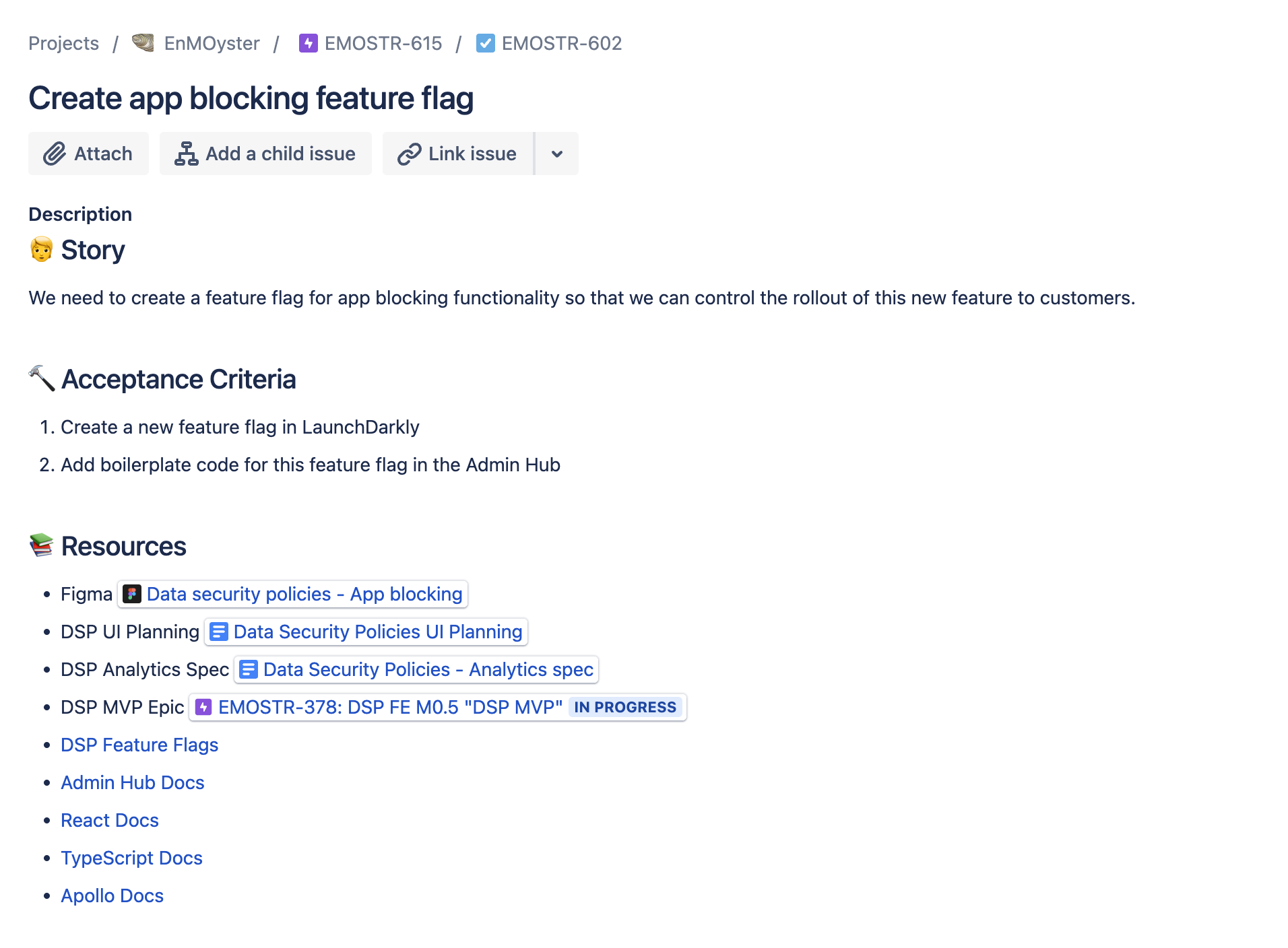
Fig. 1 - a scoped Jira ticket created with a template
We will explore the rationale behind sections in the above ticket in later proposals in this document.
2 - Clone similar tickets
Clone well-scoped tickets to avoid the same “starting-from-scratch” problem mentioned in the template proposal. I recommend cloning to ensure team-specific ticket metadata on groomed tickets appears in new tickets. Then use a template to include all necessary content.
Clone a ticket by opening the three-dots ellipsis icon dropdown menu in the top-right of a ticket and clicking “Clone”.
Cloning a ticket creates a “Cloned by” link in both the old and new tickets, which I remove since I don’t think it adds any useful information.
3 - Create a descriptive title
The title is the most important part of a Jira ticket. Some teams use tickets where the title is the sole content of the ticket. Here are some best practices for good Jira ticket titles:
- Phrase the title as an imperative command starting with a verb (like a good commit message)
- Be a descriptive as you can with the limited characters allowed
- Use the form, “To complete this ticket, I need to $TICKET_TITLE”
A good title jogs the memory of what needs doing. Here are some example titles that need clarification:
- TCS workspace tagging
- Content Policy detail page
- Add CPS search filters
And here are the improved versions of the same tickets:
- Spike on method of TCS storage for workspace tagging
- Implement Content Policy Detail Page "Created by" section to render user name and avatar
- Add filters for CPS search to fetch Jira or Confluence results
4 - Have a “Story” section
This section answers the question of “why?” to the developer. Why am I doing this work, and for whom? This section is also called a “User Story”.
A good story guides the developer through ambiguity during the work and maintains focus on the customer. The act of creating this story will sometimes prompt the question “Why and for whom are we doing this now?” and nudge developers toward driving customer value. When engineers need to make implementation decisions during the course of a ticket’s work, their attention and empathy often gravitate toward “why” and “for whom” the work is being done, leading to more accurate and compassionate decision-making.
The story in the template is:
We need to TBDTASK from TBDRESOURCE in order for TBDUSER to TBDACTION.
Writing down the “who” benefits from your work is an illuminating exercise.
Here are some example user stories:
- We need a modal to help users rename and describe a policy.
- We want to set up separate alarms for production vs. staging for cust-data-classifier so developers know the environment to respond to issues.
- Users need a way to get to the app-blocking progress tracker so that they can select which apps will be blocked on a policy. Clicking on the rule card allows them to accomplish this.
All these proposals are suggestions to nudge behavior in a more productive way, so feel free to format these stories in whatever way works best for your team. Note that customers are not always end users – they can be designers, other engineers, management, and whoever else who benefits from your completed work.
It’s tempting to list work that needs to be done in this section, but I suggest focusing more on a customer story and leaving the “what” to the next section.
5 - Have an “Acceptance Criteria” (ACs) section
This section answers the question of “what?” to the developer. What needs to be complete to move this ticket to a “DONE” status and begin work on other things? This section is also called “Definition of Done”.
This is the meat of the Jira ticket. These acceptance criterias should be descriptive and achievable. Consider using the STAR goal-setting mental modal and formatting the criterias like like good commit messages.
Here are some example acceptance criteria:
- Implement link from the app blocking rule card to the app blocking progress tracker screen
- Document how to handle regos for the three new UPP APIs in the relevant DAC
- Spike on which method of TCS storage to use for workspace tagging, timebox to two days
After completing the acceptance criterias of the ticket, a developer should feel confident that the ticket is done and take the appropriate actions in Jira to show this.
Note that some acceptance criterias are implicit and based on your team’s requirements, such as unit testing features. Don’t waste precious ticket space and developer attention on them – less is more!
6 - Have a “Resources” section
This section answers the question of “how?” to the developer. How do I complete the acceptance criterias? What links, documents, people, processes, tactics, or strategy will be helpful to complete this work?
You often have these resources on hand while creating the ticket. Preserve access to them and save time researching later when whichever developer (who may or may not be you) begins work on the ticket.
Here is a list of useful resources developers should have on hand while completing work:
- Notes on implementation during planning, grooming, or other meetings
- Email subject lines
- Slack thread links
- Documentation links
- Names of points of contact
Do yourself or someone else a favor and save this information in the ticket while you’re thinking about it!
This section concludes the answers to “why, what, and how” required to complete the work. Remember, “who?” is answered by the assignee of the ticket and “when?” is whatever sprint the ticket is in.
7 - Use the “Linked issues” feature
When creating a Jira ticket, take a second to see if it relates to other existing tickets and state these relationships with the “Link issues” feature.
To use this feature, click the chain icon “Link issue” button at the top of a ticket and choose the appropriate ticket and relationship below the ticket.
This surfaces important relationships and nudges action on critical path items. Developers who see these relationships can make better work prioritization decisions.
The most important relationship between tickets is the “is blocked by/blocks” relationship (see below proposal).
8 - Emphasize if the ticket is currently blocked
Since working on critical-path items is the fastest way teams can accomplish their goals, surfacing blocked work is important to start the process of unblocking as soon as possible. I prefer to put tickets in a separate status swimlane called “Blocked” to reveal if the team cannot make progress on it. You can also use flag, label, or “Linked issues” (see previous proposal above) features to show this in Jira. This kanban practice nudges developers to take action to unblock these tickets.
9 - Store information about the work in the ticket
This next proposal is so simple that it is often overlooked. Here are a list of some non-Jira places you can learn about your task:
- Slack
- Email
- Zoom calls
- In-person talks
- Shared documents
- Spreadsheets
- Someone’s mind
- Figma or other design software
Centralizing this information in Jira reduces the time developers spend hunting for that Slack message with a requirement or trying to remember what was decided in last-week’s Zoom sparring. Try suggesting “Would you mind adding that to the ticket?” when you hear helpful information in these places, or do it yourself while you’re thinking about the task. Creating this culture of having the Jira ticket be the “source of truth” for the issue’s work will streamline developer workflow when they later begin working on the ticket.
You can also think of a Jira ticket as a vertex in a Zettelkasten knowledge graph, where these resources are edges to other information nodes.
10 - Add the ticket to an Epic
Finally, add your Jira tickets to Jira epics. This allows developers and product managers to see how a particular task fits into a larger project or goal.
Create epics with similar processes to the recommended proposals here for tickets. If no epic seems relevant for the work, consider creating epics called “TECH DEBT” or “KTLO”. Organizing one-off tasks like this will illuminate patterns in your workflow and nudge process improvements in areas that generate unplanned work.
Special thanks to Tanvi Kaur and Chandler Harris for editing this! -AVH


