Hello,
I am trying to set a way for the leveling priority can skip a date or range of dates when doing scheduling. For instance, lets say I want a 1 week break for everyone on the team, and I want that week to be account for in the resource leveling and calculations.
I do not want to adjust the Calendar, I want to work under Resources -> Leveling Priority -> Leveling Priority -> Formula.
I have tired Start, start, StartDate, startdate, GanttStartDate, ganttstartdate, Date, Start_Date, start_date, Gantt_Start_Date, "StartDate", "startdate", "GanttStartDate", "ganttstartdate", "Date", "Start_Date", "start_date", "Gantt_Start_Date", "Start", and "start" and countless other different syntax values to try to access the "Start" value shown here.
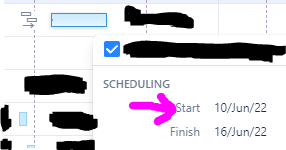
Start Date does not work because thats based on the value on the Jira issue, and the gantt is not using that value to add leveling delays nor is it editing the jira issue.
When I try to use all of the other values or even try to do something like "Start" it will provide me with this error message when I hit save settings
"Selected attribute is not supported. Please select a Rank field or a Jira field or an attribute of the Number type."
So, lets use the photo for an example, if the start date shown is between 10/jun/22 and 16/jun/22 I want to set the start date to 18/jun/22. This would be for every issue that falls within that value, not just a single issues (otherwise I could easily just use manual scheduling).
I believe there is just a syntax issue on my end, but when I try to do anything associated with a date it gives me that error message.
Any help here would be great.
Thank you

