There is a field that is marked as required and I can't seem to make it not required.
I followed the instruction on the documentation but the field still appears with a red asterisk, making it required.
Select > Issues.
In the Fields section, click Field configurations.
Click Configure next to the field configuration you wish to edit.
You will see “Required” next to fields that have already been marked required. Click Optional to remove this requirement.
To make an optional, visible field required, simply find the field and click Required.
This is how the field is showing up in the ticket, even after I followed the instructions above and clicked on Optional
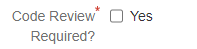
You can see in this screen-shot on the Field Configuration screen, that the word 'Required' doesn't show next to the field.



