Dear all,
I have a question on the custom email sent from Listeners in Jira.
We have X field of the multiline text type and it's default vale is set through the Behaviour that cretaes a template that contains table. You can check its visual representation (the way it shows on the view screen) in the TableVisual and its row version (how its default value is set) in the TableRaw screens attached. 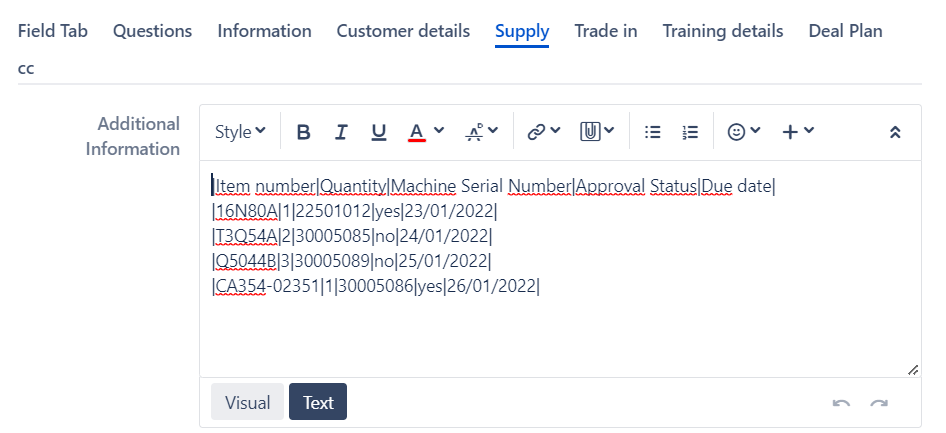
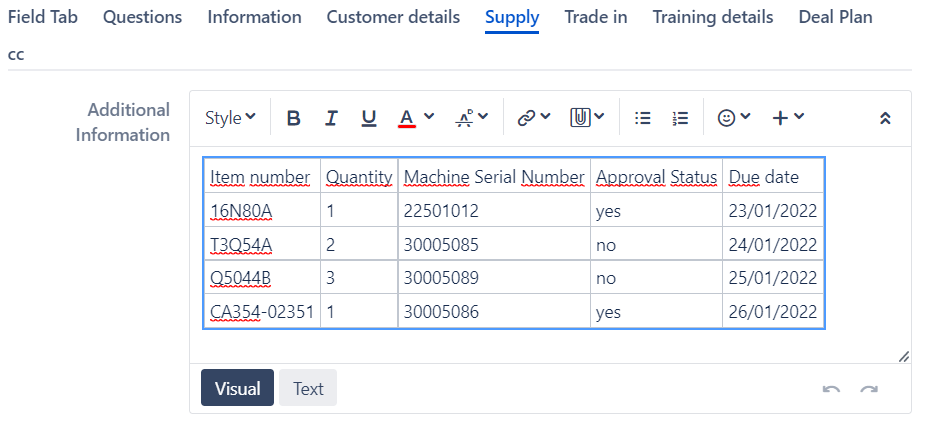
Then any time the tabel is updated the idea is to send a custom email using Listener Send custom email when Issue is updated based on the following condition:
def change = changeItems.find {it.field == "X field"}
if (change) {
def oldValue = change.oldstring
def newValue = change.newstring
}
Emailtemplate is as follows:
Dear all,
The table has been updated.
<%
def change = event?.getChangeLog()?.getRelated("ChildChangeItem").find {it.field == "Additional Information"}
if (change) {
out << 'Old: ' + "\n\n" + change.oldstring + "\n\n"
out << 'New: ' + "\n\n" + change.newstring
}
%>
Thank you!
As you can see I want to send the X field (table) the way it looked before and after the update.
The problem is that in the email the table looks as its row version. See the screen shot below:
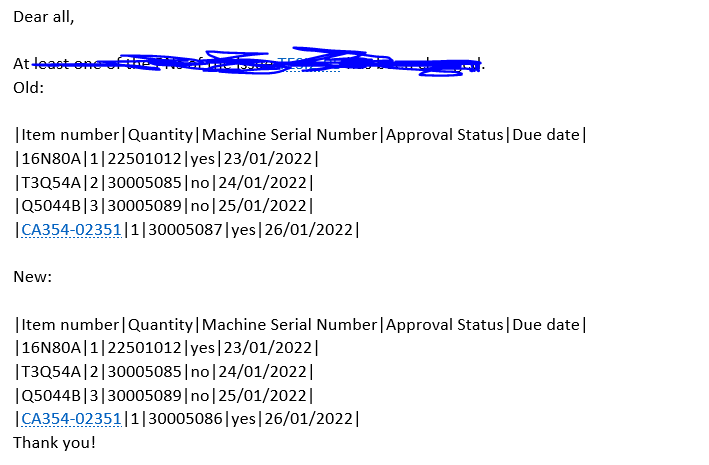
Is there any way to make it look as the table from the visual screen within the email?
Thank you,
Iryna

