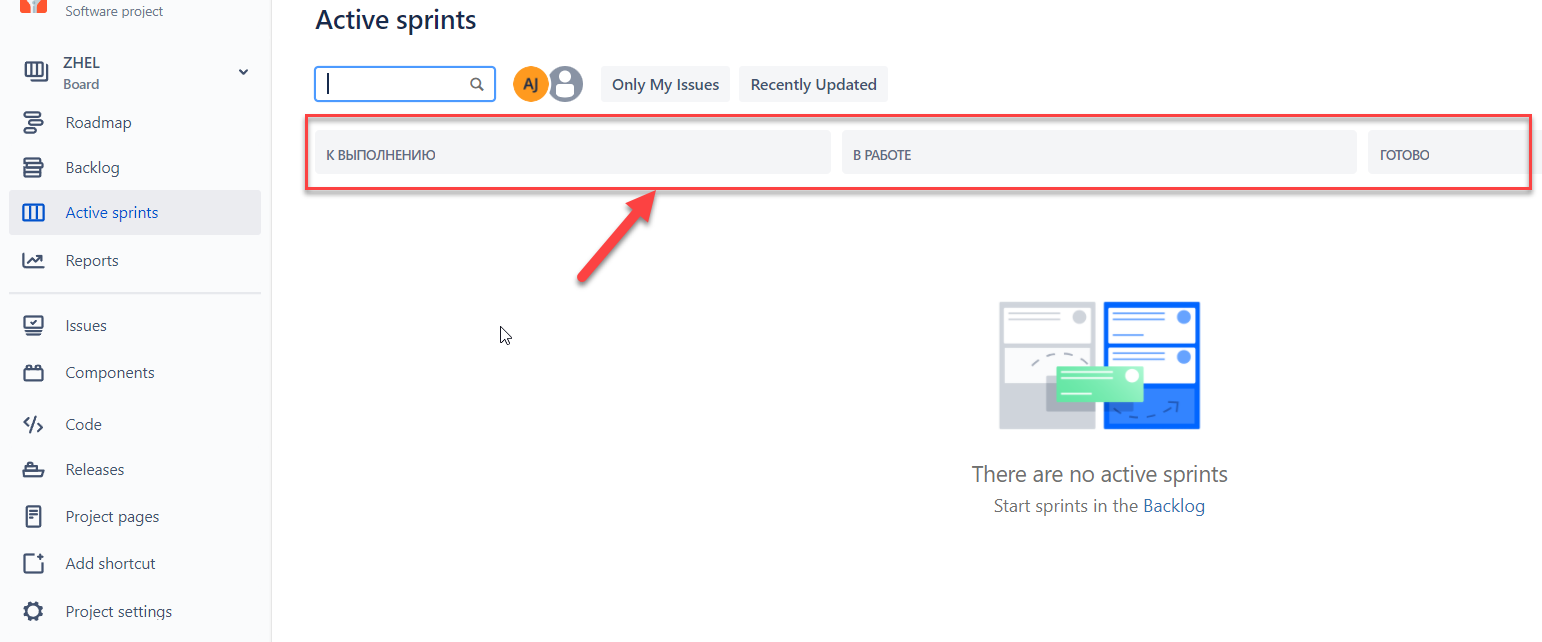
Hello world. I'm new here, so don't judge me, please, if I report this wrong.
Summary: The elements are displayed in russian on the header of the scrum board on the "Active sprints" page after changing the language to english.
Severity: text
Reproducibility: always
Platform: Google Chrome 96.0.4664.93
OS: Windows 10 x64
Preconditions:
1. User is registered and authorized on the site.
2. The "Account preferences" settings in russian.
3. The "Only My Issues" button was clicked on the "Active sprints" page.
Steps to reproduce:
1. Find the "Your profile and settings" drop-down list in the upper right corner on the "Active sprints" page.
2. Click on it.
3. Click on the "Account settings" button.
4. Click on the "Account preferences" button on the left side of the "Atlassian account" page.
5. Chose the English(US) language in the "language" drop-down list on the "Account preferences" page.
6. Close the "Account preferences" page.
7. Pay attention to the "Active sprints" page.
Actual Result: The elements are displayed in russian on the header of the scrum board on the "Active sprints" page after changing the language to english.
Expected Result: The elements are displayed in the chosen language on the header of the scrum board on the "Active sprints" page after changing the language to english.
The bug is saved even after pressing f5.
Solution: click on the "Only My Issues" button again.
Hope it will help to make the app better.