We're using the Xray tool for QA. I've created an automation task for the "Test Execution" issue using the Jira Automation add-on. It triggers base on text in a "Story". I mean when a story issue gets created and has some certain texts then it creates the Test Execution issue. That part is working well.
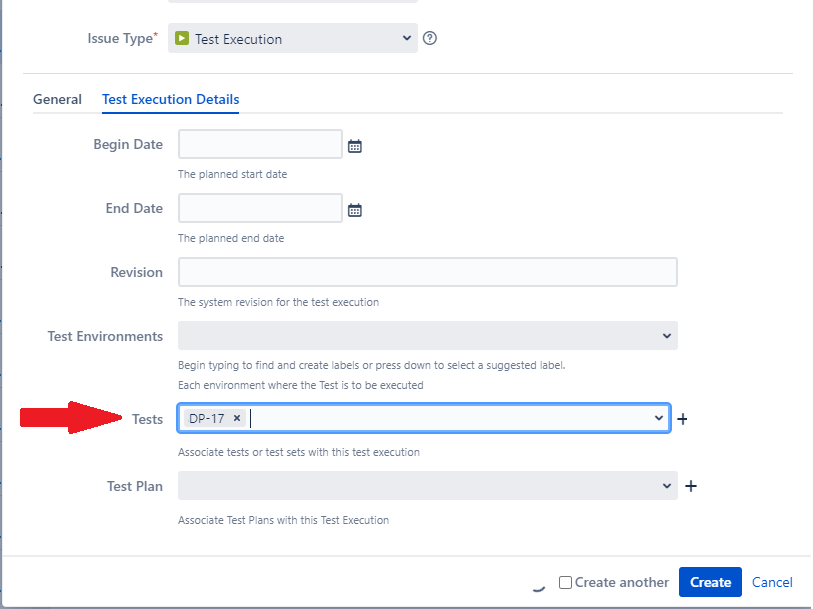
I would like to have a "Test" attached to a "Test Execution" whenever it gets created. The "Test" issue will be the same all-time for this project. The "Test Execution" Issue type has two tabs "General" and "Test Execution Details" in it's create issue screen. In "Test Execution Details" tab there is a field "Tests" where you can attach Test issues. I can't find that field from the Automation where I created the task. This is a built-in field from the Xray tool since I can't find it from the custom field list. I clicked on inspect and found the field id from the source code and tried to use the JSON option to adds the value "DP-17" in that field but it is not adding it. I tried multiple options nothing worked.
Any idea how I can make it works? Attaching screenshots that may help.
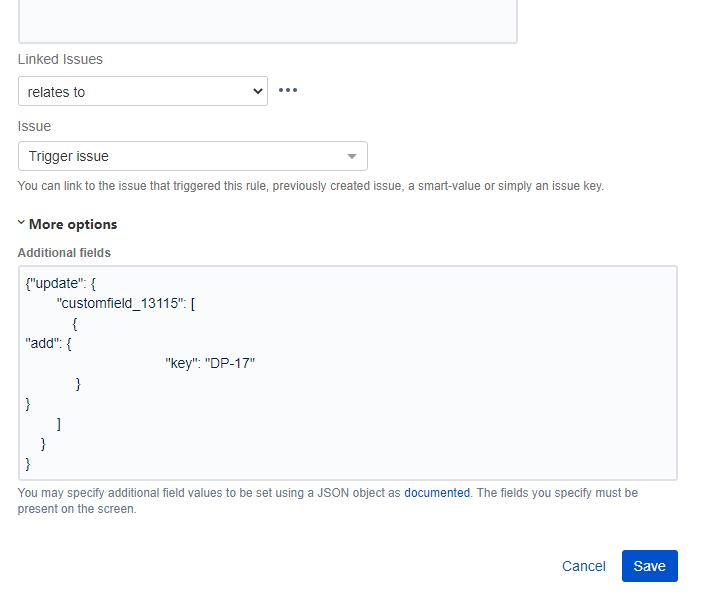
Option one
{"update": {
"customfield_13115": [
{ "add": {
"key": "DP-17" }
} ]
} }Option 2
"customfield_13115": "DP-17"
Thank you