Situation
Description
One of my customers asked me to help with their situation.
This company has a lot of customers with monthly "Time & Material" billing, which means all the worklogs from the customer's project from the previous month are taken and based on the sum of logged hours the invoice for customer is prepared.
To be able to prepare the invoice, all the work needs to logged in Jira no later than the tenth day of the following month.
But it happens occasionally logs are created later, which means these hours are not billed to the customer.
The company is in process of adopting Tempo Timesheets, which enables you
- to lock the previous month, so the users are not able to add/delete/modify the old worklogs
- do the timesheets approvals for each month - this way you can confirm with the users they have logged everything and also lock their timesheets
But the process of adopting needs some time and a few users are still not able to send the timesheets for approval on a monthly basis...
What can be done?
As a project leader you can be notified about all the changes in worklogs (based on the Jira's notification scheme), but if there a lot of changes, you don't want to read all the email notifications.
So I've prepared a special automation rule to notify the project leader, if somebody is trying to add the "old" worklog, so the project leader can react on this situation.
What does it mean "old" worklog?
During the month there are two different situations:
- In the beginning of the month (from 1st to 10th day of month) users can log their work to the current and also the previous month - if a worklog starts before the first day of the previous month, it is considered as "old"
- Later in the month (from 11th to 31th day of the month) users can log their work only to the current month - if a worklog starts before the first day of the current month, it is considered as "old"
Preparations...
Selection of the trigger
I wanted to do some action based on worklog creation, so Work logged trigger is a definitely the right choice. There's also possibility to react only on some operations (e.g. only to creation, not modification or delete). In the end I've decided to react on all the operations, because it could also be interesting for the project leader to know about the modifications and removals of worklogs.
Variables - here comes the smart values
There are four dates I needed to work with:
Worklog start date
{{worklog.started}}This smart value is available because I've used the Work logged trigger.
Today's day of month
{{now.dayOfMonth}}First day of the current month (midnight of the date)
{{now.startOfMonth.withHour(0).withMinute(0).withSecond(0).withMillis(0)}}First day of the previous month (midnight of the date)
{{now.startOfMonth.minusMonths(1).withHour(0).withMinute(0).withSecond(0).withMillis(0)}}Detect the situation based on the today's day of month
This can be done using the Advanced compare condition.
Smart value
{{now.dayOfMonth}}returns the number, e.g. on the 25th February returns 25, we can compare it with any number: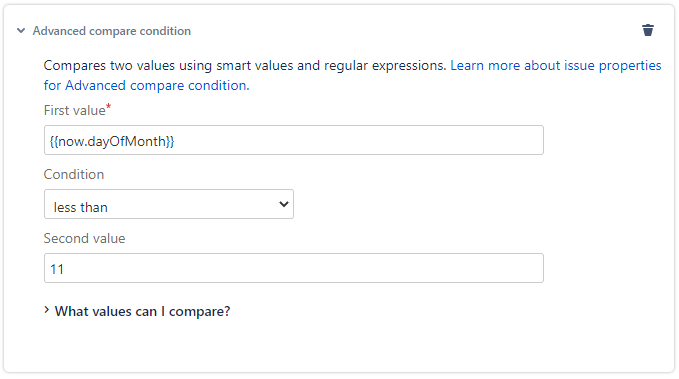
{{now.dayOfMonth}} is less than 11means the first situation - from 1st to 10th day of the month.
Detect, if worklog is "old"
This can also be done using the Advanced compare condition.
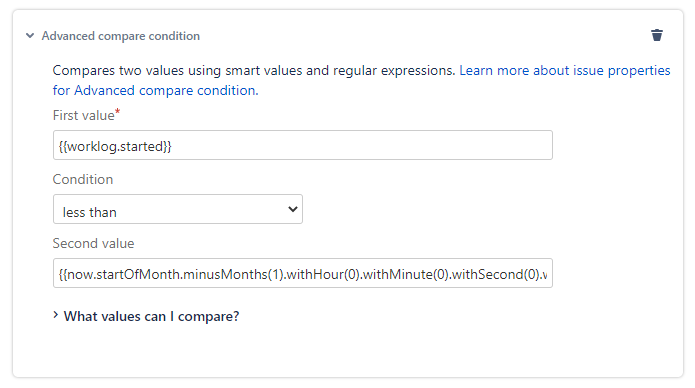
I can simply compare two dates, which one is earlier.
Action
I was asked to simply send email to the project leader.
It is possible to use some worklog smart values (these are available because of the used trigger) in the email's body like
{{worklog.comment}}
{{worklog.started}}
{{worklog.timeSpent}} (cloud only)
{{worklog.timeSpentSeconds}}to add some information about the worklog. The most important is to provide issue's key using
{{issue.key}}so the project leader knows, which issue is involved.
Let's create the automation rule
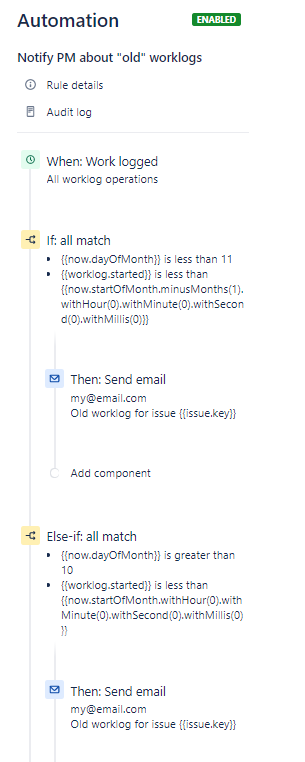
When: Work logged (all worklog operations)
If: all match
-> Then: Send email
Else-If: all match
-> Then: Send email
Improvements?
What if I need to work with various days of month?
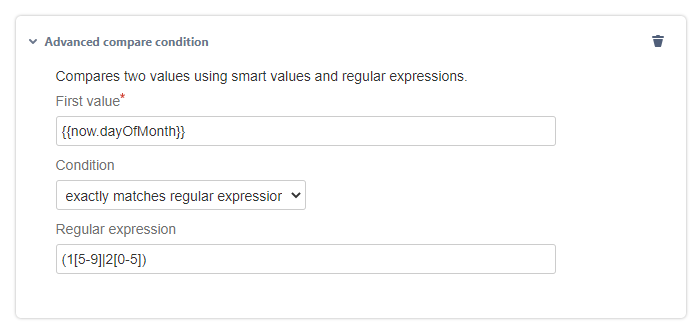
In the Advanced compare condition you can always use regular expressions like:
(1[5-9]|2[0-5])
This means from 15th to 25th day of the month
Is it really necessary to have the rule divided into two sections with the same action?
It would help, if the variable with the date can be set, something like "if we are in the beginning of the month, set the variable to the first day of the previous month, else set the variable to the first day of the current month".
Even though it is possible to create variables in Jira cloud, I wasn't able to make this conditional behavior work.
Can this be done in a more easier way / differently?
Probably yes! There are so many possibilities for automation, so please let me know your thoughts and suggestions. Thank you!


