I've run into an issue where the {{comment.author}} and {{comment.body}} tags are not working when I attempt to use them on the Project Automation page in Jira Service Desk.
- Go to Project Settings of a Jira Service Desk project
- Click on "Project Automation" near the bottom of the settings
- Click "Create rule" in the top right
- Select "Issue commented" event
- Select "Save"
- Select "New action"
- Select "Send email"
- Fill out the email form
- For the "Content" section, include the tags for showing the comment info.
- {{comment.author}}
- {{comment.body}}
Now comment on an issue by replying to the "new request" email or by adding a comment directly using the web portal.
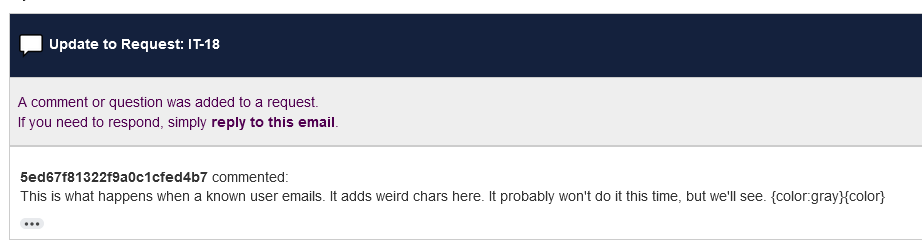
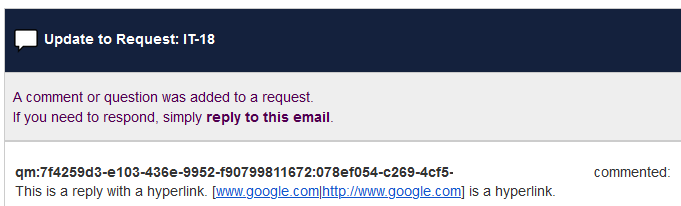
The notification that is sent has the comment.author shown as a random string of characters.
The comment.body will parse hyperlinks strangely and occasionally will add things like {color:grey} to the end of the comment body. The {color:grey}{color} seems to only happen when the comment is made via email from a known user. Emails from non-user requestors don't have the {color:grey} problem.
I know there is a "Customer Notification" module, but that does not grant access to customizing emails that Agents receive. I'm trying to create a custom email for agents when a comment is made and I'm noticing this strange glitch with the comment tags.
I tried removing all HTML and using just the comment tags and I had the same problems with the comment.author being a random id, {color:grey} tag after the comment.body, and hyperlinks being parsed incorrectly.