I'm trying to get the authorization code implementing OAuth 2.0 (3LO).
The only parameter missing is the state, which i don't know where to find.
state=YOUR_USER_BOUND_VALUE&
Hello @gabriel ,
According to the the documentation you are following, as the first thing you should go to app management (https://developer.atlassian.com/apps/) and generate the authorization url:
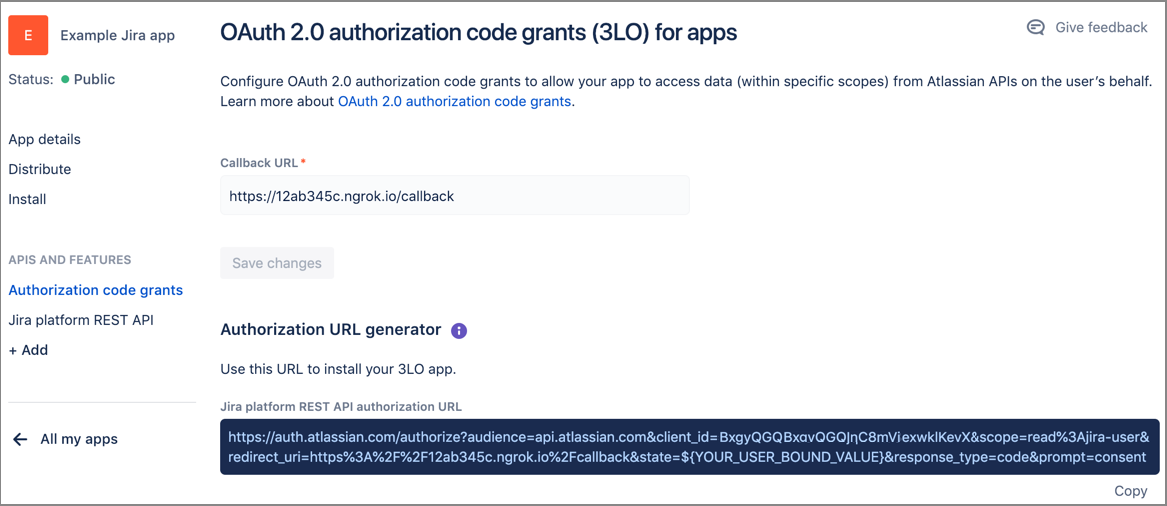
Enabling OAuth 2.0 (3LO) Before you can implement OAuth 2.0 (3LO) for your app, you need to enable it for your app in app management: In app management, navigate to your app (or create one if you don’t already have one). In the APIS AND FEATURES section in the side navigation, click +Add. In the Features section of the APIs and features page, click Add for OAuth 2.0 (3LO) then click Configure. Enter the Callback URL. Set this to any URL that is accessible by the app. When you implement OAuth 2.0 (3LO) in your app (see next section), the redirect_uri must match this URL. Click Save changes. Your screen should look something like the screenshot below. The screenshot shows a Jira app, but the screen will look similar for a Confluence app. Note, if you haven’t already added an API to your app, you should do this now...[....]
Before you can implement OAuth 2.0 (3LO) for your app, you need to enable it for your app in app management:
Your screen should look something like the screenshot below. The screenshot shows a Jira app, but the screen will look similar for a Confluence app.
Note, if you haven’t already added an API to your app, you should do this now...[....]
As you can see in above screenshot, the authorization url that generated this way has everything you need, including:
state=YOUR_USER_BOUND_VALUE
Also, for the future, please notice that this is not the best place to get help on development related questions. The right resources are listed in https://developer.atlassian.com/resources.
Specifically:
Cheers,Dario
It looks like you're new here. Sign in or register to get started.