Introduction
In this article we describe the complexity of managing release cycles of complex IT solutions that comprise of a number of Apps, Service and/or Microservices. In particular, we will touch base on release management of such solutions across multiple development, integration and Geo-distributed production environments. Among the possible solutions for this challenge we will consider Jira standard tools as well as the Jira add-on built for it.
Challenge
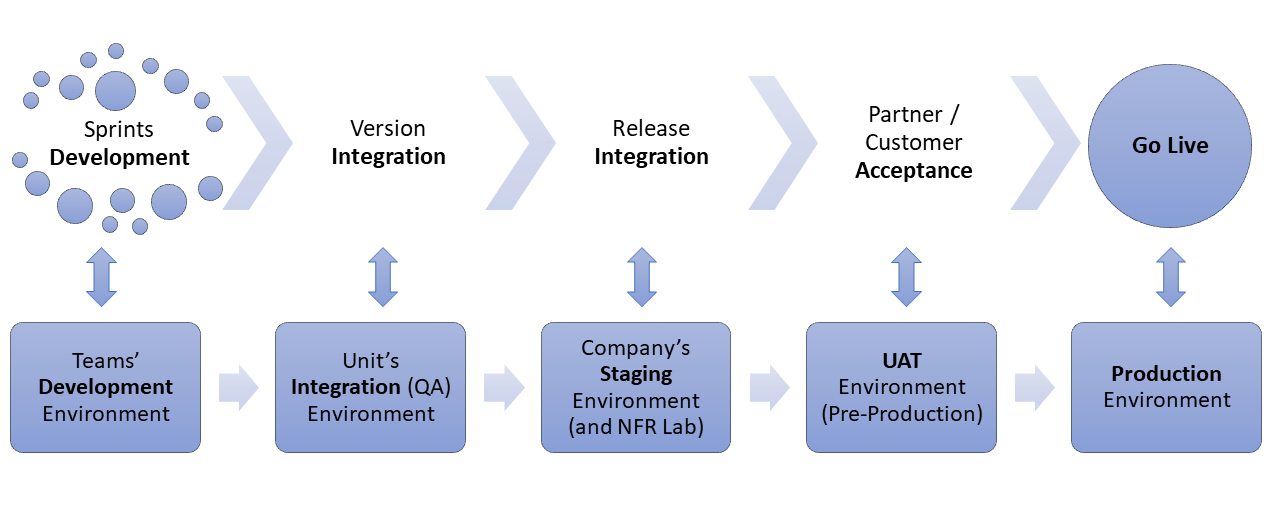
It’s not new to any R&D organization or IT department that every version/release before it reaches the production environment should go through a certain software development lifecycle. Some stages of this lifecycle directly linked to specific environments where necessary actions are taken. It could be even vice-versa - the environment itself dictates the state of the lifecycle. The picture below depicts a possible example:
Multi-version releases
Things become slightly more complicated when the solutions we are trying to deliver are comprised of multiple Apps, Services and/or Microservices. We will not discuss the task of how we can manage multiple version releases as it is well covered in the following article - Efficient Release Management of Microservices Based Solution. We will take this as read. Instead, we will focus on Environments.
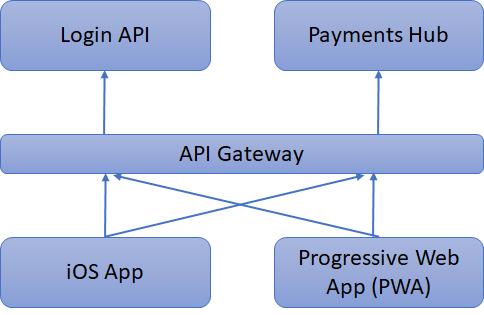
Most complex solutions are technically decoupled so that individual components can, theoretically, be delivered independently, as shown in the example below.
But reality is that usually some of these components are tied to each other when it comes to delivering features that go through multiple layers, e.g.
- ITSec requirements to upgrade Login API requiring changes in iOS App and PWA,
- PCI DSS requirements require changes in all four components.
So, there are integration points that need to be followed and multiple components should “meet” within integration environments for end to end testing. Therefore, as Release Manager, you should watch out for them and ensure they arrive in the appropriate environment, in-time for end-to-end tests.
Multiple environments
The real complexity for any Release Manager happens when the company decides to deploy their multi-component solutions across different Geo-locations. Why would you go there? Fortunately or unfortunately, there are numerous of reasons for you to get there regardless of whether or not your business is B2B or B2C, namely:
- There might be regulatory requirements like “Legal data should stay within the EU“ or “Customer data should not leave the USA“.
- You might decide to have a proper DR site with active/passive or active/active mode. “Proper“ means something further than the next room in the same data centre.
- You might decide to have your point of presence closer to your partners (B2B) or end users (B2C) as the speed of services is playing a more and more important role and you don’t want to waste time due to latency between the partner/user location and your services hub.
- As a B2B company, you might not control the destination environment yourself and instead, you simply deliver your solutions to a partner-hosted infrastructure.
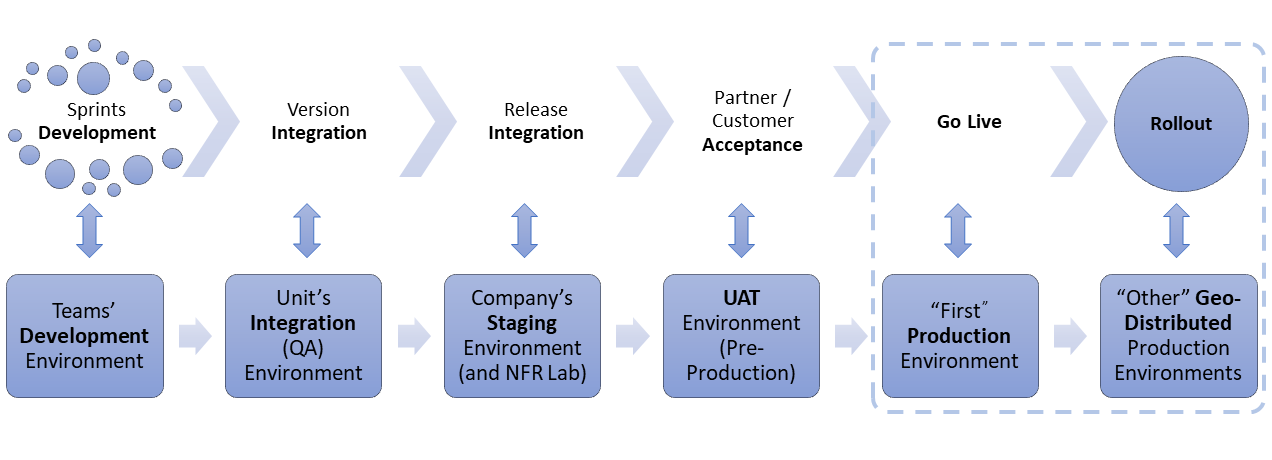
So, probably the previous workflow needs to be extended and will possibly look like the following:
Getting it meshed
For the Development, Testing and Integration Environments it's common practice to have multiple versions of software running on it simultaneously. At the very least, you want to have “Current“ and “Next“ deployed there. When it comes to production, having multiple versions of the same software components is a reality. Here are few reasons for that:
- When delivering a new release of a multi-component solution, it is too bold to create it across all of your environments at once. You probably want to switch new features on, move a percentage of your traffic to a new functionality, justify it works as expected, cross check the non-functional metrics and give the green light for further rollout. This just takes time.
- you might also wait days/weeks for your version to be approved by regulatory bodies (B2G) or your partners (B2B)
- as a B2B provider you might get dozens and hundreds of partners. Rolling out to all of them takes time.
- you may have included a particular extension to suit a specific client/regulation and there is no need to disrupt other clients in different parts of the world as they can easily wait for the next version containing something more relevant for them.
So, all the above takes time. Your developers are not sitting idle. And by the time you are halfway through with rolling out the previous version, a new version needs to be delivered “today“ because some client is waiting and “we are committed”.
To make a long story short, like it or not, we are very quickly getting into a situation involving different environments running different versions of different components of our solution.
We can't change that. But at any single point of time we need to know:
- Where is a specific version of a specific component deployed, and where is it not?
- What is the current version of a particular component (e.g. Login API) now deployed within a specific environment (e.g. Production Hub in Pennsylvania).
Solution
We are looking for a solution that will help us track how our version jumps between different environments throughout the development lifecycle and understand when it reaches “first“ productions and “others” during the rollout routine. Thus, we can answer the question of “what’s deployed and where”?
Suggested approach
Since a version goes through a lifecycle and jumps from one environment to another, why not create a custom workflow for it? Jira standard functionality is limited to 2 version statuses - Released/Unreleased. So, we need to extend it:
“Version” deserves a workflow.
We also need to reference all environments and/or any particular one. Therefore,
“Environment” needs an entity to identify and refer.
As a result, the two should be connected in a many-to-many relationship, to empower Release Managers with
“Dashboards” and/or “Confluence” pages to answer the question of “what’s deployed where”?
Let’s put our words into action
Test Project: Mobile Apps relying on some Core APIs and Services
As an example we took the above Mobile App project.
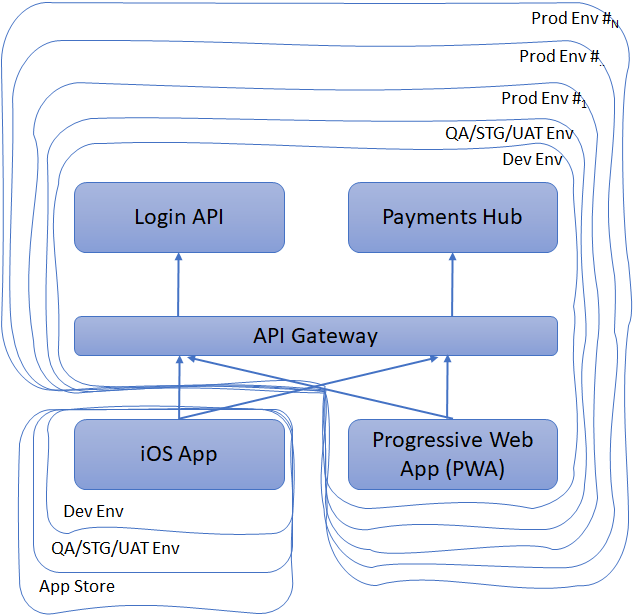
Mobile App has an iOS version that we deliver through App Store. We also have Progressive Web App (PWA) that we target on Android devices and deploy per DataCenter (DC) in Pennsylvania, Indiana and Texas.
Let’s add some context …
iOS app version 1.26 was just submitted to the App Store after a successful Apple review, while with version 1.27 we started grooming to kick off Development Sprints.
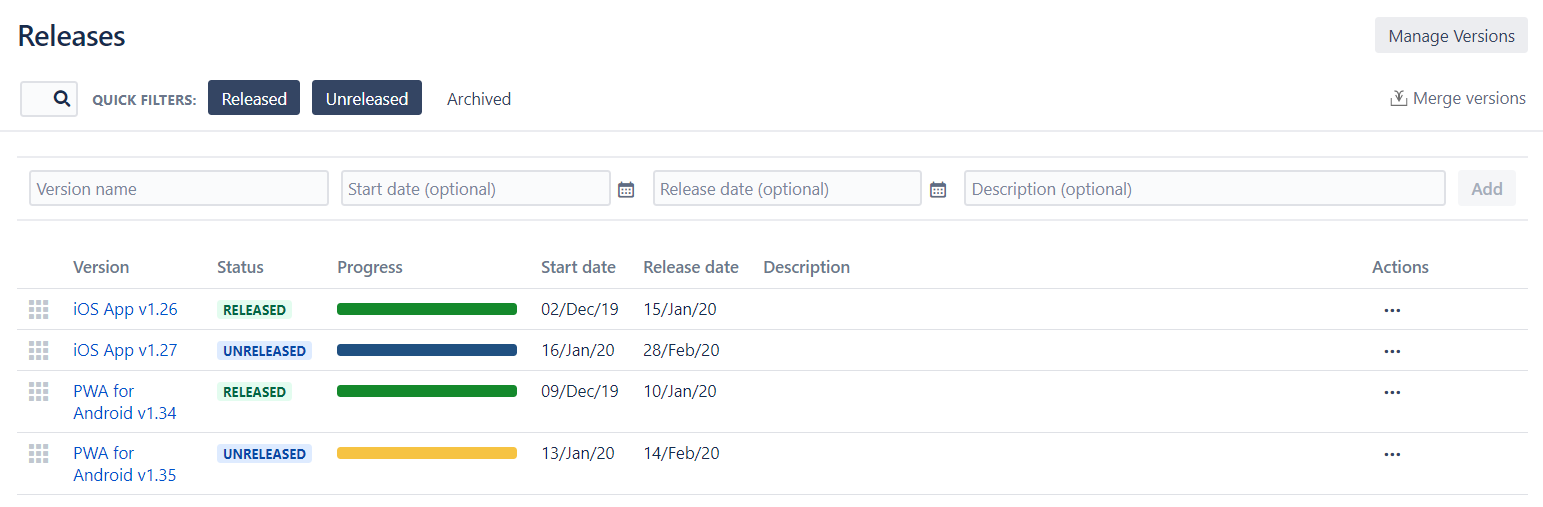
PWA for Android version 1.34 was just deployed on our servers residing in Pennsylvania, Indiana and Texas while version 1.35 is half way through Development Sprints.
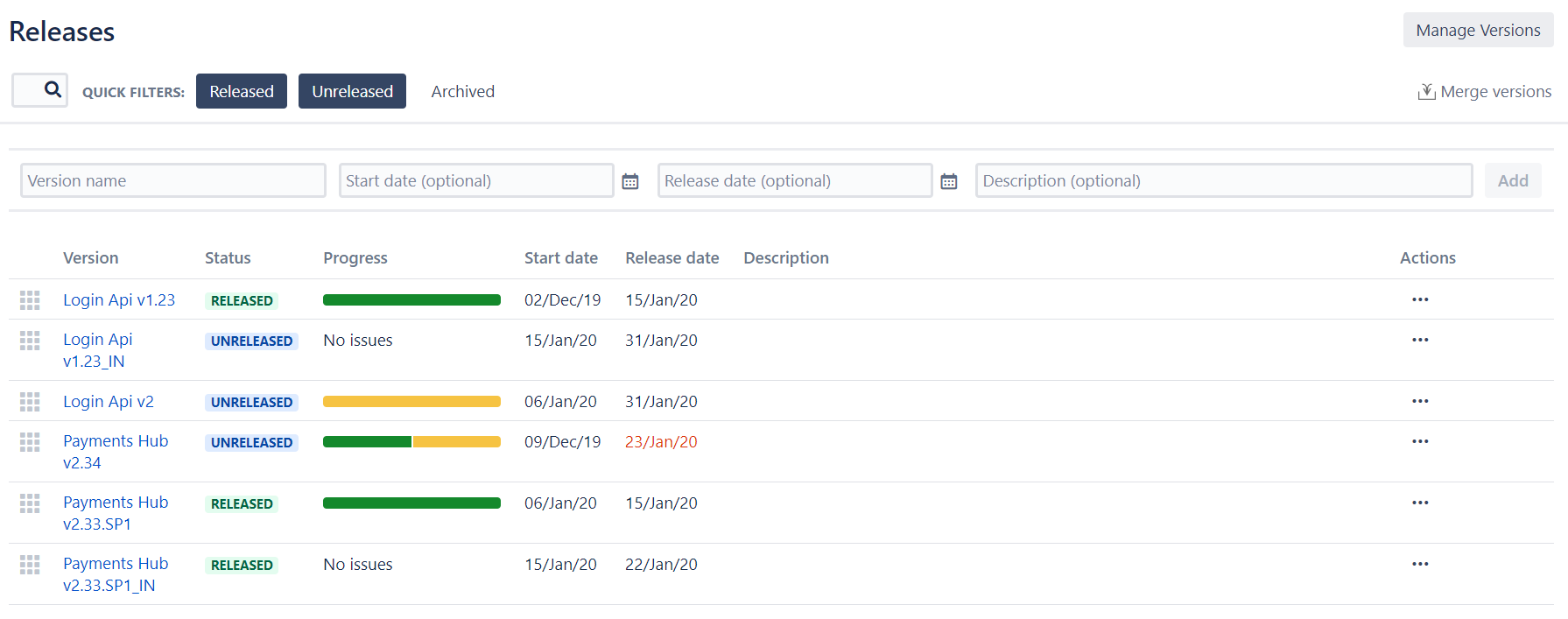
“Login Api” v1.23 is deployed on Production in Pennsylvania and Texas. For Indiana we had to do some extensions and create additional Jira version to accommodate a set of stories and technical tasks. The version is currently on UAT. Next version - “Login Api” v2 is on the way, and going through performance testing in our NFR Lab
For “Payments Hub“ we have longer versions and v2.34 just came to hardening sprint. But for our Apps release we required some of the stories completed in Sprint 1 out of 4. So we created a service pack ”v2.33.SP1” on top of the previous version and deployed on Production in Pennsylvania and Texas. For Indiana, we yet again had to do some extensions so “Indiana“ specific version of service pack was deployed.
Option A: Jira Standard Tools
Inspired by 6 steps to better release management in Jira Software article, we created a new “Process Management“ project in Jira with 2 issue types - Task and Sub-task. These two represent our Versions and Sub-versions respectively where Sub-versions are mainly used “minor” versions, representing customization carried out per each production environment and/or service release.
The workflow looks like the following
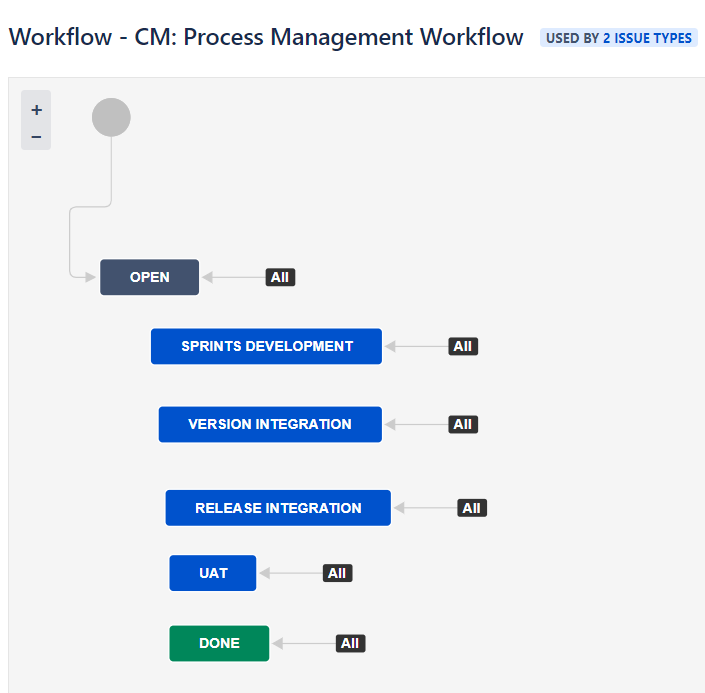
We intentionally did not complicate it with multiple transitions and restrictions on those transitions that “probably“ will be a task for any real-use case.
The obvious next step for us, was to add a Kanban board to visualize the flow of our versions jumping from status to status. Here’s what we have got:
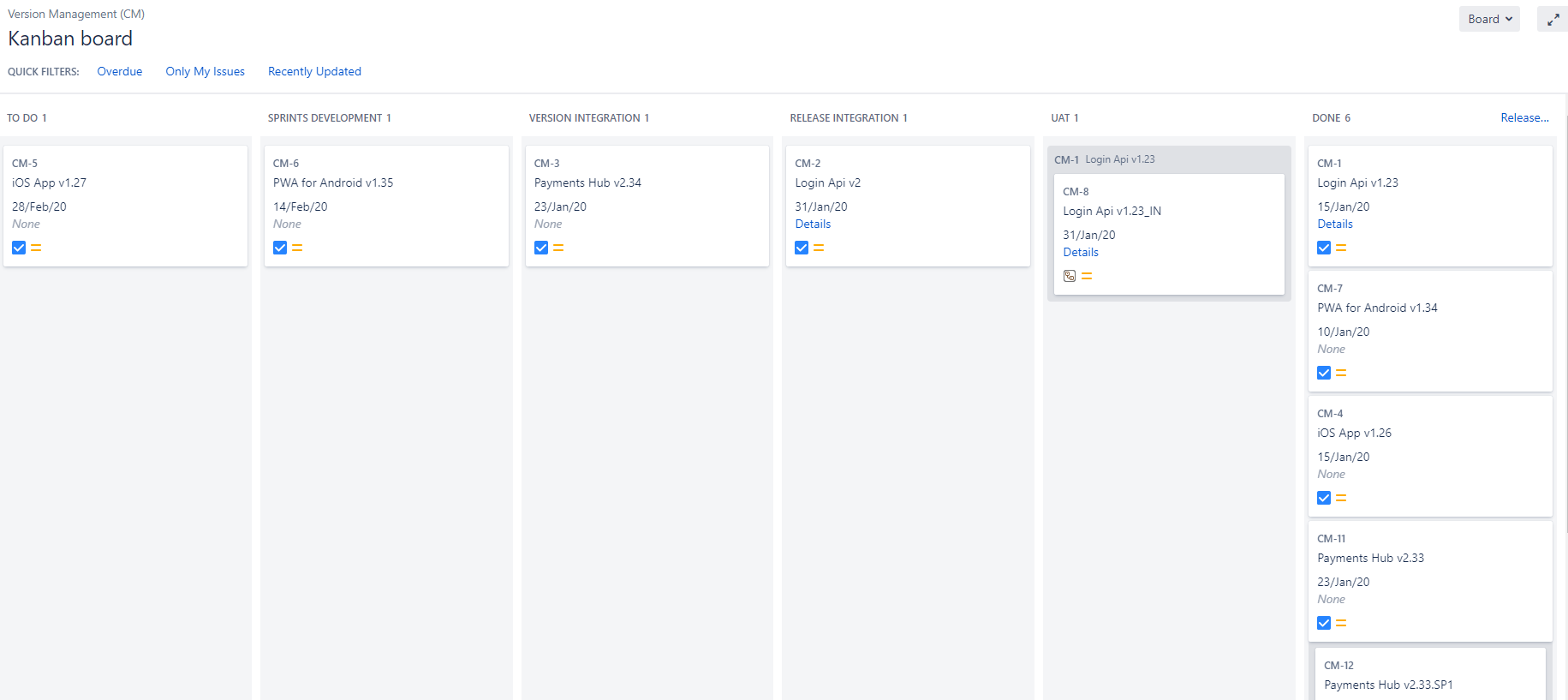
We created versions from the above examples as Tasks and Sub-tasks specifying Release date as Due date. We also added “Overdue” filter and appropriate color coding to attract attention.
The Drawback of this solution is that we have to create versions manually, sync the names and release/due dates on a regular basis so our board depicts an up-to-date view.
To make this job easier we added a link to a standard Jira version details page so we can always navigate to any specific version & check what’s changed.
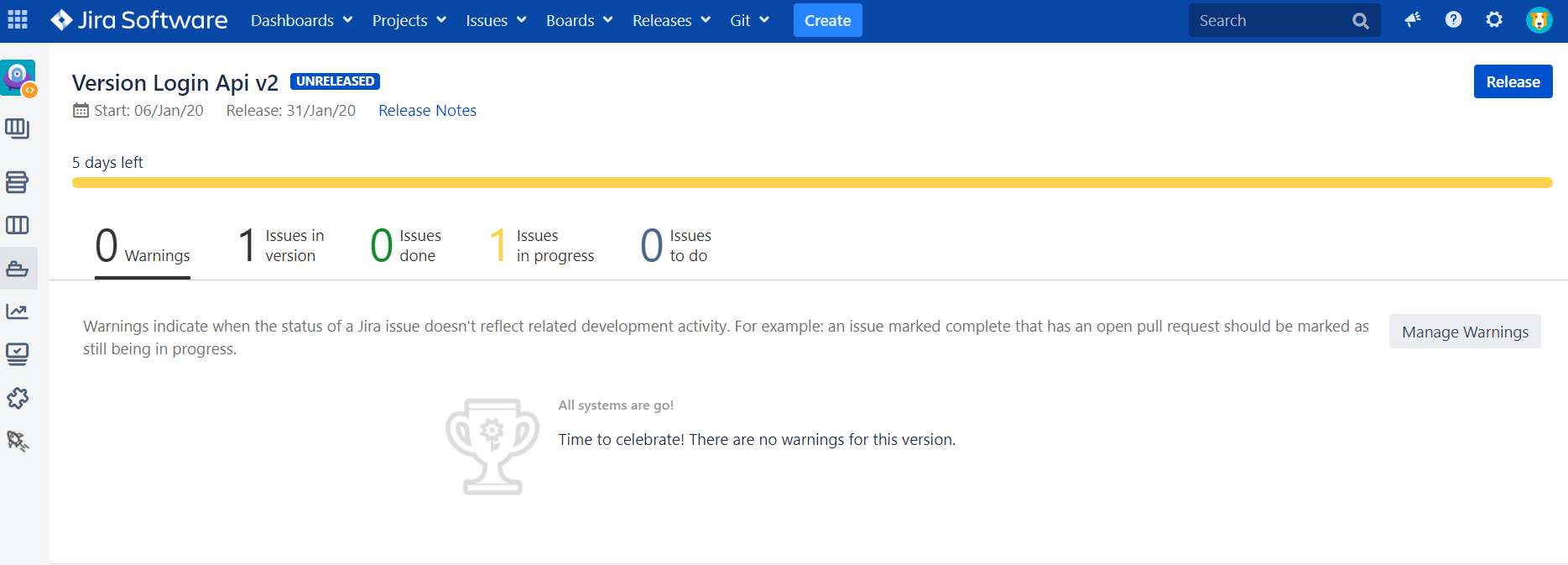
Job half done. Let’s see how we can specify Environments. We considered few options for this:
- use “Labels”
- multi-select / check-boxes “Custom Field”
- new IssueType with own workflow and option to use standard links to map Versions and Environments
For the sake of this example, we decided to proceed with “Custom Field”. The only compromise we had to make was to put abbreviations instead of human readable names as we wanted to outline it on the cards. See below
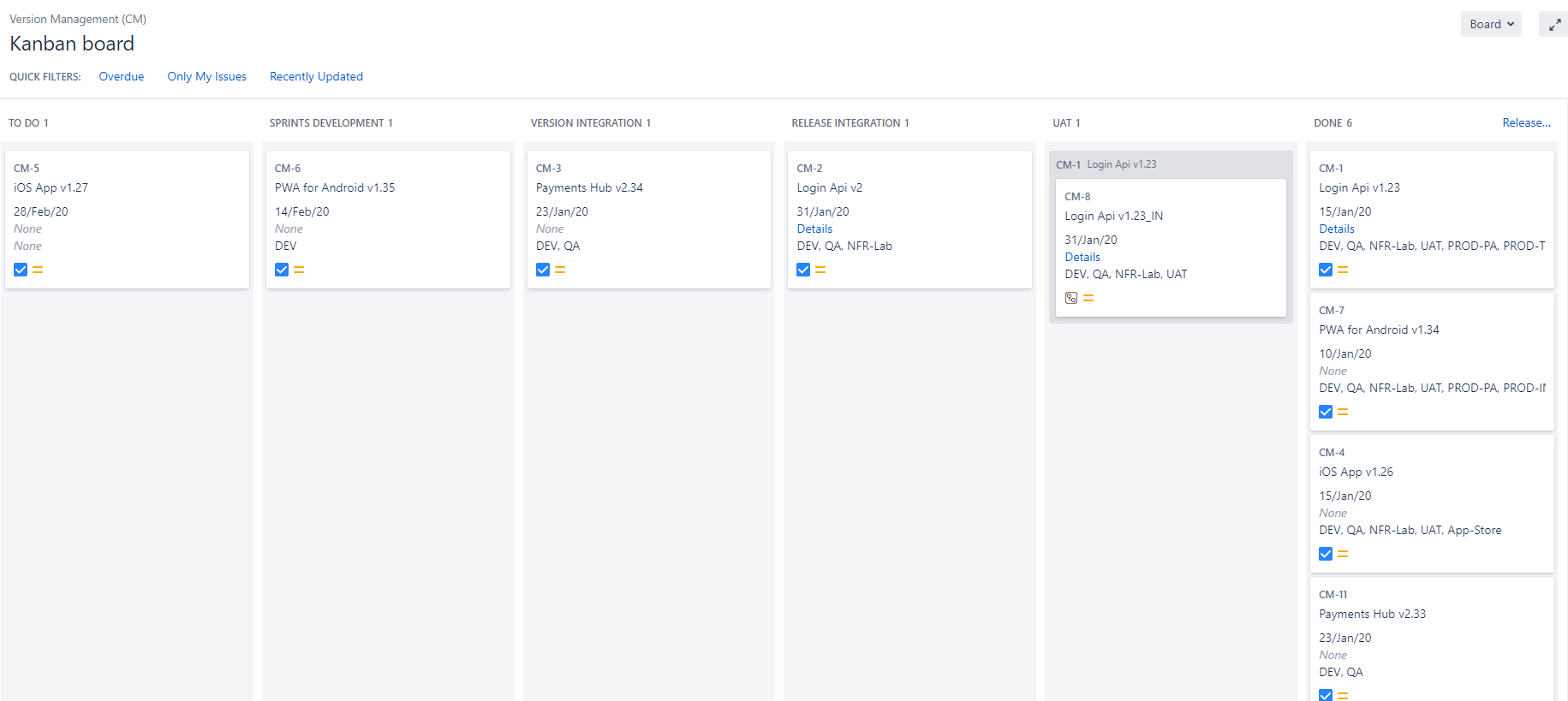
Let’s try to configure some Dashboards now to show how different versions are deployed across different environments.
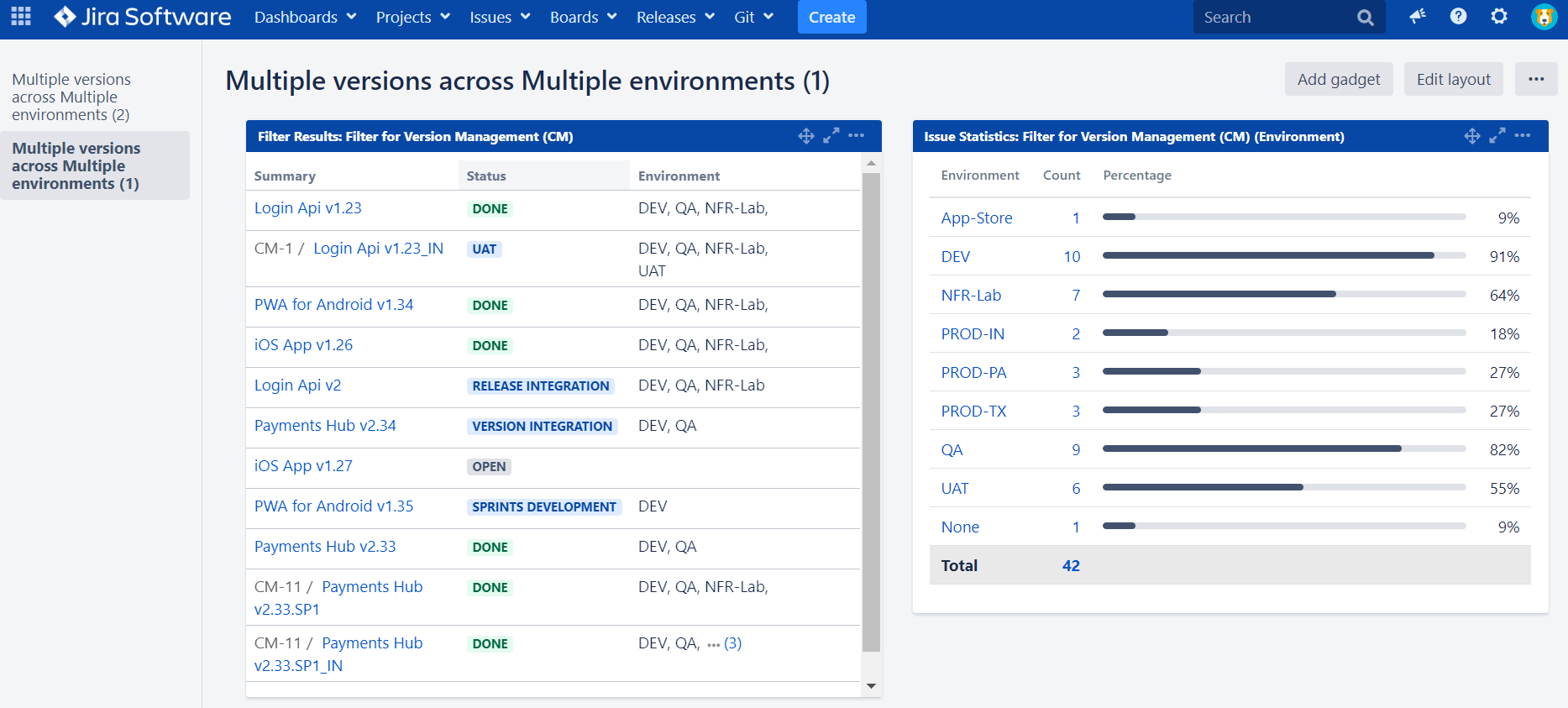
This could be extended with much more sophisticated gadgets in a real-use case, but for our needs, it is good enough to answer the question we have put to ourselves.
Option B: Release Management Add-On
For organizations that operate hundreds and thousands of versions, the time required to create version tickets manually as well as sync names/due dates upon each and every change is essential. Therefore, we added this functionality into our add-on - Release Management for Jira. Let’s see how we can do the same use case with it.
Following the Quick tour we created Release board and extended Jira standard version statuses with custom workflow as outlined below
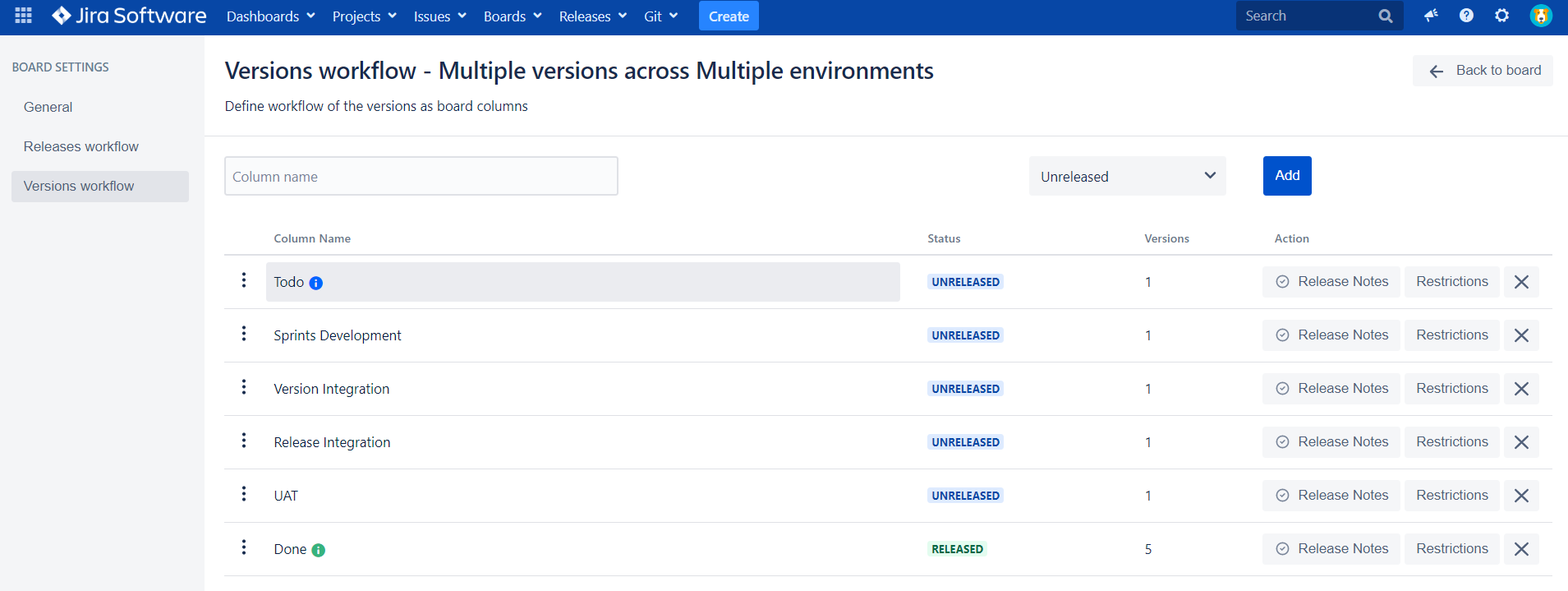
As a result, our test example on Release board looks like the following:
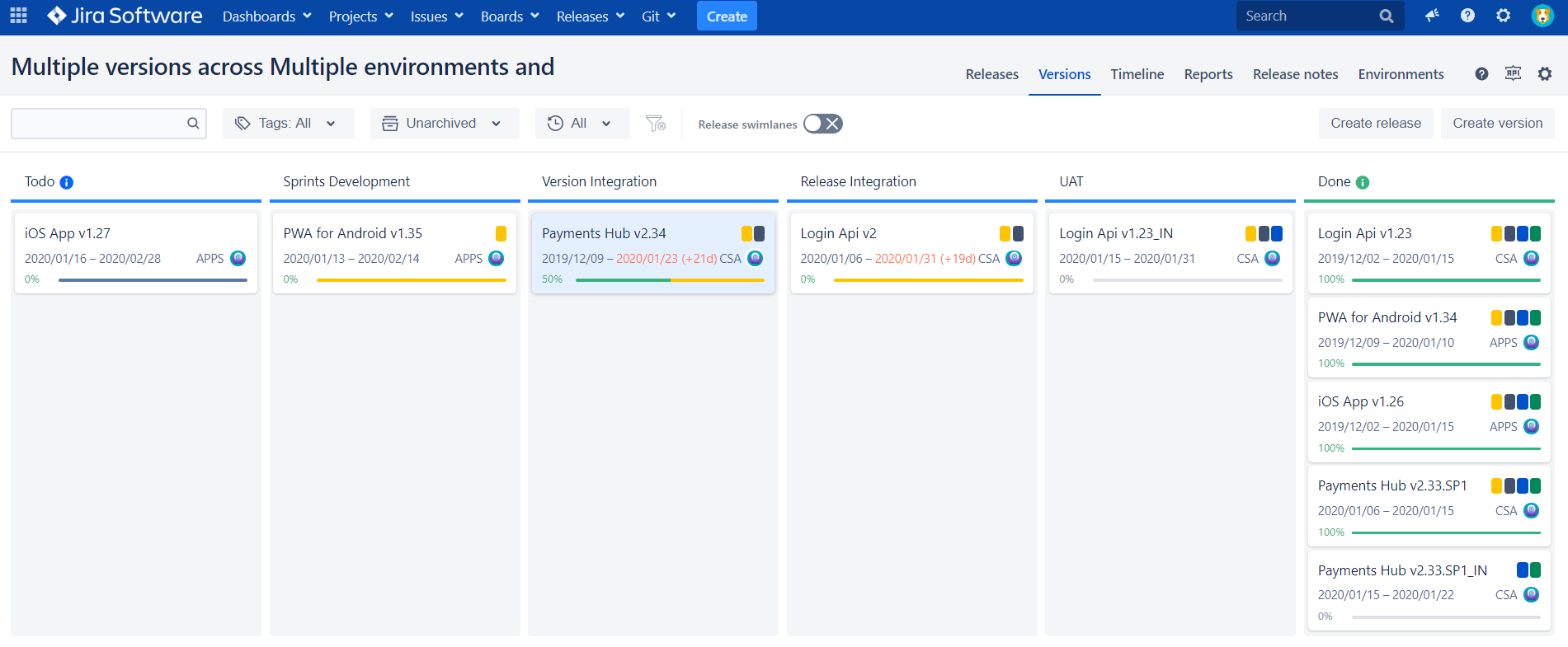
The cards on the board represent Jira standard versions mapped to Released/Unreleased statuses. Therefore, moving versions through our workflow, we automatically adjust the status in Jira. Color coding indicates the progress of the version. Thus we eliminate the manual work required for synchronization, which we had to do in the previous section.
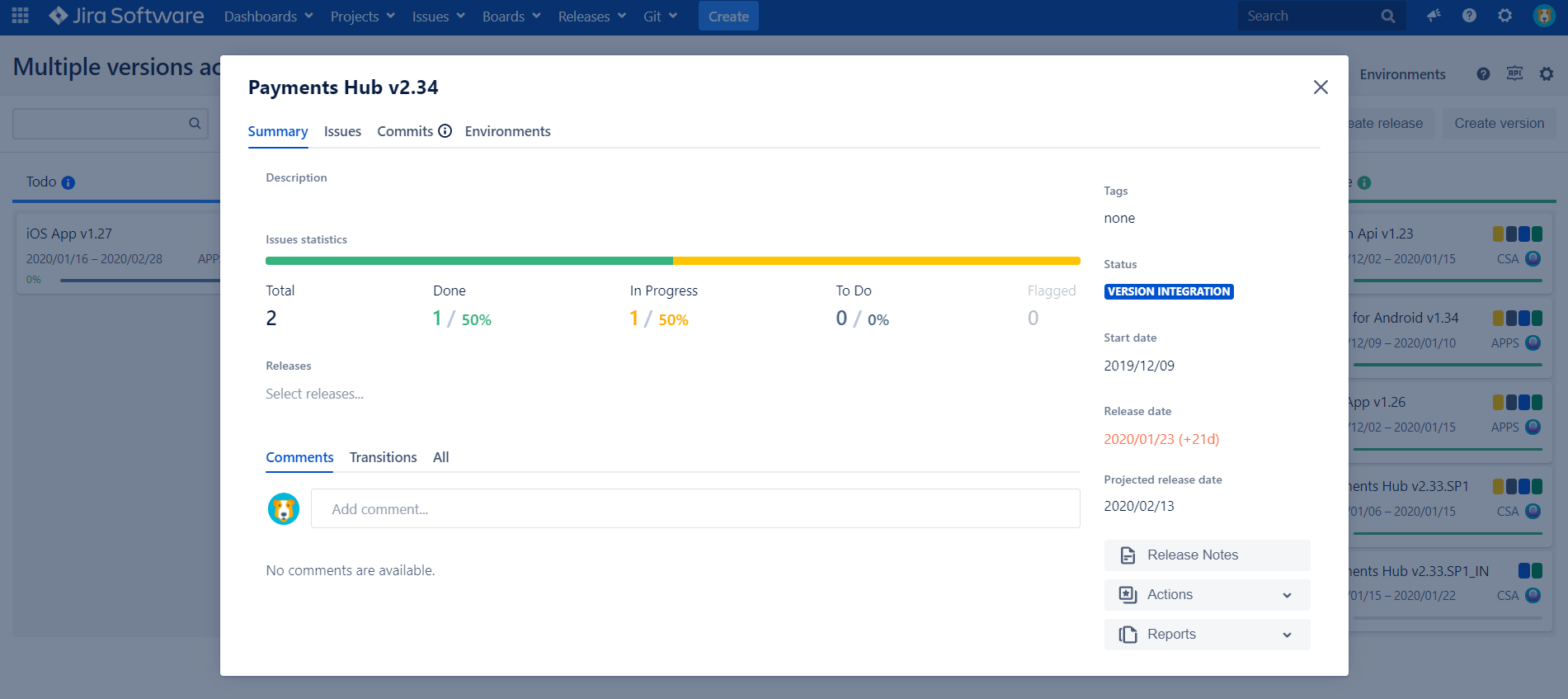
By clicking on the card, we get a proprietary Version Details screen that compared to the standard Jira view, has much more sophisticated capabilities to
- track & act on version
- manage scope
- check code changes
- specify environments
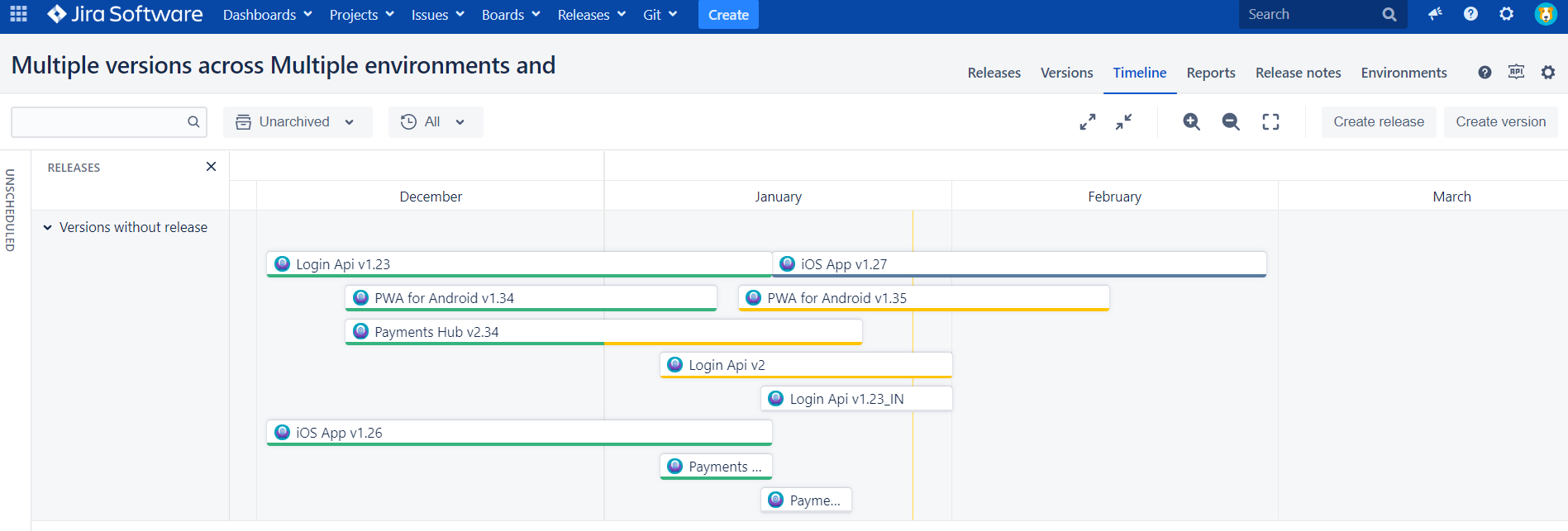
We can also check out a timeline view that gets us a very nice visualization of our versions in timeline.
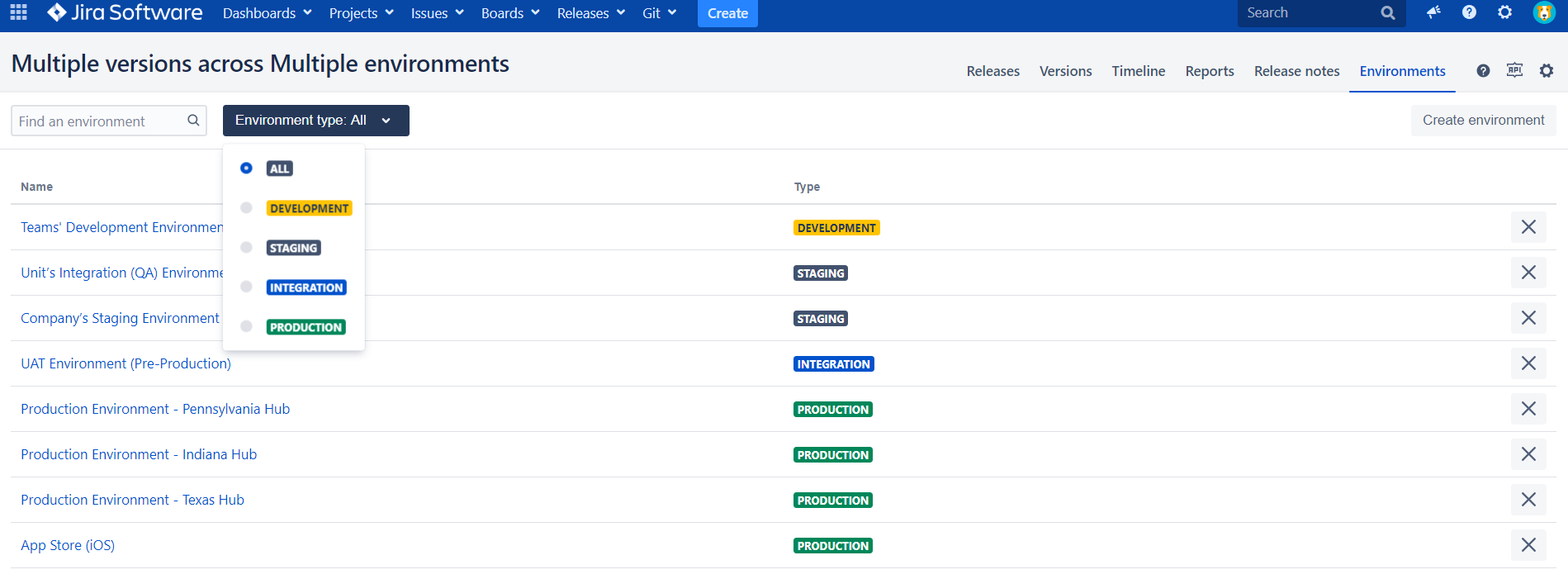
Release Management for Jira has a notion of Environment that we used to list all our Development and Production Environments & “color“ them accordingly. You can also specify some of the environment details like Environment spec, URL, access credentials and additional comments, which we found very useful.
Following that, we noticed that our version cards have colored pin points indicating the environments it was/is deployed to. By clicking on a version card and choosing the Environments tab we can see it in all detail.
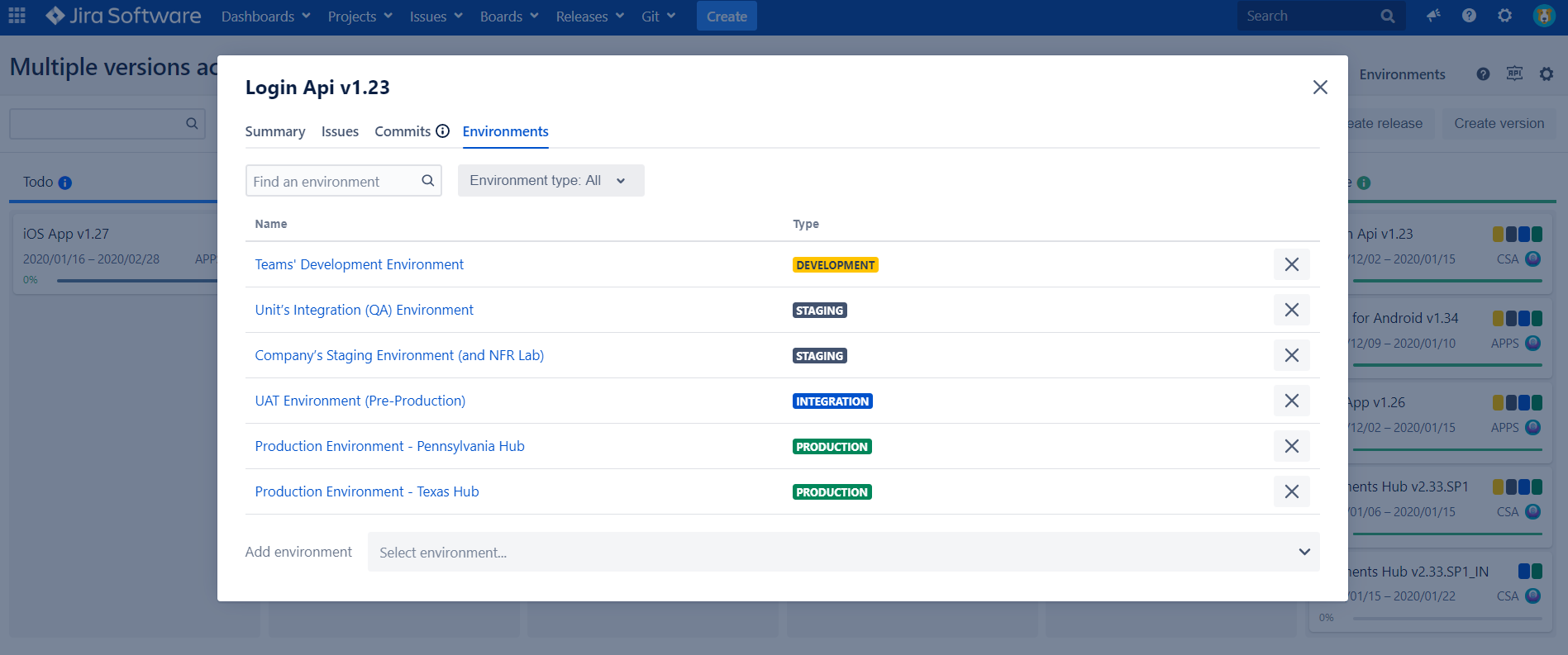
We also created a test Dashboard to see what we could get out of the Gadgets provided by the Release Management Add-on. Thus, we decided to check what’s deployed in Pennsylvania and when “Login Api“ v1.23 is deployed:
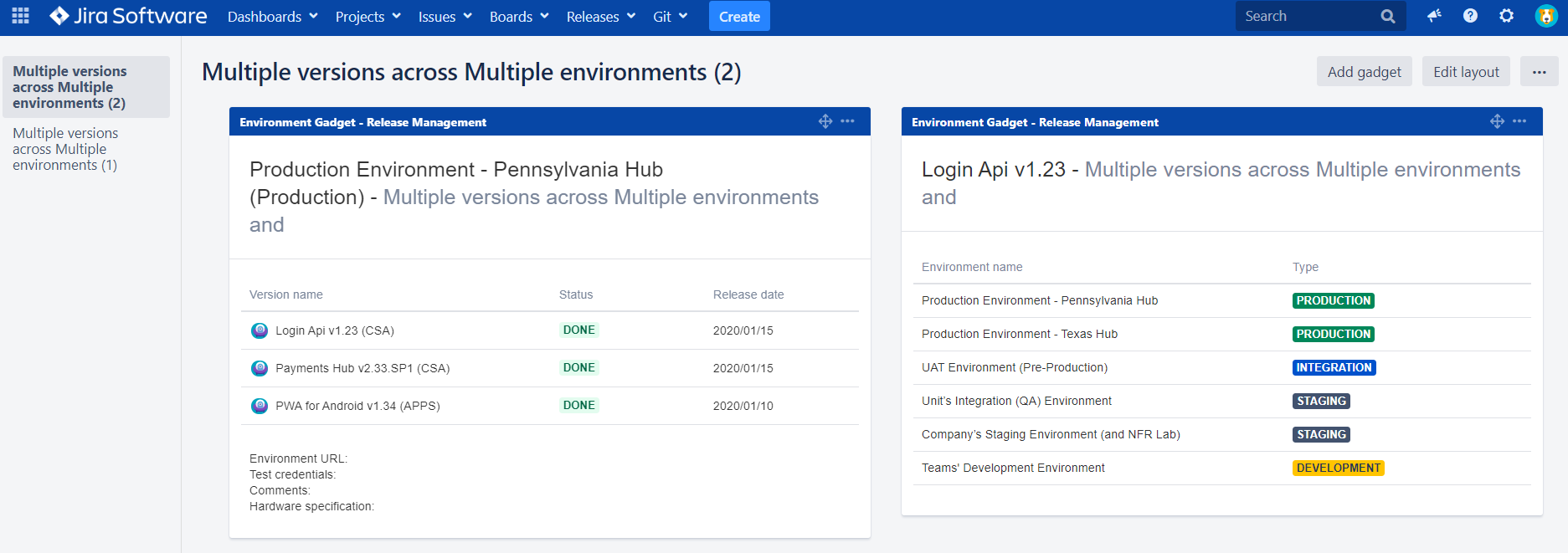
This can now be extracted into some Confluence pages, but we decided not to go that far.
Wrap-up
In this article we outlined that managing multiple versions across multiple environments is a challenge we can’t avoid. But there is a solution to it. All we need is to:
- Define version workflow
- Find the way to define Environments in Jira and make the link between versions and environments
- Create Dashboard/Confluence to visualize “multiple versions across multiple Environments“
We tried to implement the above steps with Jira standard tools, as well as our add-on (Release Management for Jira). I hope this has given you a few insights useful for your own real--use case.
Also, we would love to hear about your experiences, if you have tried something similar or have better suggestions. Just leave comments for this article.
Thank you for reading. Stay tuned!
BTW, is it available for Jira Cloud?
Following Atlassian visionary movement to the cloud we released our Cloud App in early 2020. In the latest version we added support for deployment “Environments”. So, now also in cloud you can manage multiple versions across multiple Environments.


