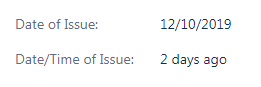
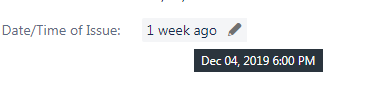
We've always just used custom date fields on our issues, which display the actual date selected in the picker. We recently had a request to allow a complete date/time stamp (this is a service desk project, and we want the customer to indicate the date and time the incident they're reported occurred.) I added a date/time field, but it doesn't display what I'm hoping for.
Instead of displaying the actual date and time the user selected, it's displaying a relative - "2 days ago", for example. If you mouse over it, you do see the actual date/time, but this doesn't help in a service desk queue when we have hundreds of tickets. Is there a way to change how that kind of field renders so it shows the actual value? (Oddly, it does display correctly in the customer view via the portal; it's only in the agent view that it's a problem.