The Atlassian Community Forums are currently in read-only mode. We will be relaunching on a new platform on September 22 (read more here). We apologize for the extended downtime. For concerns or questions, please email communitymanagers@atlassian.com. See you on the other side, on the new Atlassian Community Forums! :)

×

Forums

Articles
Create
cancel
Showing results for 
Search instead for 
Did you mean: 

Tooltip: Plugin "Jira_Cloud_REST" returned an error I want to know how to solve it

권구희
I'm New Here
I'm New Here
Those new to the Atlassian Community have posted less than three times. Give them a warm welcome!
February 5, 2025

Plugin "Jira_Cloud_REST" returned an error: Invalid HTTP code (404). Please verify the address of your JIRA installation in the configuration settings and that TestRail can reach your JIRA server.
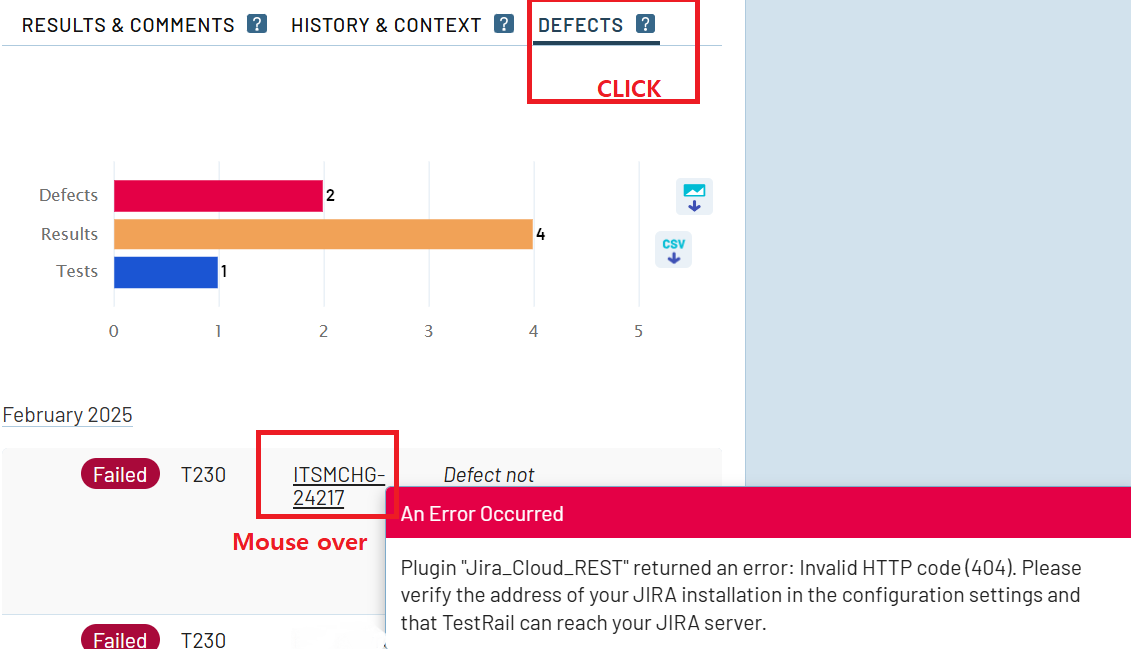
image.png


When you mouse over Defect, a tooltip appears: an error occurred. How can we solve this?

For reference, when I click on Defect, it connects to the jira ticket.


1 answer

Comments for this post are closed

Community moderators have prevented the ability to post new answers.

0 votes
Vishal Biyani
Rising Star
Rising Star
Rising Stars are recognized for providing high-quality answers to other users. Rising Stars receive a certificate of achievement and are on the path to becoming Community Champions.
February 5, 2025

@권구희 

404 means resource not found. Looks like this is a configuration issue. You may need JIRA Admin permissions to check the configuration and fix the issue.

DEPLOYMENT TYPE
CLOUD
PRODUCT PLAN
STANDARD
TAGS
AUG Leaders

Atlassian Community Events