Hello!
I am trying to make a simple automation that is getting me a bit frustrated.
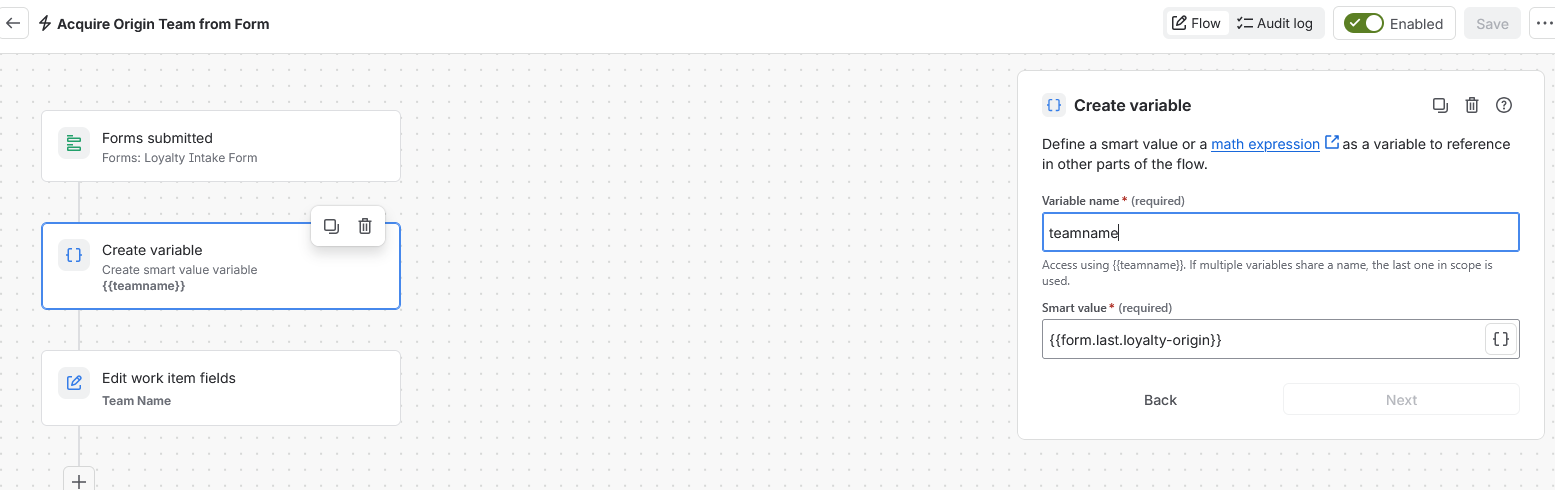
I have a submission form on a jira space that creates a new initiative. On that form is a field "Loyalty Origin Team" which is a dropdown.
What I want to do is -> When the form is submitted, have the automation go look at the Loyalty Origin Team" response and drop it in to a short text field (called Team Name). That's it.
I have given the form field a key (loyalty-origin), and tried pulling it both directly and through a smart value. My automation runs, it doesn't give me any errors, but it isn't actually changing the work item.
I'll post my very simple flow in a moment, but are any of these possible ->
Is the automation running too fast to detect the attached form? (should I add a delay)
The responses in the form Dropdown have too many characters for a Short Text field?
Is the dropdown response not being seen as "text"