Hi,
I'm trying to connect cursor.com web agents (not cursor local) to jira. In cursor.com you can connect to MCP servers
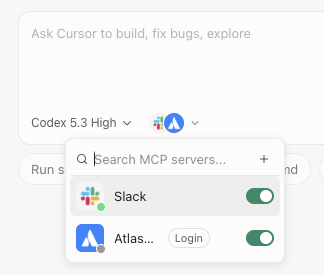
When I click on Login it's asking me to authorise the app, but on the second screen I get this blocking error
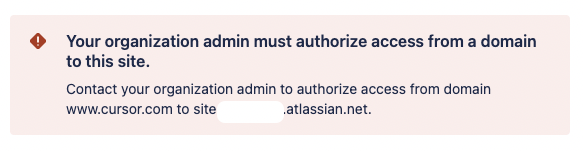
I am a Jira admin, but there's so many admin pages and apps that I don't know where to do this. Please could someone direct me to the right page?
Thanks
Hi @Sam
This looks like the same issue faced in the post below. Answer provided by @Raul Pelaez may be what you are looking for.
Regards
Exactly Florian,
Select Apps > AI settings > Rovo MCP server.
Select Add domain and add the domain https://example.com/**
The thing is (I think) Cursor does not expose a public MCP endpoint like Lovable...
You must be a registered user to add a comment. If you've already registered, sign in. Otherwise, register and sign in.
HI @Sam
Check the following, go to Platform Experience in Atlassian administration, then to Sites and select your site, this will transfer you to the site settings.
In the site settings, select connected apps, in the settings option there, make sure User installed apps option is set to "Allowed"
You must be a registered user to add a comment. If you've already registered, sign in. Otherwise, register and sign in.