The Atlassian Community Forums are currently in read-only mode. We will be relaunching on a new platform on September 22 (read more here). We apologize for the extended downtime. For concerns or questions, please email communitymanagers@atlassian.com. See you on the other side, on the new Atlassian Community Forums! :)

×

Forums

Articles
Create
cancel
Showing results for 
Search instead for 
Did you mean: 

Why can I not add a new member to my team ?

Kris Dewachter
Community Champion
September 1, 2023

Hi All,

I've created a new "Team" in "Teams". And I was able to add members to it.

But there is 1 person I am not able to add to the team. I keep getting the error message below.
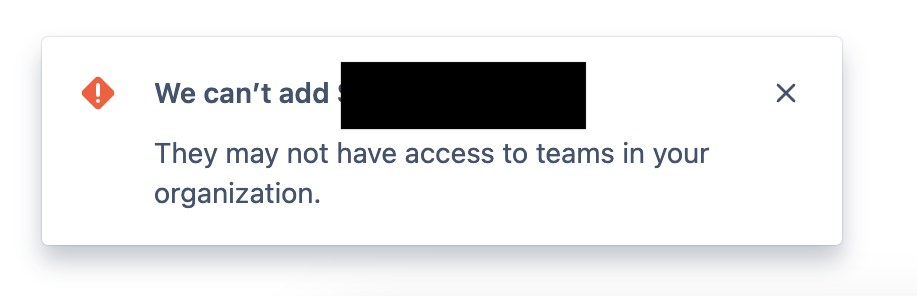
Screenshot 2023-09-01 at 20.59.03.png

I am unable to pinpoint why this user can not be added. I've tried :

  • Giving this person JSM product access
  • Giving this person the "Team Member" role

The Atlassian documentation does also not state what the requirements are for being able to be added to a team.

Does somebody have the answer ?


Best regards,

Kris


1 answer

Comments for this post are closed

Community moderators have prevented the ability to post new answers.

1 vote
Jehan Bhathena
Community Champion
September 2, 2023

Hi @Kris Dewachter ,

Not quite how the "Invite Team" work, but based on what I've tested, you can do the below steps to grant the same permissions:

  • Add the user as a JSM Agent to your Instance
  • Navigate to the JSM Project, Project Settings -> People -> Add people -> Role "Service Desk Team"

I believe the above steps should fulfill your use case.

In any case if you're still interested in debugging the error you can try the below steps:

You can perhaps share that error here, or debug it on your own too :-)

Kris Dewachter
Community Champion
September 5, 2023

Hi @Jehan Bhathena ,

Thanks for your reply and suggestions.

Unfortunately, giving the user JSM Agent permissions, still does not allow me to add him to the team.

And in the developer tools, no network errors appear.

I'm going to log this one at Atlassian support. Maybe they can figure out what is going on. Will post the solution here later.

Best regards,

Kris

DEPLOYMENT TYPE
CLOUD
TAGS
AUG Leaders

Atlassian Community Events