I'm in the process of implementing the new "Journey" feature. So far, this works as expected for very simple Journeys.
Now, we want to create a more complex Journey:
- a customer starts a new Issue via a special Request Type asking for input from the customer. This Request Type triggers the Journey
- The Journey creates it's first Issue and waits until that is resolved
- When the first Issue is resolved, only one of three possible Issues is to be created. Which Issue is created depends on the input of the Customer in the very first step here
- The Journey is supposed to wait until the one Issue created in step 3 is resolved
- Then it is supposed to create the final Issue
Steps 1 to 3 of this work as expected. The Journey creates the one Issue as expected.
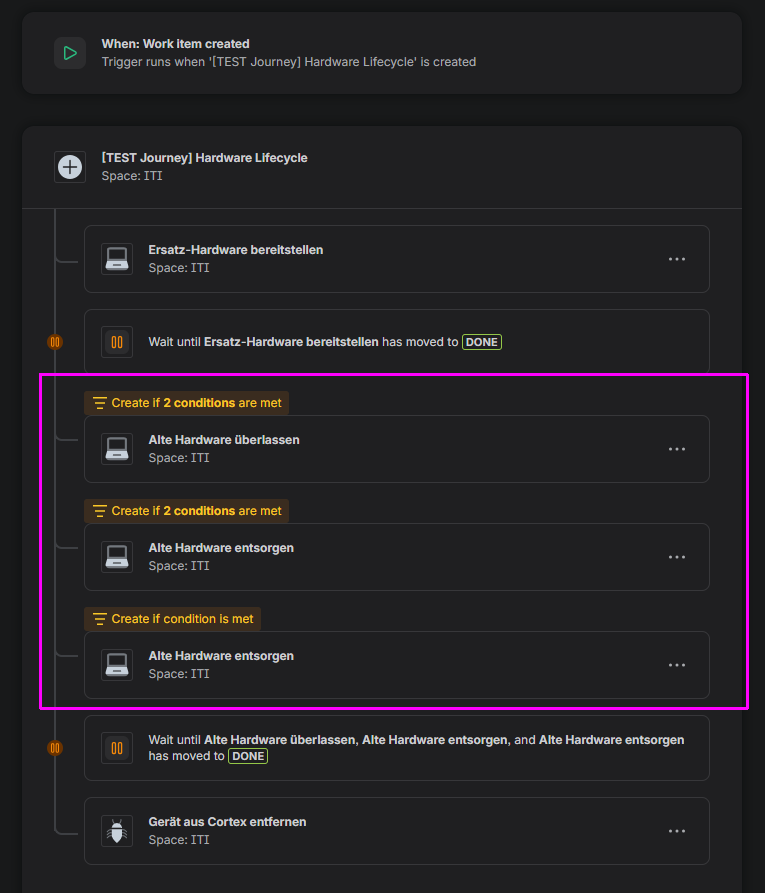
It is step 4 I get an error at. The last Issue is never created. There is no error in the Audit Log. I suspect there is an error as the created automation "wants" to wait for 3 Issues to be resolved when there is only one Issue actually created.
This is the Journey. It is the three Issues in the pink frame, of which only one is created.
Can anyone here nudge me in the right direction? Is this possible at all?

