Forums

Articles
Create
cancel
Showing results for 
Search instead for 
Did you mean: 

Validation rule not working

Shivalika Sharma
February 18, 2026

Hello,

I am struggling to make field Call1Log1 (Radio Group with Yes/No) mandatory when

- Location (Drop Down) becomes USA and

- Application (Drop Down) becomes FRAPP


The field Call1Log1 appears when above conditions are met and when it appears it has to be mandatory with the red asterisk beside the field name.

I have tried two different ways:

1. Validation rule with

- Condition: Location:USA AND ImpactedApps:FRAPP AND Call1Day1:[empty]

- Validation rule: .+

- Execute only on user action is ticked

2. Set field label

- Condition: Location:USA AND ImpactedApps:FRAPP

- Set required attribute and Execute only on user action is ticked

The 2nd way works only when I choose a Yes/No value, and its not mandatory when its empty.

Not mandatory when no option is chosen
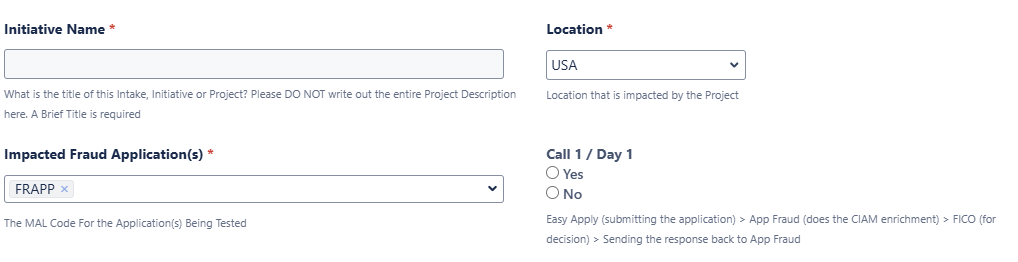
Not mandatory when no option is chosen.png


Mandatory only when an option is chosen - 2nd way
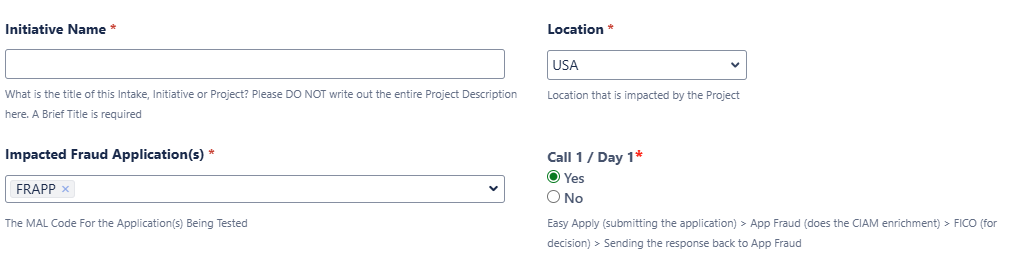
Mandatory only when an option is chosen - 2nd way.png

Please help.

2 answers

1 accepted

0 votes
Answer accepted
Alex Medved _ConfiForms_
Community Champion
February 18, 2026

Use Validation rule (field definition rules macro)

Set 2 parameters only: condition and message to show 

the condition would be something like this

Location.label:USA AND ImpactedApps.hasValue(FRAPP):true AND Call1Day1:[empty]


Shivalika Sharma
February 18, 2026

I tried the Validation rule solution, still not working with the below:

- Condition: Location.label:USA AND ImpactedApps.hasValue(FRAPP):true AND Call1Day1:[empty]

- Message to show when validation rule matches: Mandatory Field Data Missing: Call 1 / Day 1


Rest all fields are empty, unticked.


Please help

Alex Medved _ConfiForms_
Community Champion
February 26, 2026

How is the "Impacted Fraud applications" field is configured?

Shivalika Sharma
February 26, 2026

Its a Multi-Select. The option I need is ID = FRAPP and LABEL = FRAPP. Its also a required field and separator to use when showing values is ,

Alex Medved _ConfiForms_
Community Champion
February 26, 2026

A little video that does exactly what I was trying to explain... Uses the validation rule as answered before. Hope it helps

Shivalika Sharma
February 27, 2026

Thank you.

0 votes
Prasanna Ravichandran
Rising Star
Rising Star
Rising Stars are recognized for providing high-quality answers to other users. Rising Stars receive a certificate of achievement and are on the path to becoming Community Champions.
February 18, 2026

Hi,

Radio fields often don’t become mandatory on appearance because “required” is applied only after user interaction. You need to enforce validation at form level.

Workarounds:
• Use a form validation rule (not label setting)
• Trigger validation on submit, not only on user action
• Ensure the field is visible before validation runs
• Add a default blank state (no preselection)
• If needed, use conditional required + error message

This ensures the field is mandatory even when no option is selected. Hope this helps.

Shivalika Sharma
February 18, 2026

Ensure the field is visible before validation runs: How do I ensure that? The field only becomes visible to the user when the conditions are met.


Add a default blank state (no preselection): That won't look right for the form. I am assuming you are asking to add 3 radio buttons with empty/no value, yes and no.


Thank you


Suggest an answer

Log in or Sign up to answer
TAGS
AUG Leaders

Atlassian Community Events