The Atlassian Community Forums are currently in read-only mode. We will be relaunching on a new platform on September 22 (read more here). We apologize for the extended downtime. For concerns or questions, please email communitymanagers@atlassian.com. See you on the other side, on the new Atlassian Community Forums! :)

×

Forums

Articles
Create
cancel
Showing results for 
Search instead for 
Did you mean: 

How to hide the database Views line on a Page.

Glyndwr Bartlett
Contributor
April 14, 2025

When I create a View of a database and copy the view to a page it shows the other views at the top. 
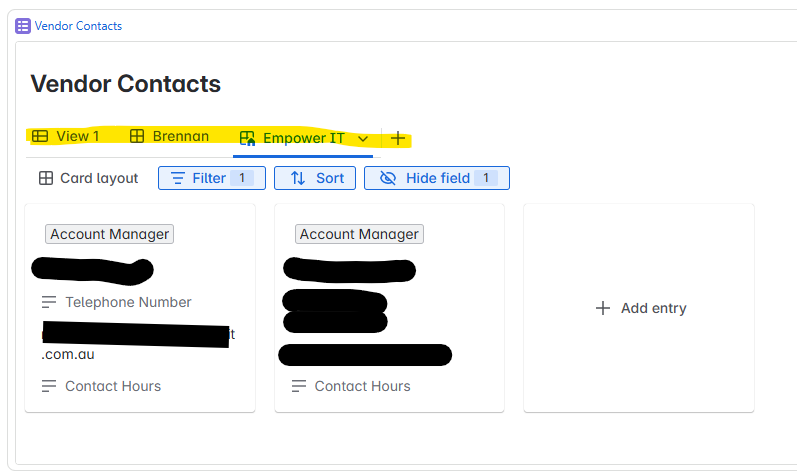
Screenshot 2025-04-15 075228.png

This View is for Empower IT and has been displayed in their Page. So having "Brennan" and all the other Vendors could be confusing. How do I hide this line? Hiding the line under it would be good as well as all I need are the contact details (i.e., in this case, the two cards).

Kind regards,

Glyn


1 answer

Comments for this post are closed

Community moderators have prevented the ability to post new answers.

0 votes
Tomislav Tobijas
Community Champion
April 15, 2025

Hi @Glyndwr Bartlett ,

Unfortunately, embedded databases currently do not support 'hiding' views. You might want to check out open feature suggestions such as this one: CONFCLOUD-79661: Option to Restrict View Toggling for Embedded Database Views which I believe is what you're looking for.

Basically, the only way I could think of is just to create a 'separate' database with only one view which you could then embed.

Cheers,
Tobi

Glyndwr Bartlett
Contributor
April 15, 2025

Thank You Tobi,

I voted for the feature.

Kind regards,

Glyn


Like Tomislav Tobijas likes this
DEPLOYMENT TYPE
CLOUD
PRODUCT PLAN
FREE
PERMISSIONS LEVEL
Product Admin
TAGS
AUG Leaders

Atlassian Community Events