Disclosure: I build Approval Nudge at Quietmill.

Deactivating the account does not remove the person from an approval already waiting for them.
An approver leaves the company on Friday. Their Atlassian account is deactivated. On Monday, Jira still shows their name on a request waiting for their decision.
Nothing has gone wrong with the offboarding. The account is inactive. Offboarding the person and repairing their open approvals are two separate jobs.
Atlassian documents this in JSDCLOUD-13020: deactivate or suspend someone who is already named on a JSM approval, and they remain on its approver list. The ticket is unresolved and currently lists no known workaround.
Deactivation is not reassignment
A JSM approval is created when a request enters a workflow status with an approval step. Jira reads the people or groups from the configured approval source and waits for the required decisions. The normal path assumes those people can still receive the request and answer it.
Deactivating an Atlassian account stops that person from answering. It does not choose a replacement. It also does not change the approval rule or remove the earlier assignment. Jira preserves the request as it was.
That is safer than silently transferring authority to somebody else, but it leaves the service desk with a live request waiting on a person who cannot respond.
Find the requests before somebody reports them
Start with open requests that still carry a pending approval:
approvals = pending() AND statusCategory != Done
The status condition matters. Migrated or repaired requests can retain old approval data after the work is closed. Those are records to inspect, not people to chase.
For each live result, compare the pending approvers with your active Atlassian accounts. The JSM request API exposes each approver, their decision and whether their account is active. On a small site, an admin can make the same check from the request and user administration screens.
The useful question is not simply, “Is this approval old?” It is, “Can every person Jira is still waiting for answer today?”
Check the approval rule before you repair anything
Before editing the Approvers field, open the workflow and check how many decisions the step requires.
- One or a fixed number must approve: adding another eligible approver can give the request a person who can supply the missing decision.
- Everyone must approve: adding another person does not replace the inactive person's decision. The approval still needs administrative repair.
- The source is an approver group: changing group membership affects more than this request. Treat it as a site-wide access decision, not a quick ticket edit.
Keep the original approver visible unless your audit policy requires something different. Add the replacement as an additional approver, then check the approval panel before asking them to respond. This preserves the original assignment instead of making it appear that the new person was always responsible.
If the workflow requires everyone, the request needs a fresh approval round with the correct people. Record the earlier decisions and test the repair on one request first. The exact transition path depends on the workflow, and JSDCLOUD-13020 lists no supported workaround for removing the inactive person from the existing approval. Jira's issue history retains earlier activity, but the approval panel will show the new round.
A safe automation has to know when not to act
The tempting automation is simple: find an inactive approver and overwrite the field with a replacement. That is also where a useful repair can become an audit problem.
A safer process needs four guards:
- Confirm that the approval is still pending immediately before the change.
- Confirm that the replacement account is active and eligible to approve.
- Never make an approval decision for either person.
- Record who was added, who could no longer answer and why the change happened.
If any check fails, leave the request unchanged and tell the admin what needs attention. An uncertain approval is not a place for a best guess.
Where Approval Nudge helps
Version 3.7 added the first half of this fix: find the account that cannot answer and stop nudging it. Approval Nudge checks the pending people it finds during each scan. When an account is deactivated, the Approvals Overview marks that person instead of treating them like somebody who merely missed an email. The app does not try to resend Jira's approval email to an account that cannot receive it.
The current Advanced edition adds the second half: give the request another active person who can answer. A project admin chooses one project-wide fallback stand-in. For an approval that uses the Approvers field, the next scan can add that active stand-in immediately when a pending approver is deactivated. It does not wait for the normal age threshold.
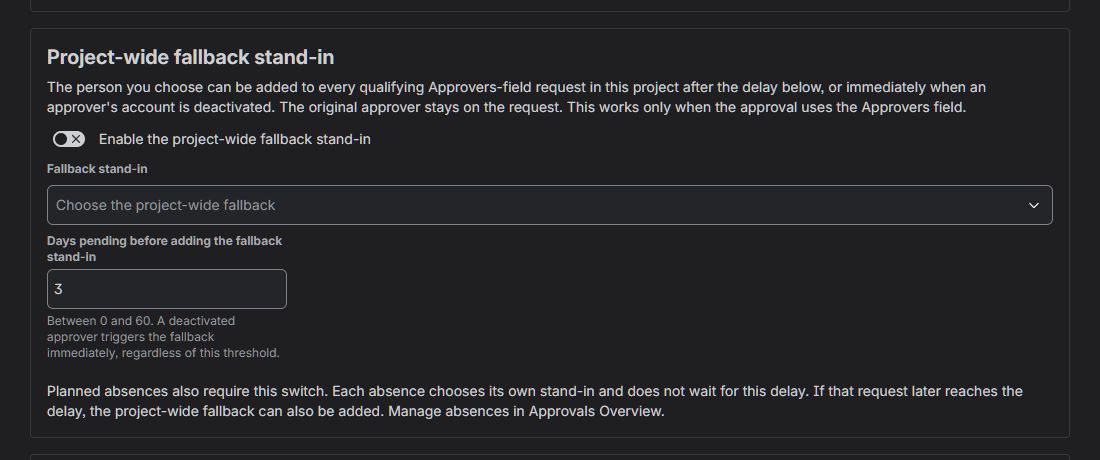
The fallback can act immediately on a deactivated account. Its normal delay still applies to approvals that are simply old.
The original approver remains on the request. The stand-in is additional, and an internal comment records why they were added. Approval Nudge never transfers the original person's identity, authority or decision. If anyone has already approved or declined, the app leaves that approval alone.
The same boundaries still apply. The fallback does not edit approver groups, does not act on team-managed approvals and cannot make an “everyone must approve” step forget a missing decision. It gives a fixed-number approval another active person who may supply a required decision; it does not rewrite the workflow's approval policy.
Make offboarding include open approvals
The durable fix is procedural. When someone leaves, check four places: work assigned to them, automation they own, approvals still waiting for them, and any groups that grant approval authority.
Jira cannot infer who should inherit a decision. Your organisation has to choose that person. The useful automation is the one that finds the stranded request, applies the replacement rule you already approved and leaves enough evidence for the next admin to understand what happened.
How does your service desk handle approvals during offboarding today: a report, an admin checklist, a duty manager, or the first requester who notices the work has stopped?
