September 2026 is not just another Jira Cloud update.
Atlassian is introducing another set of data limits and guardrails across the Jira Cloud family.
And if you're a Jira Standard administrator, there is one question you should be asking before September arrives:
Do I actually know how healthy my Jira instance is today?
Not next month.
Not after someone hits a limit.
Today.
Because once you know today's baseline, you can measure what changes over time.
Without a baseline, you're guessing.
Something important is changing in Jira Cloud
Atlassian is introducing additional hard limits starting in September 2026.
The published limits include:
| Jira configuration |
September 2026 limit |
|---|
| Field options per field |
20,000 |
| Work item security levels per space |
50 |
| Permission grants per permission |
50 |
| Releases per space |
15,000 |
| Workflows per workflow scheme |
150 |
| Statuses per workflow |
200 |
Atlassian's official documentation confirms that these limits are being introduced to help protect Jira Cloud performance, reliability, and scalability as sites grow.
And this is important:
These changes are not presented as a Premium-only concern.
They apply across the Jira Cloud family.
That means Standard administrators should not assume:
"We're on Standard. This probably doesn't affect us."
It can.
But here's the bigger problem for Standard administrators
The question isn't simply:
"Will I hit one of these limits?"
For many organizations, the answer may be no.
The limits are high.
The bigger problem is:
How do you know where your Jira environment stands today?
Atlassian has introduced optimization capabilities for managing Jira configuration, but its Site Optimizer experience is positioned for Premium and Enterprise customers.
That creates an uncomfortable situation for Standard administrators.
You may know that Jira has limits.
You may know that your configuration is growing.
You may know that September 2026 is approaching.
But you may not have the same level of built-in optimization visibility available to higher-tier customers.
So what do you do?
Create your own baseline.
You don't need another dashboard. You need a baseline.
This is where QuotaWatch takes a different approach.
The first question QuotaWatch should help you answer isn't:
"What should I delete?"
It's:
"Where are we today?"
Think about your Jira instance like a company's financial health.
You wouldn't look at your bank balance once and declare:
"We're financially healthy."
You look at trends.
Month over month.
Year over year.
You want to know:
Are we improving or getting worse?
Jira configuration deserves the same thinking.
Your Jira health score is your starting point
Install QuotaWatch and establish your Jira health baseline.
Then you can track it over time.
For example:
August 2026
Health Score: 91
Everything looks comfortable.
November 2026
Health Score: 84
Configuration has started growing.
February 2027
Health Score: 76
Several areas are approaching recommended thresholds.
That tells a completely different story from simply saying:
"We haven't hit any limits yet."
You haven't hit the limit.
But you're moving toward it.
That's the information an administrator needs.
Think MoM, not just "Are we below the limit?"
This is one of the biggest mindset changes QuotaWatch can bring to Jira administration.
Instead of asking:
"Are we under the limit?"
Ask:
"How quickly are we moving toward the limit?"
Imagine your Jira instance has:
-
3,000 releases
-
5,000 releases
-
8,000 releases
-
11,000 releases
-
13,000 releases
You are technically below the 15,000-release September limit.
But the trend matters.
If your organization is adding hundreds of releases every month, the important question isn't today's number.
It's:
"When will our current growth rate become a problem?"
That's why month-over-month tracking matters.
And then there is YoY
Month-over-month tells you what's happening now.
Year-over-year tells you what happened to your Jira environment over a longer period.
Maybe your team added:
-
More projects
-
More workflows
-
More statuses
-
More components
-
More releases
-
More field options
-
More permissions
-
More configuration
None of those decisions necessarily looked wrong when they were made.
But collectively, they can create configuration sprawl.
A year later, your Jira environment may look very different.
Without historical measurements, that growth is almost invisible.
September 2026 makes this more important
Atlassian describes the new limits as software-enforced ceilings.
If a limit is reached, Jira can prevent actions that would exceed that limit. Atlassian notes that end-user actions that don't require exceeding the limit continue to work, but the configuration change itself can be blocked.
Imagine your Jira administrator needs to make an important configuration change.
They try to add another entity.
Jira says:
You have reached the limit.
Now the conversation changes.
It is no longer:
"Let's monitor our configuration."
It becomes:
"How quickly can we remediate this?"
That is a much more expensive problem.
Don't wait until Jira tells you
This is the real reason to start measuring now.
If you install QuotaWatch after you hit a limit, you have historical context only from that point onward.
If you install it now, you can establish your pre-September baseline.
Then you can compare:
Before September → After September
Month → Month
Year → Year
That makes the data useful.
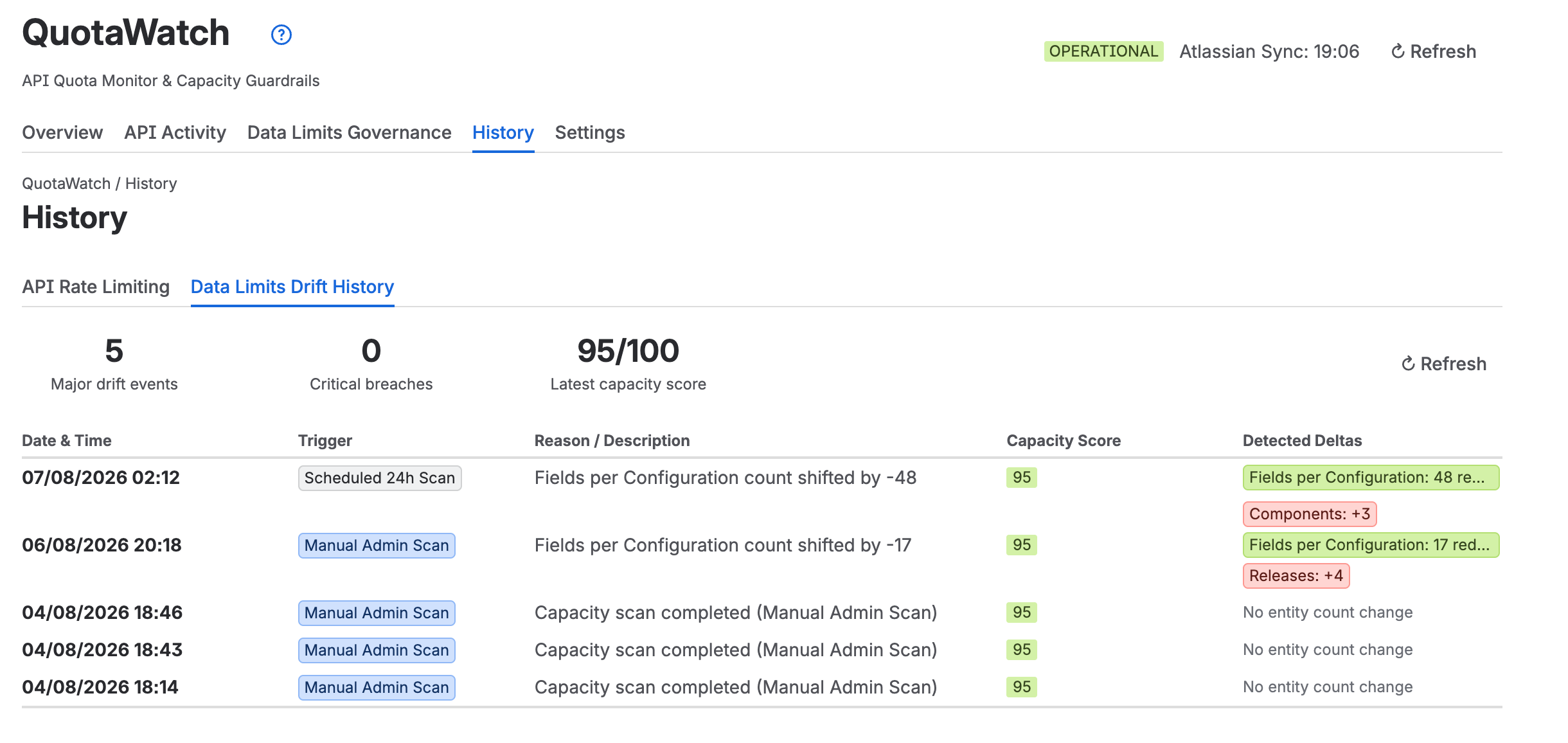
What should a Jira Standard administrator track?
At minimum, you should know how your Jira environment is changing across important configuration areas.
Think of your Jira health in terms of:
Configuration
Are fields, statuses, workflows, components, priorities and other configuration entities growing?
Data volume
Is your Jira environment accumulating data faster than expected?
Limits
How close are important configuration areas to Atlassian's published limits?
API health
Are your apps and integrations consuming API capacity aggressively?
Trend
Is your environment improving, stable, or deteriorating?
Overall health
If you had to explain the state of your Jira environment to your manager in one number, what would it be?
That's your health score.
The Standard plan shouldn't mean "blind spot"
This is the message I think every Jira Standard administrator should take away:
You don't need Premium to start thinking about Jira governance.
You don't need to wait for a problem.
You don't need to wait until September.
And you don't need to manually remember what your Jira configuration looked like six months ago.
Start measuring now.
QuotaWatch gives you a simple operating model
The goal isn't to make Jira administration complicated.
It's actually very simple:
1. Measure
Know your current Jira health.
2. Baseline
Record where your environment stands before the new limits fully matter.
3. Track
Compare your health month over month.
4. Compare
Look at year-over-year changes.
5. Investigate
Identify areas growing faster than expected.
6. Act
Clean up, consolidate or redesign configuration before it becomes an operational problem.
That's proactive Jira administration.
"But my Jira is nowhere near the limits."
Perfect.
Prove it.
That's actually one of the best reasons to install QuotaWatch.
If your Jira health score is strong and your configuration is comfortably below the limits, you have something valuable:
Confidence.
And if the numbers start moving in the wrong direction?
You discover it while you still have time to act.
The real value isn't finding a problem
It's finding a problem early.
There is a huge difference between:
"We're at 70% and growing."
and:
"We've hit the limit."
The first gives you options.
The second gives you a fire to put out.
September 2026 is your deadline for action, not your deadline for awareness
Don't wait for September to ask:
"Are we ready for the new Jira limits?"
Ask the question now:
"What does my Jira instance look like today?"
Then ask it again next month.
And the month after that.
Build your own Jira health history.
Because when September arrives, you shouldn't be discovering your Jira environment.
You should already know it.
Start tracking your Jira health today
If you're running Jira Standard, QuotaWatch gives you a practical way to start building visibility around your Jira environment.
Establish your baseline.
Track your health MoM.
Compare it YoY.
Watch the trend.
And most importantly:
Know what is changing before Jira forces you to react.
September is coming.
Don't wait for a Jira limit to become your first health check.
Install QuotaWatch and find out how healthy your Jira instance is today.
