One Epic. Three Stories under it. Six subtasks under those. The same shape every release, in every project that ships — and built by hand it's ten create dialogs, nine parent assignments, and about three sprints before somebody quietly stops doing it properly.
The obvious fix is to save that Epic and its children once and stamp it out. Jira Cloud has no such button, which is why some version of this question has been on this Community since 2019 and has been asked again since. What Jira Cloud does have is two native routes that get you further than the threads suggest — one of them documented by Atlassian and routinely underrated.
This is the map as of September 2026: what you can build with no app at all (with the actual rule, step by step), the exact point where that route stops paying for itself, and what changes when the structure lives somewhere other than a rule. Written for Jira admins and delivery leads who set this up for other people.
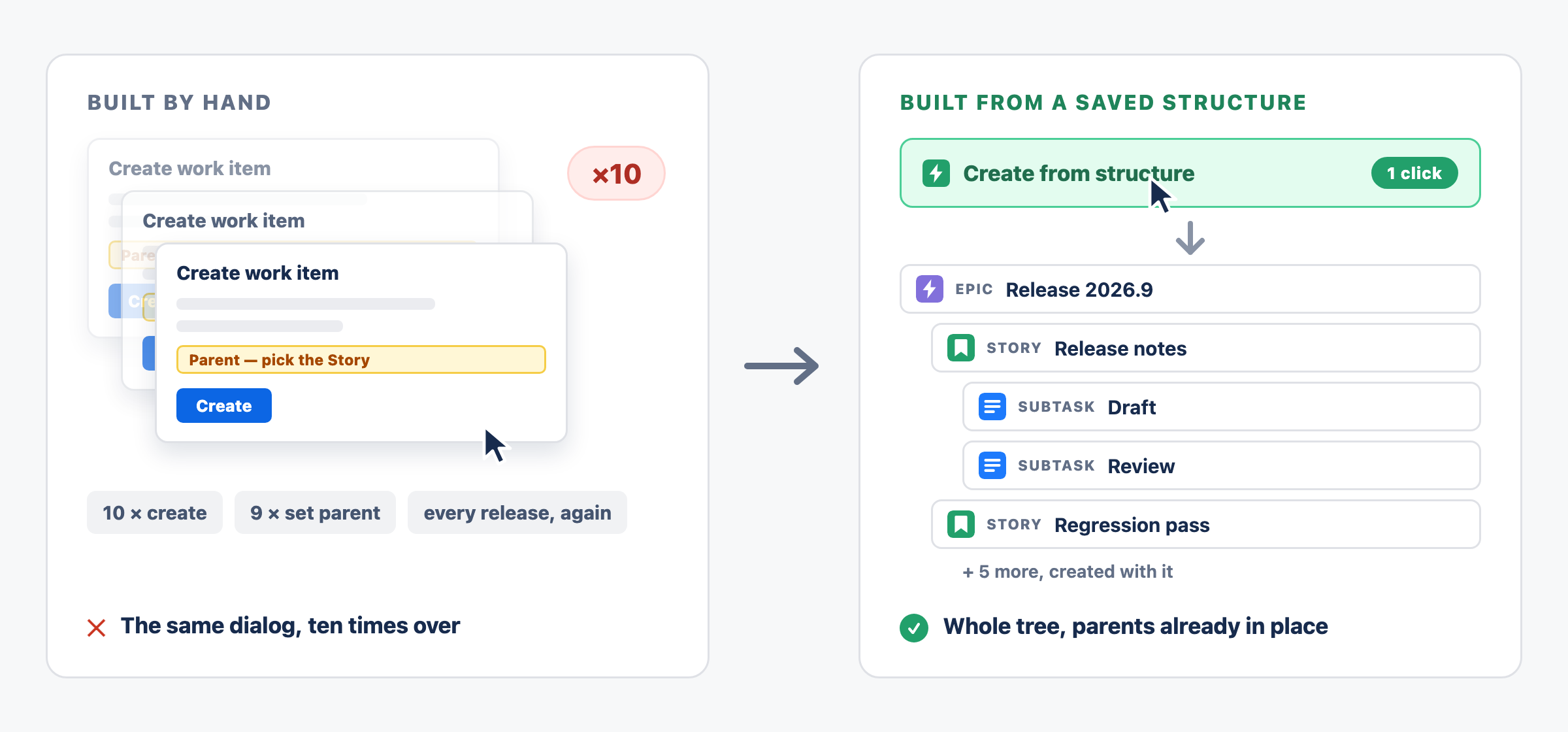
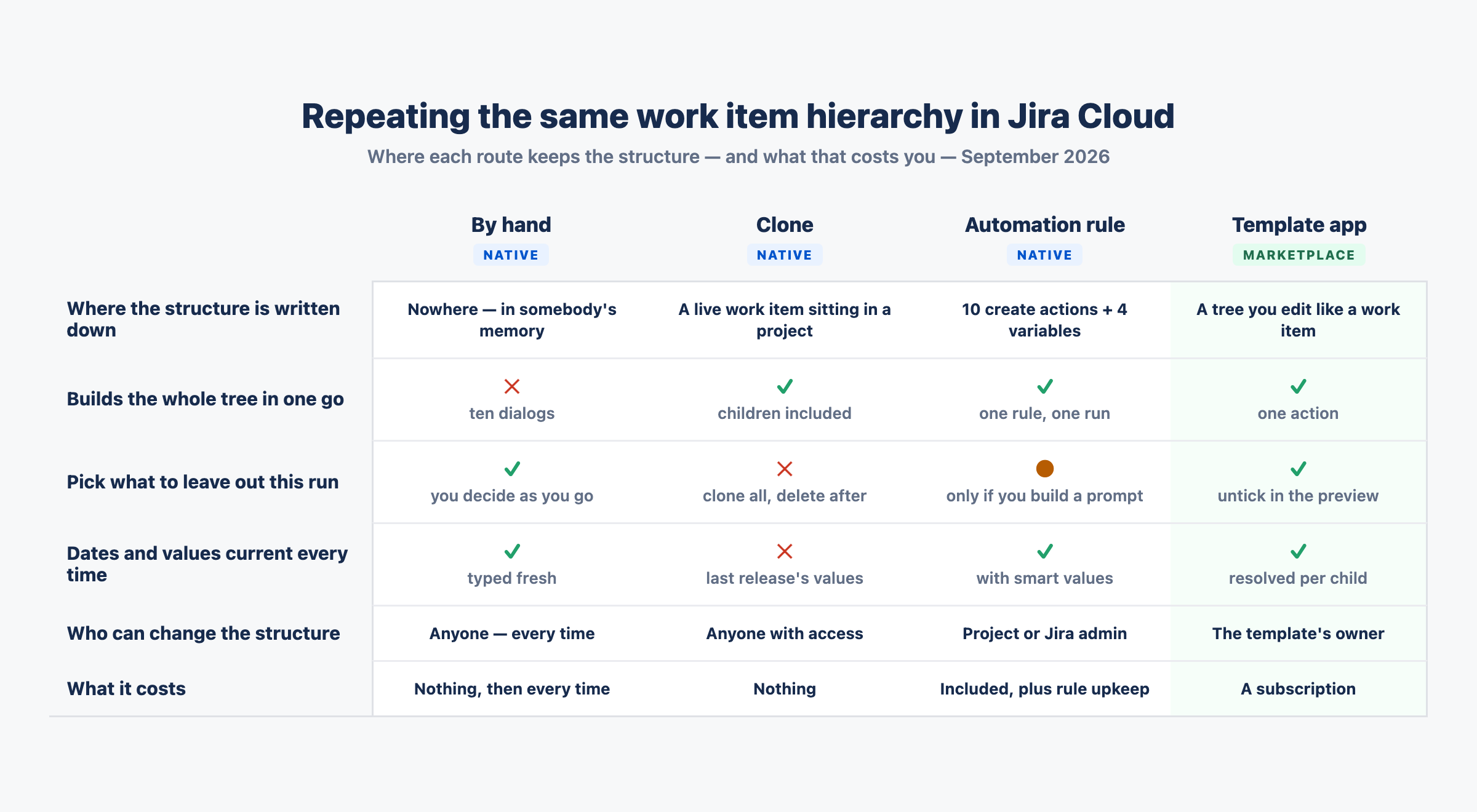
Ten work items and nine parent assignments by hand, or one action that produces the same tree — the question is where the structure is written down.
Why there is no template to save
Jira Cloud's templates all sit one level above the work item. Project and team templates give a new space a sensible starting point — boards, work types, a workflow — and that's the level they operate at. There is nothing that says "this Epic, with these three Stories and these six subtasks, again". As of September 2026, an admin cannot save a work item and its children as a reusable structure natively.
So the native answer isn't a template at all. It's one of two mechanisms that recreate the structure: Clone, and Automation. Both are worth knowing properly, because between them they cover more cases than most threads on this board admit.
The route most threads skip: Clone
Keep one Epic as a golden copy — the shape you want repeated — and clone it when you need it. From the work item, Actions → Clone, and the dialog lets you include attachments, links, subtasks and, on an Epic, its child work items. You get the whole tree as real work items, with a prefixed summary and a link back to the original.
Two clicks, no rule to build, nothing to maintain. The trade is that a clone carries last time's values: the dates, assignees and summaries are the previous release's until someone edits them, and the comments come along too unless you untick them — so whatever was said on the golden Epic lands on every copy. And your golden Epic is a genuine work item living in a project, so it turns up in boards, filters and reports unless you park it somewhere the team doesn't look.
One thing worth separating: this is the manual Clone from the work item's Actions menu. Automation has its own Clone work item action, and it behaves differently — it copies across the field data it can, but it "will not clone work item links or comments".
If the structure comes up a handful of times a quarter, and someone would be editing the fields anyway — this is the answer, and you can stop reading here.
The rule that builds the whole tree
When the structure repeats often enough that cloning and renaming becomes its own chore, the native tool is Automation. Here the folklore is wrong: you'll often read that a hierarchy needs one rule per level, chained together by labels. It doesn't. Atlassian documents a single rule that creates a parent and its children, and the same pattern scales to a full Epic → Story → subtask tree.
The walkthrough below was built in a company-managed project. It rests on one smart value and one habit. {{createdIssue}} refers to the item the rule created most recently — so the moment the rule creates a Story, it no longer points at the Epic. You capture each key into a variable as you go:
- Trigger — whatever starts a release. Scheduled works; so does a Manual trigger, which can ask whoever runs it for input. Mine takes a Release key, defaulting to
2026.X, and exposes it as {{userInputs.releaseKey}}.
- Create work item — the Epic, with a summary that uses what was typed in:
Release {{userInputs.releaseKey}}.
- Create variable — name it
epicKey, value {{createdIssue.key}}. This is the step people miss.
- Create work item — the first Story, with Parent set to
{{epicKey}}.
- Create variable —
storyOneKey, value {{createdIssue.key}}, captured before anything else gets created.
- Create work item — a subtask with Parent work item set to
{{storyOneKey}}. Repeat for the second subtask.
- Repeat steps 4–6 for each remaining Story, each with its own variable —
storyTwoKey, and so on.
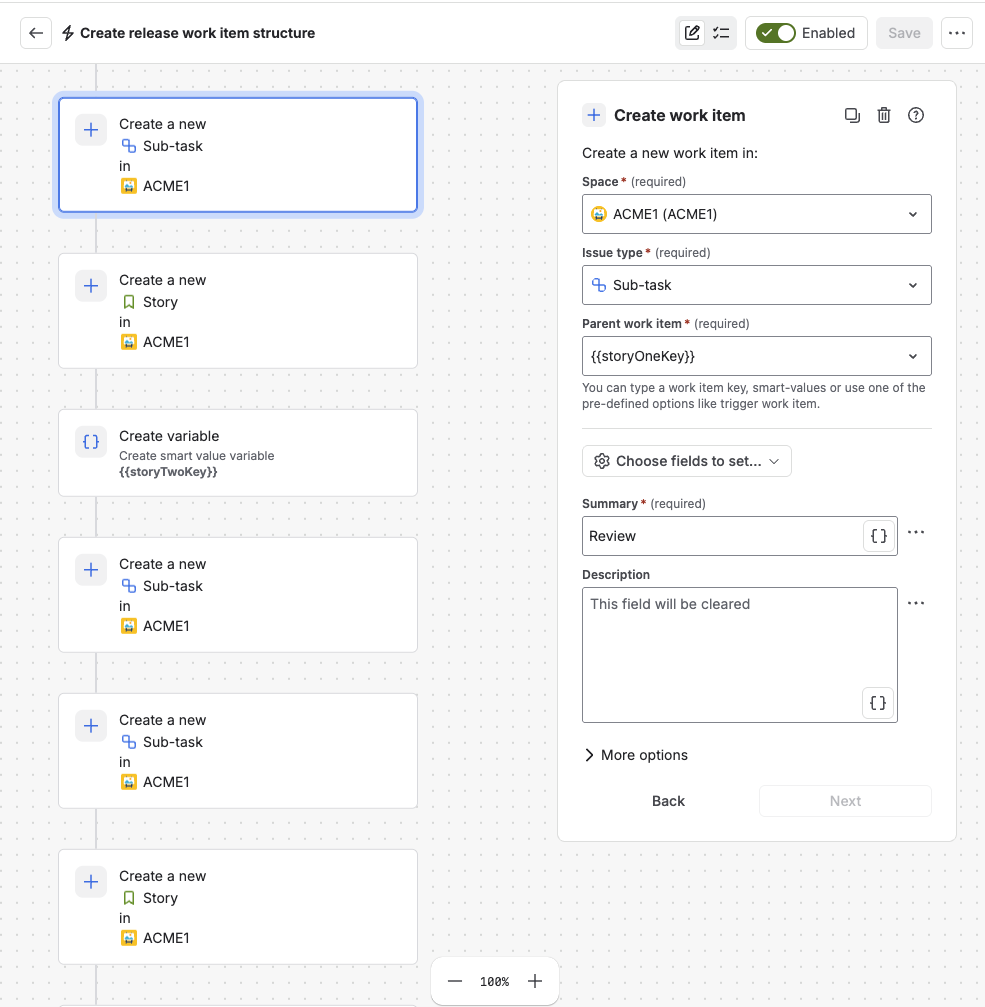
The move the whole thing rests on: the subtask's Parent work item is {{storyOneKey}} — the variable captured two steps earlier, before the next create overwrote {{createdIssue}}.
If you have never pointed a Parent field at a variable, the field itself tells you it is allowed: "You can type a work item key, smart-values or use one of the pre-defined options like trigger work item." That is the whole trick.
That is the mechanism. Now the size of it. Written out for the tree this article opened with — an Epic, three Stories, six subtasks — the flow comes to fourteen components in a fixed order: ten Create work item actions with four Create variable steps threaded between them, each create carrying its own panel of space, work type, parent and fields. It does not fit on one screen — below, the flow runs left to right across three columns.
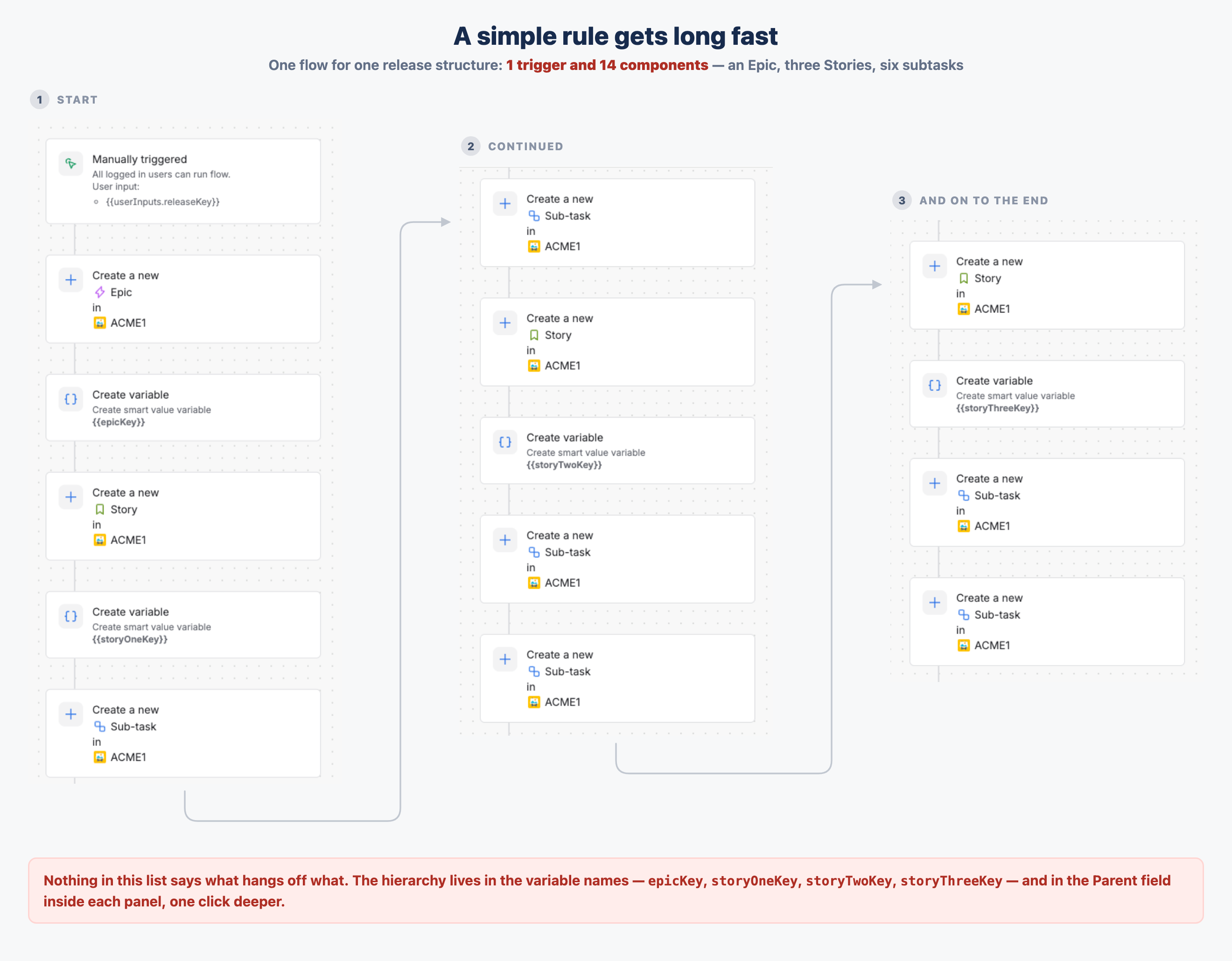
One flow, read left to right: fifteen rows that look nearly the same. The first card is the manual trigger with its releaseKey input; everything after it is a create or a variable.
The order is load-bearing, too. Each Create variable has to sit between the item it captures and the next create, because that next create overwrites {{createdIssue}}. Move one step, or skip one variable, and nothing complains: the rule saves, the rule runs, and a subtask quietly lands under the wrong parent. You find out by looking at what came out.
One detail worth knowing while you build this: there is a dedicated Create sub-tasks action, and on its own it only sets the summary of each subtask. Choosing Add fields converts it into the full Create work item action, which is where the rest of the fields live.
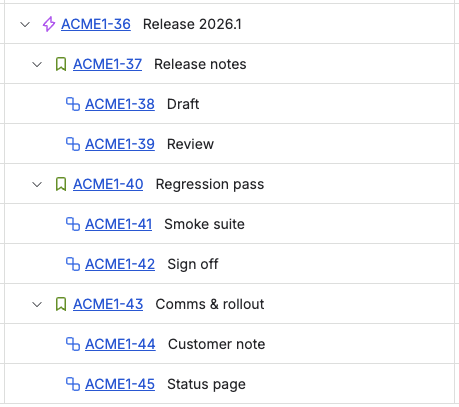
What comes out of one run: ten work items on three levels, every parent already in place. The Epic's summary is the release key typed at the prompt.
For a small fixed structure — a parent and a couple of children, the size of the rule above — this is genuinely the answer. It's native, it's included in your plan, and you don't need an app for it. The question is what happens as the tree grows, because the rule grows with it, one component at a time.
Where the rule stops paying for itself
The limits are real — they're just not the ones usually quoted.
The structure is the rule. An Epic with three Stories and six subtasks is ten create actions and four variables, ordered by hand. Adding one subtask means editing the rule; variants mean more conditions, more branches, or more rules. There's also a ceiling — a rule can hold 65 components, and the tree above is about fourteen of them. Comfortable for one structure; less so once one rule is carrying several. And the rule stays the only place the shape of your process is written down — in a form nobody can read at a glance. The rail is a flat list of near-identical rows; the tree exists only as variable names, inside panels, one click deeper each.
You can loop one level deep, and only one. The instinct is to create the Stories and then branch over them to add each one's subtasks — and half of that works. The branching documentation points you at a branch for All created work items, precisely because the main flow always applies to the trigger item and not to what the rule just created. So one branch can hand every created Story the same set of subtasks. What you can't do is go deeper or vary it: "Branches cannot be nested in one another, and do not support the use of the If/else block condition." A tree where each Story gets different children is still unrolled by hand.
Branches won't sequence anything for you either. The same page: "Branches on multiple work items (such as 4 sub-tasks) will run in parallel with no guarantee one will finish before the next one starts. Therefore, you cannot rely on changes between branches." And: "Branches are isolated. Any changes that occur in a branch will not be visible to the main branch, or any others." That's exactly why the pattern above keeps its variables in the main flow rather than branching.
Choice at run time is limited to values, not shape. The prompt is real and it is useful — the rule above asks for a release key and stamps it into the Epic's summary, so every run is named correctly without anyone editing the flow. What you can't ask at that moment is which parts to create. There is no preview of the structure with items to untick; the shape is decided in the flow, in advance, by whoever can edit it.
And it's an admin's object. Automation rules are configured in project or Jira admin settings, while the shape of the process usually belongs to the team running it. Every "we've added a step" becomes a request to somebody else.
The scorecard
| What you need |
Native route |
What you actually get |
|---|
| The same tree a few times a quarter |
Clone, including child work items |
The whole hierarchy in two clicks — carrying last time's dates and assignees |
| The same tree on a trigger or a schedule |
One Automation rule with variables |
The full hierarchy, no app — with the structure unrolled by hand inside the rule |
| A tree that varies from run to run |
A manual trigger that prompts for input |
A question and a condition — but no preview of the structure to untick before it is created |
| A structure the team owns and edits |
The golden work item you clone |
The nearest native thing to a template object — but a live work item, not a template |
| Values that are current on every run |
Automation rule, with smart values |
Dates and users can be computed per run — a clone instead carries last time's values |
What changes when the structure lives in a template
Full disclosure: I work on Templify at Terano Apps, so treat this section as the vendor's answer. The four routes above are the part that matters, and they work without us.
The difference an app makes here is not "it creates child issues" — Automation does that, as above. It's where the structure is written down. Mark a work item as a template, give it the children and links you want, and the tree becomes something you edit like any other work item instead of a numbered list of actions.
Two things follow from that. The dialog can show you the structure before it exists — "Select the issues in the template structure you want to create" — so the person kicking off this release unticks the parts it doesn't need, at the moment they know. And the release key that the rule took as a trigger input is here just a field in the template, filled in at creation along with any other dynamic values, a due date of now + 7d or the current user, resolved per child. If you want it triggered rather than clicked, there's an automation action that does the same thing from inside a rule.
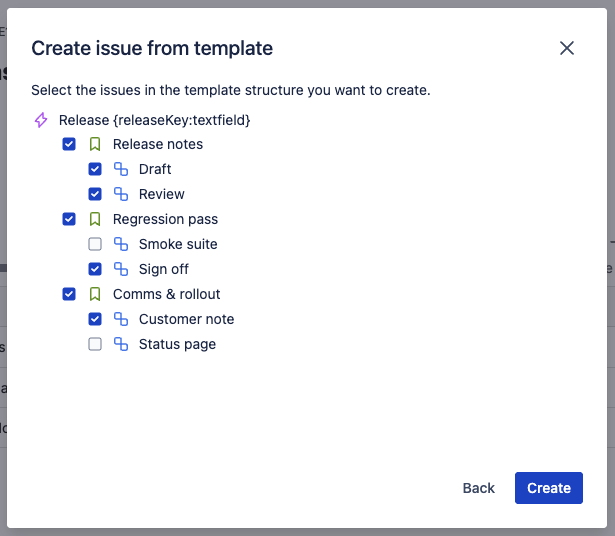
The same structure as a template. Two subtasks are unticked, so this run skips them; the root carries the release key as a field rather than as a trigger input.
It's on the Marketplace here: Templify.
The honest boundary: if you're stamping out one fixed structure on a schedule, the rule in the previous section already does that, for free. The case for a template is variation, ownership and values that need to be current — not the creation itself.
Quick answers
Can a single automation rule create an Epic, its Stories and their subtasks?
Yes. Create the parent, store its key with Create variable set to {{createdIssue.key}}, then create the children with Parent pointed at that variable. Atlassian documents this pattern for a work item and its subtasks; extending it to three levels is the same move repeated.
Why does my Story end up under the wrong parent when I use {{createdIssue}} twice?
Because it always means the most recently created item. After the rule creates a Story, {{createdIssue}} is that Story — not the Epic. Capture each key into its own variable at the moment it's created.
Can I branch over the Stories and add subtasks inside the branch?
Yes, for one level: a branch on All created work items is the documented way to act on what the rule has just created, and it can give every created Story the same subtasks. You can't nest a second branch inside it, branches on multiple items run in parallel with no ordering guarantee, and they're isolated from the main flow — so anything varied or order-dependent belongs in the main flow, with variables.
What about importing the structure from a CSV?
That works, for a one-off. The importer builds the hierarchy when the file carries Work item ID, Work type and Parent columns, with parents listed above their children. It is a good way to land an existing structure once, and a poor way to run a weekly ritual.
Does Jira Cloud have native work item templates?
No — as of September 2026 the native templates are project- and team-level. There's no native way to save a work item plus its children as a reusable structure.
Is Clone good enough?
Often, yes. For a structure you repeat a few times a quarter and edit afterwards anyway, cloning an Epic with its child work items is the cheapest thing that works. It gets expensive when the number of fields to fix up after each clone starts to rival building the tree by hand.
Our structure changes every quarter — does automation still make sense?
It works, but you're paying for it in rule edits. Every change to the process is a change to a list of create actions inside an admin-only object, and there's nowhere else the current shape is recorded. That's the trade to weigh, not the creation itself.
If you're solving this a different way — Clone plus a bulk edit, an import, something with branches I've written off too quickly — I'd genuinely like to read it in the comments.
