
Smart Filter Manager for Jira (FMJ) is basically the admin dashboard Jira never gave you for filters. If you've ever tried to figure out who owns what, why there are twelve almost-identical JQL searches floating around, or what actually breaks if you delete an old filter, you know how much of a black box native Jira is here.
FMJ opens that black box up. You get a full table of every JQL filter in the instance, private ones included, with smart countersthat flag invalid JQL, filters owned by people who've gone quiet, and duplicates you didn't know existed.
And instead of fixing any of that one filter at a time, you can select a batch and reassign ownership, delete the dead weight, or check what a filter's actually connected to before you touch it. > Smart Filter Manager for Jira (FMJ)
ℹ️ The Filter Sprawl Problem Nobody Talks About
JQL Filters (or "saved JQL searches" if you want to be technical about it) are one of those Jira features that quietly run the whole show. Dashboards, gadgets, boards, reports, subscriptions, automation rules... a huge chunk of that is built on top of JQL filters people saved at some point.
The problem is what happens next. As a Jira instance grows, JQL filters pile up fast. Someone creates one for a sprint review and never touches it again. Two people independently build the exact same filter because neither knew the other one existed. Someone leaves the company and their filters just... sit there, still shared, still running, with nobody watching them.
Jira's built-in features handle the basics fine. But the moment you need to do anything at scale, like bulk deleting old filters, reassigning ownership after someone leaves, or updating sharing settings across dozens of filters at once, you hit a wall. It's doable, technically. It's just painfully manual.
That's the gap Smart Filter Manager for Jira (FMJ) was built for. It gives admins a proper dashboard for managing filters at scale, so cleanup and governance stop being a multi-day slog and start being something you can actually keep on top of.
🤔 So What Is Smart Filter Manager, exactly?
Smart Filter Manager for Jira (FMJ) is an Atlassian Marketplace app for Jira Cloud that gives admins a much better interface for handling filters instance-wide.
Here's what it actually does:
- Shows every saved JQL filter in a clean table view,
- Smart counters that flag invalid JQL, filters owned by inactive users, and duplicates, so you're not hunting for problems manually,
- A dedicated view specifically for dealing with duplicated filters,
- Bulk ownership reassignment, so you can move dozens of filters to a new owner in one shot instead of one at a time,
- Bulk deletion for the orphaned or unused stuff cluttering your instance.
Basically, it's a control panel. Instead of clicking into individual filters one by one, you get a bird's-eye view and can act on groups of them at once.
😅 Why Bulk Actions Actually Matter
It's easy to underestimate how much friction this solves until you're the admin dealing with it. A few of the recurring headaches:
- Orphaned filters: someone leaves the company or loses access, but their filters stay right where they are, sometimes still feeding a dashboard or automation rule that nobody remembers building.
- Duplicated filters: different people building the same logic independently, which just adds noise and confuses everyone trying to find the "real" one.
- Ownership changes: when someone switches teams, their filters need to move with them, or at least get reassigned to someone who'll actually maintain them. Doing that one filter at a time is nobody's idea of a good afternoon.
- Cleanupthat never happens and filters accumulate. Deciding which ones are safe to delete, and actually deleting them, is tedious enough that it usually just... doesn't happen.
- Not knowing what you'll break: Delete or edit the wrong filter and you might take out a dashboard widget or break an automation rule with zero warning. That uncertainty alone stops a lot of admins from touching anything.
- Scale: what's manageable for a ten-person team becomes a real operational problem once fifty teams are all creating and sharing filters independently.
🚀 How Smart Filter Manager Actually Changes This
- Bulk ownership transfer: Instead of reassigning filters one at a time, you can select a group by owner, creation date, or usage, and move them all to a new owner in one action. Genuinely useful for those "someone just left" moments, where you can route their filters to an admin account for review instead of leaving them orphaned.
- Bulk delete: You can filter for the stuff that's unused, private with no traffic, or shared but never actually opened, and clear it out in one pass instead of picking through filters individually.
- Visibility before you act: before you delete or reassign something, you can see where it's actually being used, whether that's a dashboard, a gadget, or a subscription, so you're not deleting something blind and finding out what broke later.
- Consistency at scale: With bulk tools in place, it's actually realistic to enforce naming conventions, sharing rules, and archival policies across the whole instance instead of hoping people follow them voluntarily.
⭐ Where This Actually Comes in Handy
- Someone leaves the company: this is the classic one. A power user departs and leaves behind a hundred filters feeding half the org's dashboards. With bulk tools, you reassign everything to an admin account, review what's still needed, delete the rest, and adjust sharing, all in an afternoon instead of a multi-week cleanup project.
- Teams merge: When two teams or projects consolidate, filter naming, sharing, and ownership usually need realigning. Bulk editing lets you rename, reshare, and reassign across the board instead of doing it filter by filter.
- Regular housekeeping: Set a recurring filter audit. Anything unused for a few months or sitting at zero usage gets flagged and cleared out, keeping the catalog from ever getting out of hand again.
- Migration prep or Post-migration cleanup: before moving to a new cloud instance, you can pull everything together, review it centrally, and reconfigure what's actually worth bringing along. From a Datacenter platform to a cloud platform, you can focus on what matters, and just add a post-migration clean up step once your data are all migrated to the Cloud.
📊 Native Jira Cloud vs. Smart Filter Manager
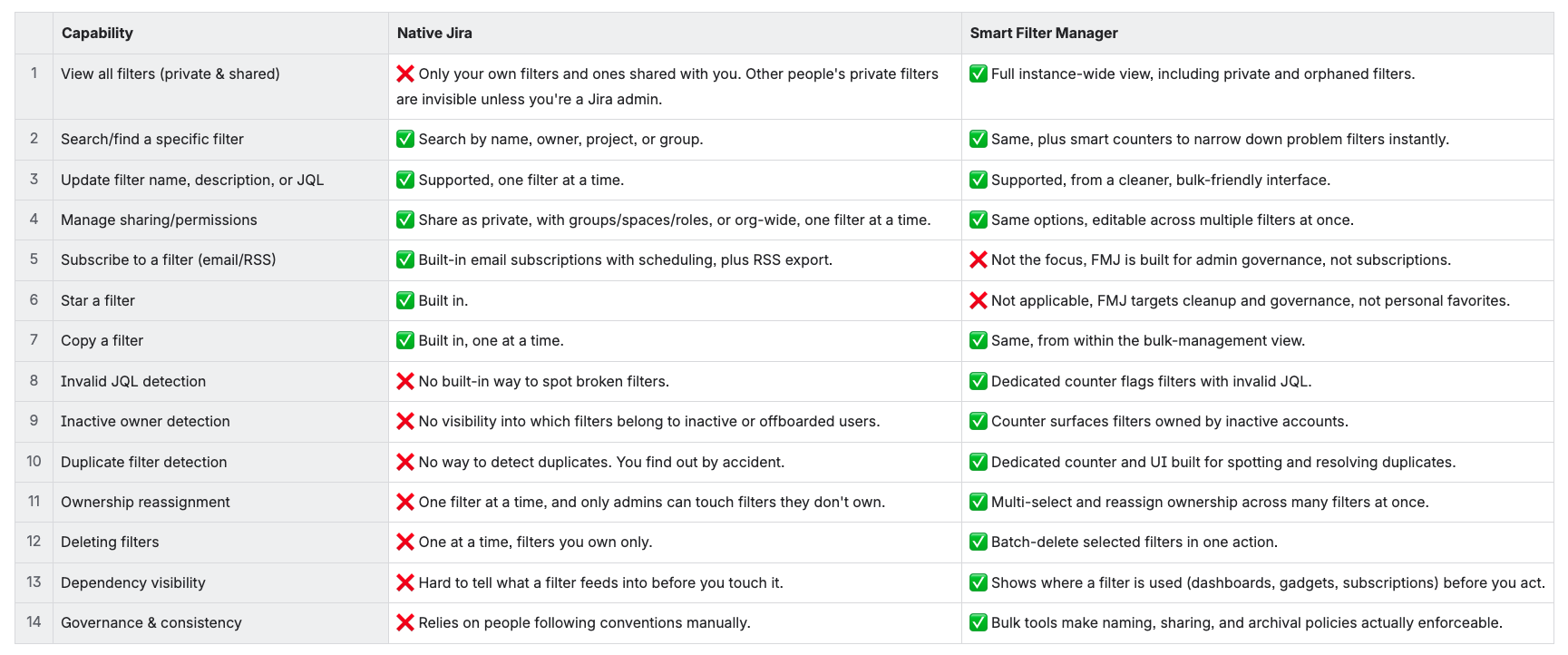
Looking at it side by side, the gap isn't really about missing features, native Jira covers the basics fine. It's about what happens once you're managing JQL filters at real scale.
One-by-one workflows are fine when you've got a handful of filters to deal with, but they fall apart fast once you're staring down hundreds of them across dozens of teams. That's when small manual tasks start eating whole afternoons, mistakes get made because nobody can see the full picture, and things slip through simply because checking them one at a time isn't realistic anymore.
Smart Filter Manager for Jira (FMJ) doesn't reinvent what a JQL filter is, it just gives you a way to see everything at once and act on it deliberately, instead of hoping nothing important gets missed.
🚦 Where You Still Need to Be Careful
- Bulk power comes with bulk risk, so a few things worth keeping in mind: Accidental deletions happen. Always preview and check dependencies before you commit to a bulk action, and keep a backup or export as a safety net.
- Dependencies are real: deleting or editing filters tied to dashboards or gadgets can break things downstream, so checking dependency visibility isn't optional, it's the whole point.
- API limits exist: running a lot of operations at once can strain Jira Cloud's API, so a tool that handles retries and batching gracefully matters more than it sounds.
- Permissions still apply: even with admin-level tooling, some changes will still be blocked by underlying permission constraints.
- Communicate with your users: reassigning or deleting filters without a heads-up can confuse the people who relied on them. A quick notice goes a long way.
- Policies make the difference: bulk tools are only as good as the standards behind them. Without clear naming, sharing, and archival policies, mass operations can just create a different kind of mess.
🏆 Wrapping Up
JQL filter sprawl isn't a hypothetical problem, it's just what happens naturally as more teams build dashboards, reports, and automation on top of Jira. The bigger the instance gets, the more filter lifecycle management turns from a nice-to-have into something that actually needs owning.
Smart Filter Manager for Jira (FMJ) handles that directly: bulk ownership transfer, bulk deletion, sharing edits, and audit visibility, turning what used to be weeks of manual cleanup into something you can knock out in an afternoon.
The result is a cleaner JQL filter catalog, less risk from orphaned or forgotten filters, better governance, and a lot fewer admin hours burned on busywork.
If you're managing a mid-to-large Jira Cloud instance with a JQL filter count that keeps climbing, a bulk-capable filter manager isn't really optional anymore. It's just what keeping the instance sane looks like now.
⚙️ Try it on your Jira Cloud, it’s free for 30 days! > Smart Filter Manager for Jira (FMJ)
🎥 See FMJ in action: https://www.youtube.com/watch?v=-NrxuJtPs0k
