Healthcare organizations are increasingly using Jira to manage their projects, track their requests and manage their workflows. The question that inevitably arises though when patient data is involved: Is Jira HIPAA compliant?
Jira and HIPAA are becoming more connected. More healthcare providers, medical technology companies, and health insurance organizations are using Jira to manage projects, service requests, and operational workflows. They do this while meeting strict security and compliance requirements.
For many Jira administrators, this raises several questions:
- Can Jira be used in a HIPAA-regulated environment?
- What does Atlassian recommend?
- How can teams investigate historical changes efficiently?
- What should be considered when choosing Marketplace apps?
Let’s look at what HIPAA means, what Atlassian suggests, and what we can learn from practical examples.
What Is HIPAA?
The Health Insurance Portability and Accountability Act (HIPAA) is a U.S. federal law that protects Protected Health Information (PHI). Organizations that create, receive, maintain, or process PHI must implement appropriate administrative, technical, and physical safeguards to protect such information.
One crucial requirement is maintaining audit controls, mechanisms that enable organizations to record and review activity involving systems that store electronic Protected Health Information (ePHI).
Healthcare providers, medical technology organizations, and many others depend on these audit controls to assist security investigations and show compliance during internal and external audits.
Can Jira Be Used in HIPAA-Regulated Environments?
Yes, when set up according to Atlassian’s recommendations.
Atlassian provides guidance for organizations in HIPAA-regulated environments. Eligible Jira Cloud plans can be covered under a Business Associate Agreement (BAA). Atlassian publishes a HIPAA Implementation Guide that explains how administrators can set up Jira and Jira Service Management to meet HIPAA requirements.
The guide covers topics including:
- Account configuration
- User permissions and access control
- Notifications and automation
- Security settings
- Third-party app management
- Recommendations for handling Protected Health Information (PHI)
As a best practice, organizations should avoid storing unnecessary PHI in free-text fields, like Jira work item descriptions, comments, or attachments, whenever possible. Administrators should also regularly review user permissions, remove unnecessary access, and periodically check connected Marketplace apps and integrations to ensure they still meet the organization’s security and compliance needs.
In the case of using Rovo, it is recommended to turn off web search. Read requests may include data, such as search parameters, from app instances. These are subject to the destination's policies.
It’s important to remember that HIPAA compliance can’t be achieved through software alone. It relies on an organization's overall security policies, administrative procedures, infrastructure, and system setup.
Jira HIPAA Compliance Checklist
So, HIPAA requires organizations to implement appropriate security measures to protect ePHI. This includes access controls, audit controls and data integrity controls.
It is recommended to review these requirements before handling protected health information:
Requirement | What to check |
|---|
Business Associate Agreement (BAA) | Sign a BAA with Atlassian for eligible Jira Cloud products. |
Access controls | Restrict access to sensitive data based on user roles and responsibilities. |
HIPAA configuration | Configure and tag eligible Atlassian apps according to Atlassian's HIPAA implementation guide. |
Audit trails | Review Jira activities, field changes, and user actions to support investigations. |
Sensitive data protection | Check whether PHI is exposed in work items, descriptions, comments, or attachments. |
Third-party apps | Review Marketplace app security, data handling, and applicable BAA requirements. |
Audit docs | Maintain relevant change records and evidence for internal and external reviews. |
Why Jira History Is Important for HIPAA Audits
One important part of being ready for a HIPAA audit is the ability to review and investigate Jira past activities. During an audit or security investigation, organizations often need to show who made a change, what was changed, and when it happened.
Jira keeps a full history of work items, offering a useful audit trail. However, in large Jira environments, checking individual work item histories one by one can take a lot of time and effort. Quick access to complete, searchable historical records helps teams look into incidents more quickly, confirm ownership and workflow changes, and gather evidence for internal and external HIPAA-related audits.
How to Choose Jira Apps for HIPAA Audit Preparation
When choosing a Marketplace app for a healthcare organization, functionality is just one part of the decision. Security and privacy are also very important, especially for apps that access Jira data.
Before you install any app, think about these questions:
- Does the app meet Atlassian’s security and privacy standards?
- Is it built on Atlassian Forge, so it can run within Atlassian's secure cloud platform?
- Does it support Data Residency to help meet your organization’s data rules?
- Does it follow Jira’s permission model and offer extra access controls?
- Does it avoid storing a separate copy of your Jira data?
- Does it give your team the audit visibility it needs without adding unnecessary security risks?
One example of a Marketplace app that helps organizations improve audit visibility is Issue History for Jira (Work Item History). The app offers a complete and searchable history of Jira and Jira Service Management work items.
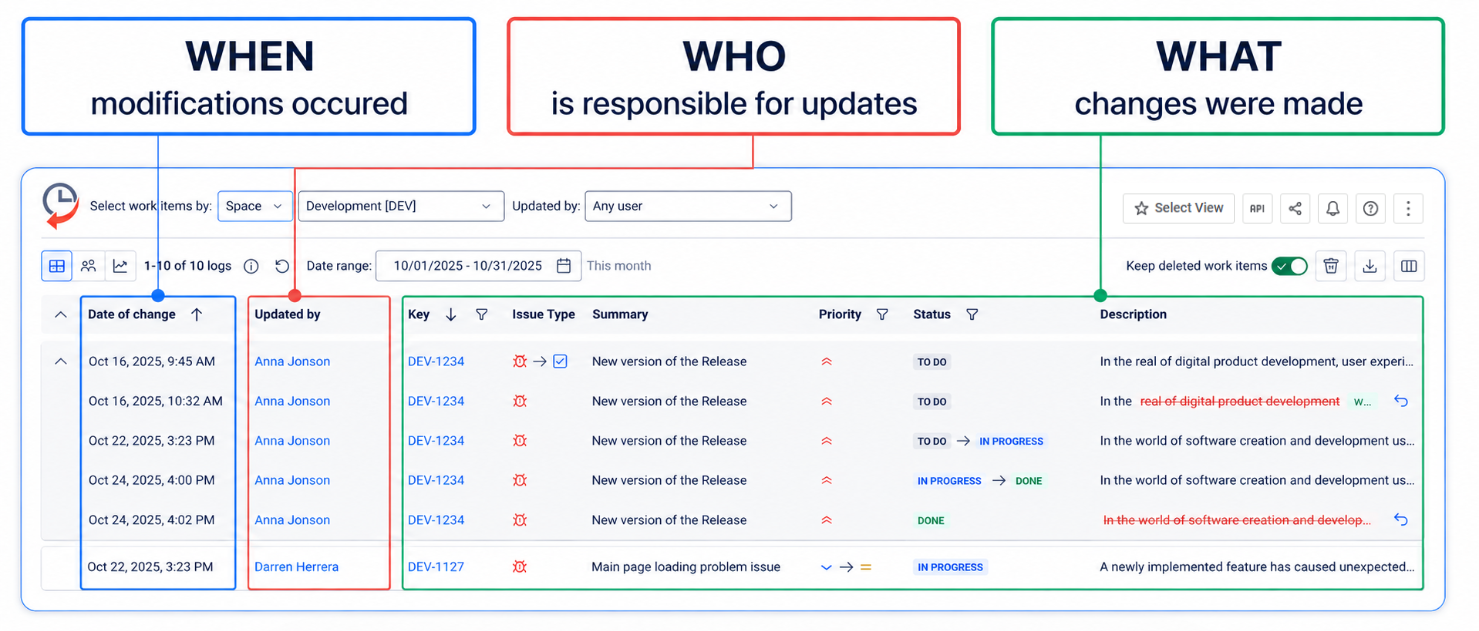
This feature makes it easier to investigate past changes, review user activity, check field updates, and export records for audits and reports. Built on Atlassian Forge, it supports Data Residency, respects Jira permissions, and doesn’t store customer work item data. Instead, it retrieves historical information on demand.
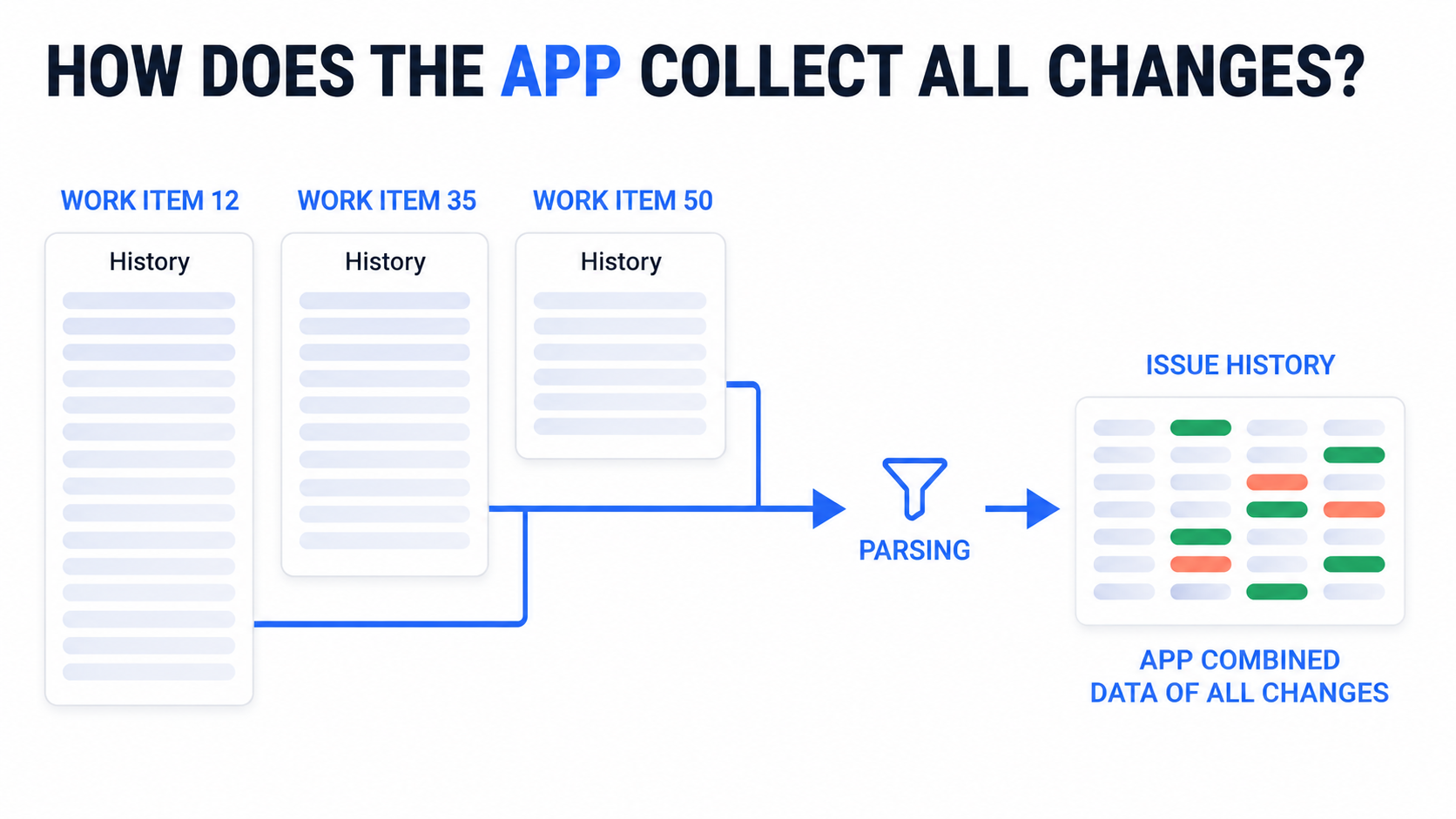
A good example is Med-Metrix, a U.S.-based healthcare technology company. Its team uses Issue History for Jira (Work Item History) to support HIPAA-related audit activities.
This allows administrators to quickly review past changes, check ownership updates, and look into bulk modifications across Jira projects. By making Jira history more accessible, the company cut monthly audit preparation time from 5 hours to just a few minutes, greatly simplifying its audit process.
Need better visibility into Jira changes for HIPAA audit preparation? Try Issue History for Jira →
Final Thoughts
There is no single solution for HIPAA compliance. The best approach is to follow Atlassian's recommendations, secure your Jira environment, and make sure that historical changes are easy to review. This helps teams prepare for audits more quickly and investigate issues with more confidence.
FAQ: Jira HIPAA Compliance
Is Jira HIPAA compliant?
Yes, Jira Cloud can be used in a HIPAA-compliant environment provided the organization has an appropriate BAA with Atlassian and has in place the needed security controls. Compliance is not automatic.
Which Jira plans support HIPAA compliance?
Atlassian supports HIPAA use on eligible Jira Cloud Standard, Premium and Enterprise plans. Free and trial plans are not eligible for a BAA.
How can I track Jira changes for HIPAA audits?
Jira has native work item history and audit logs, but it can be a real pain to go across multiple work items and see what's changed. Apps such as Issue History for Jira (Work Item History) can help you to see who changed what and when, look at deleted work items and export detailed change history reports to Excel, CSV or PDF. That's obviously a massive help when you're trying to gather supporting evidence for a HIPAA audit.


