Disclosure: I'm the developer of Estimation Poker for Jira, one of the apps mentioned below. The first half of this article is about what Jira does without any app.
Most Scrum teams in Jira estimate in story points, and many do it the same way: someone reads out the work item, people call out a number, and whoever speaks first sets the anchor for everyone else. Planning poker removes the anchor by keeping the votes hidden until everyone has picked. Here is what Jira Cloud gives you for that, and what to look at when you choose an app.
What Jira does natively
Each board has an estimation field. Company-managed boards usually estimate with Story Points, team-managed boards with Story point estimate (Board settings > Estimation), and the field has to be on the work item's screen to be edited.
Jira itself has no voting. The suggestion to add it, JRACLOUD-74720 "Implement a voting system for story points", was closed as Won't Fix.
So teams improvise: a poll in the video call, cards held up to the camera, or a "3, 2, 1" countdown in chat, after which someone types the agreed number into each work item. That works up to a point. The first answer in chat still anchors the rest, nothing records which votes led to the number, and someone has to retype every value.
Five things to check in a planning poker app
- Are the votes hidden on the server, or only on the page? In some apps every participant's browser receives the values as soon as they're cast, and only the page hides them. To check in a trial: vote from two accounts, open the developer tools (Network tab) in a third browser before anyone reveals, and look at what the app's requests return.
- Does it have the "Runs on Atlassian" badge? Atlassian grants it when an app runs entirely on Forge with no external servers. It answers most of IT's data questions at a glance.
- Where does the agreed value go? It should land in the board's estimation field, written as the person who saves it, so it shows in the work item's history and in your reports. Try it in a team-managed space too: the field has a different name there.
- Can people vote before the meeting? If votes cast on the work item also count in the live session, the work items everyone agrees on can be saved without discussion, and the meeting only covers the ones where people disagree.
- How much setup does a session need? Check who has to be invited, whether someone must host the game, and what happens when the host leaves.
How Estimation Poker for Jira handles them
I built Estimation Poker for Jira around these five points.
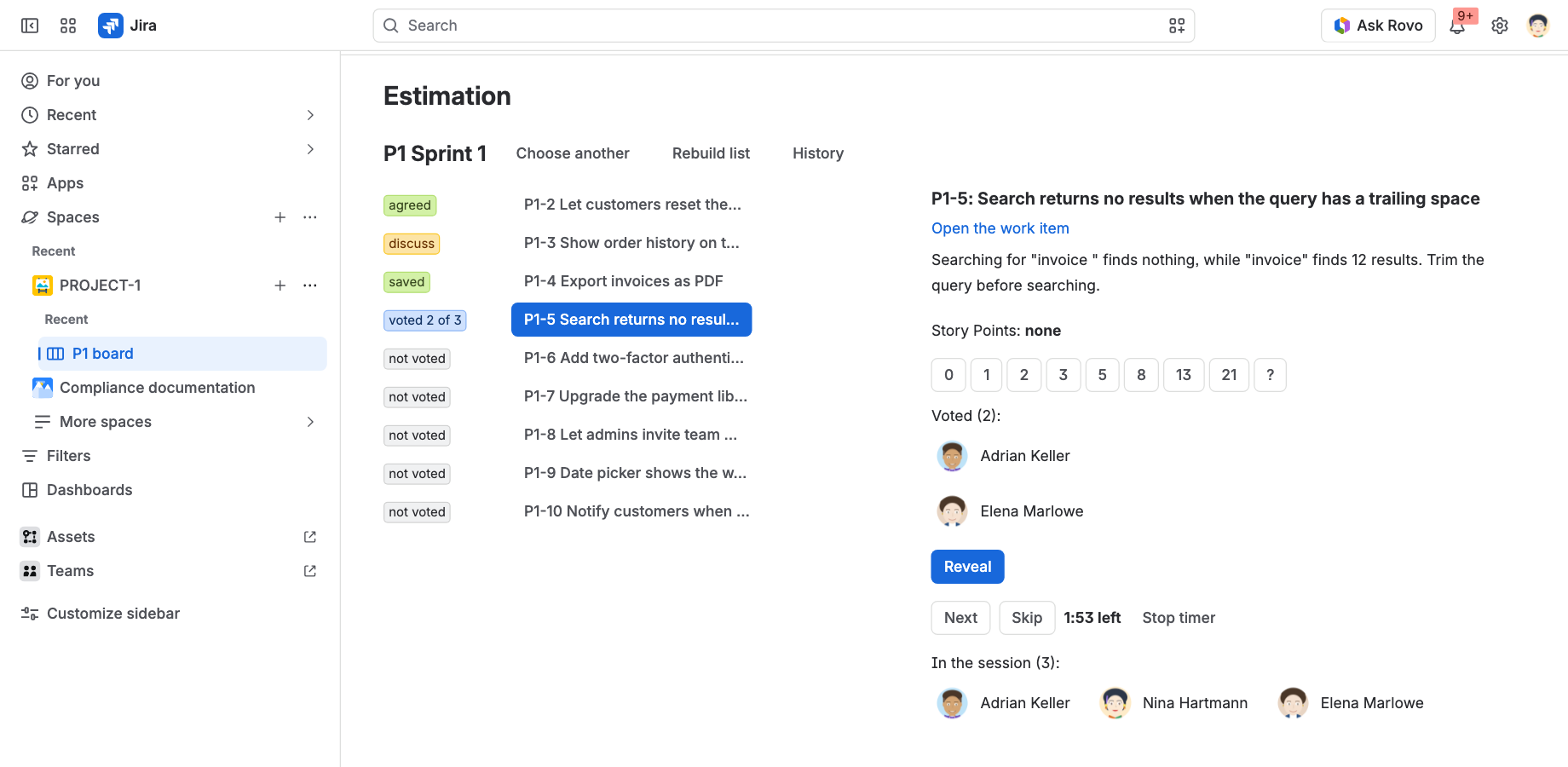
Each work item has an Estimate panel with the cards, and a session over a sprint, the backlog or a filter uses the same votes, so votes cast before the meeting already count when it starts.
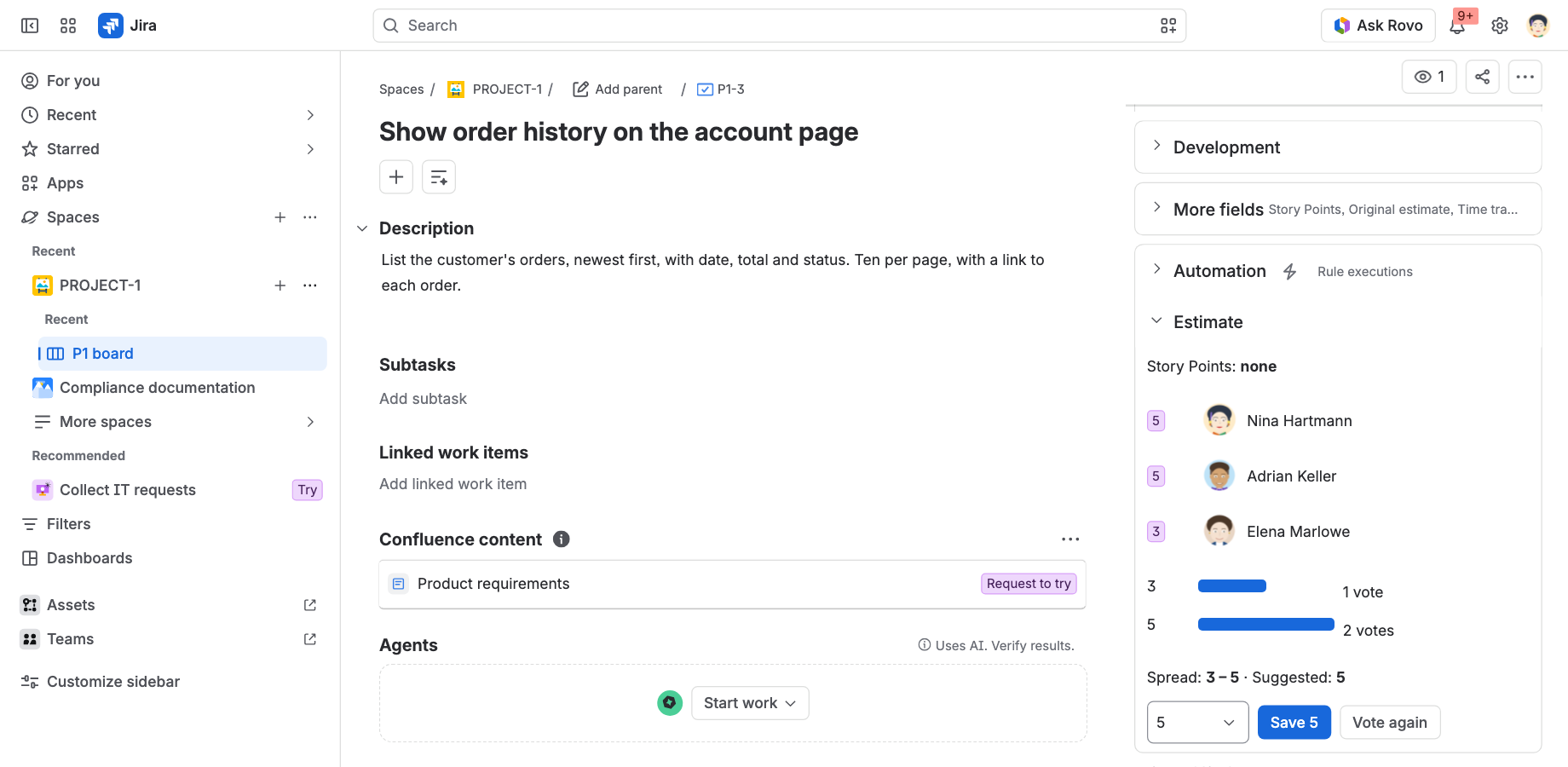
Vote values stay in Forge storage until someone clicks Reveal, and the app returns nobody's values before that, not even to admins. After the reveal you see a bar per card, the spread and a suggested value. If at least two people picked the same card and nobody differed, the value is saved straight away.
The app finds each board's estimation field by itself, in company-managed and team-managed spaces, and saves as the person who clicks Save. T-shirt sizes are saved as numbers, using a mapping the project sets.
There is nothing to set up. The deck is Fibonacci by default, a session starts from the sprint, backlog or board menu, and everyone who opens the same sprint joins the same session, so nobody has to host it.
The app runs entirely on Atlassian Forge, so no data leaves Atlassian.
Over to you
How does your team estimate today? If you dropped planning poker, or kept it, I'd like to hear why in the comments.
Estimation Poker for Jira on the Marketplace (free for up to 10 users)
Drafted with the help of AI


