Hi Community 👋
Today I want to share a small but meaningful update to how asset entities are named and more importantly, explain why we made this change and what problem it solves for IT and operations teams.
The problem we kept hearing
If you've managed a CMDB in Assets for any length of time, you've likely hit this wall: you can't rename things without breaking things.
Want to relabel "Server_Linux_Prod" to something your service desk agents can actually understand? That rename ripples through your AQL filters, automation rules, and API integrations. Potentially breaking reports, workflows, and scripts overnight. So most admins face a painful trade-off:
- Prioritize the end-user → use human-readable names like "Production Database" and deal with the AQL nightmare of spaces, special characters, and escaping syntax.
- Prioritize the developer → use machine-safe names like database_instance_prod and accept that your portals, dashboards, and reports look like they were written for a compiler, not a person.
Neither is a good answer. And as your organization evolves, teams rename, services consolidate, terminology changes, that technical debt compounds. What started as a clean CMDB slowly becomes a mess of legacy names that nobody wants to touch because the blast radius of a rename is too unpredictable.
What we built: a dual-identifier model
We've introduced Display Names for all Assets configuration entities: schemas, object types, attributes, statuses, and reference types.
Every entity now has two identifiers:
|
Identifier
|
Purpose
|
Mutable
|
|---|
|
Name
|
System identifier used in AQL, APIs, and automations
|
Yes, but triggers a warning modal
|
|
Display Name
|
Human-readable label shown in the UI, portals, and reports
|
Yes, freely. No downstream impact
|
When you create a new entity, you enter a Display Name first. Assets automatically generates a safe system Name from it, which you can override before saving. Existing entities have been automatically backfilled your Display Name will initially match your current Name, so nothing changes on day one.
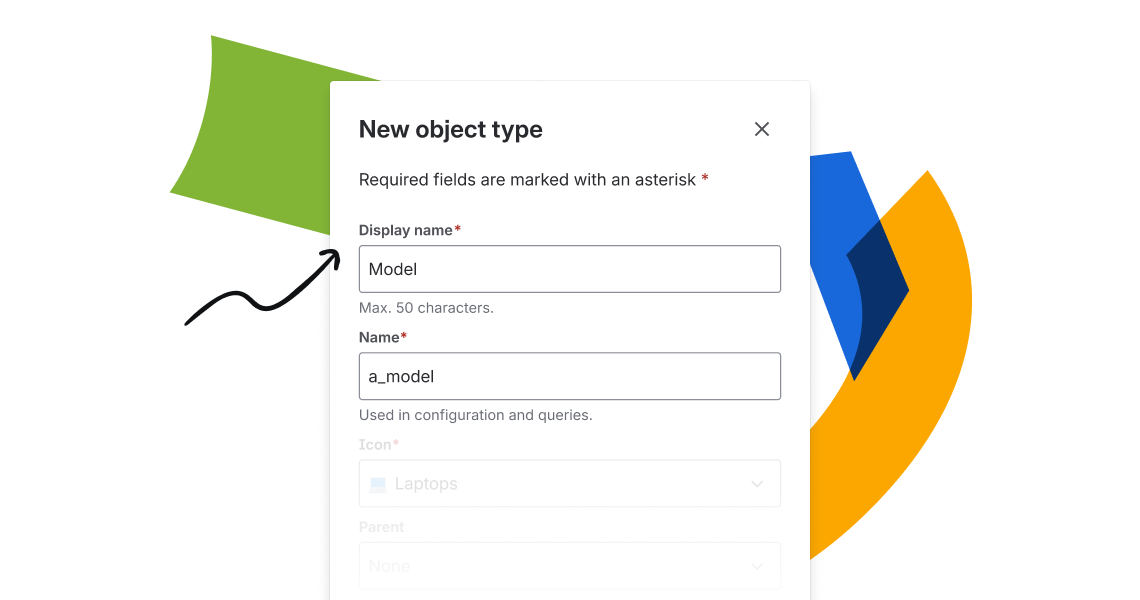
Why this matters at scale
For IT Directors and Operations leaders managing enterprise-scale CMDBs, the implications go beyond cosmetic:
- Eliminate integration fragility. Your AQL queries, Jira automation rules, and API scripts are anchored to the system Name, which is now protected. UI rebranding is fully decoupled from system stability.
- Accelerate org changes. When your company rebrands a service or restructures IT, a terminology update is now a 5-second config change; not a database migration that requires coordination across every team that references that schema.
- Support global teams. Display Names allow you to present localized, language-appropriate labels in your portals for regional teams, while the underlying AQL remains a single consistent identifier across your global instance.
- Cleaner self-service portals. End users and service desk agents see readable, business-friendly labels — not the developer conventions your CMDB was built on years ago.
One important note for your integrations team
AQL, APIs, and automations continue to resolve entities using the system Name, not the Display Name. If you have existing scripts or filters, nothing changes unless you explicitly edit the Name field (which will surface a warning before saving). This change is fully backward-compatible.
Getting started
- Open Assets → select any schema, object type, or attribute.
- Find the Display name field under the General tab → enter your preferred label → Save.
SAC Documentation


