👋 Hi Community,
If you've ever had an alert close itself just as the underlying issue came roaring back — or hit "close" a second too early and lost all the context — we have good news.
From June 18, 2026, you can reopen a closed alert in Jira Service Management- Operations without losing any of its history, links, conversation, or audit trail. The same alert. The same context. One click.
This is the most-upvoted alert lifecycle request we've ever received, and we're thrilled to finally ship it.
🤔 What this solves
Today, once an alert is closed, it's closed for good. When a recurring issue surfaces, you have to create a brand new alert — which means:
-
You lose the original alert's payload, timestamps, and metadata
-
Links to related incidents, problems, and changes are broken
-
The conversation thread and responder notes are orphaned
-
Compliance and audit reporting loses continuity
The new Reopen alert action keeps all of that intact.
✨ What you can do now
-
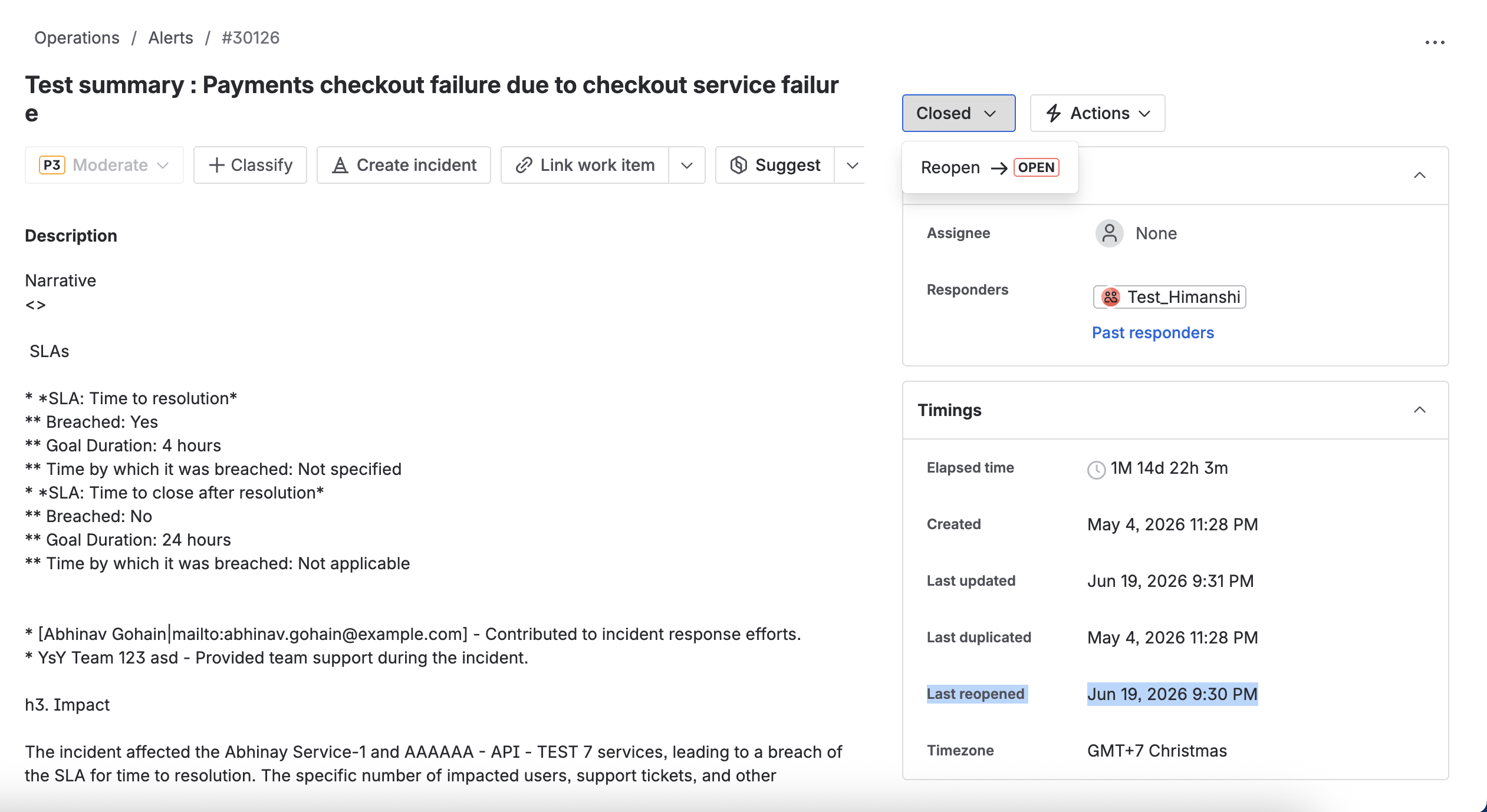
Reopen a closed alert in one click from the alert detail page — the action lives in the status dropdown when the alert is in Closed state.
-
Status returns to Open (not Acknowledged) so the responder explicitly takes ownership again — keeping MTTA measurements clean.
-
The alias is restored automatically, unless another open alert is already using it — in which case you get a clear message and a link to the conflicting alert.
-
Routing and escalation policies fire again, with a clear "Reopened" label so on-call responders know it's not a brand-new event.
-
Every reopen is logged in the alert activity log (all plans).
🔍 How it works under the hood
A few things worth knowing:
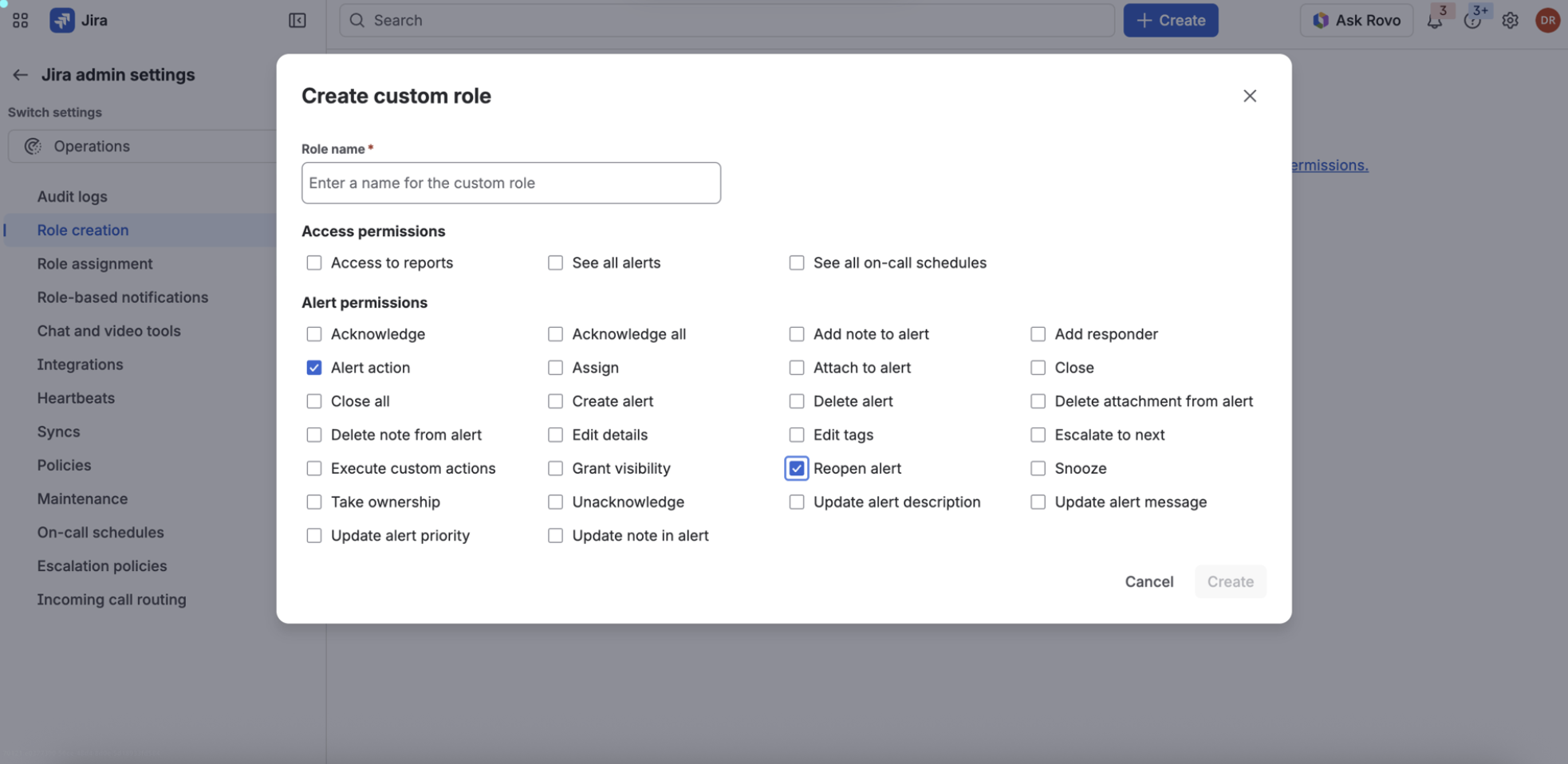
-
Grouping: Alert grouping decisions are made at ingestion time. A reopened alert will only re-join an active group if its attributes still match the group's criteria.
-
Multiple reopens: Yes — an alert can be reopened as many times as needed. Each event is logged individually.
📋 Where to find it
- Open any alert in "Closed" status
- In the status dropdown (top right of the alert detail page), choose Reopen alert.
-
The alert moves back to Open, the activity log gets a new entry (Reopened by [you] — Status changed: Closed → Open), and routing kicks off again.
💡 Pro tip: If you're using alert aliases for deduplication and want to reopen a recurring alert, do it before the next instance fires. That way the alias is still free, the original alert gets the alias back, and everything stays connected. Read more here.
📦 Who gets it
The Reopen alert action is available to all Jira Service Management Operations customers on Standard, Premium, and Enterprise plans.
🚧 We will shortly we adding the below integrated flows
We're shipping the core action first. These are the fast-follows we're already working on:
-
Automation trigger support — Reopen will fire the "alert status changed" automation trigger, so your existing automation rules can react to reopens. This is being finalized with the Automation team and will land within a few weeks of GA.
-
First-class integration/sync support — Currently, reopen doesn't natively propagate to connected tools (e.g., reopening a Jira work item when an alert is reopened, or vice versa). We will soon be adding this extension.
-
Reopen from the mobile app
If any of these are critical for your team, let us know in the comments — your input shapes what we build next.
❓ Frequently asked questions
|
Question
|
Answer
|
|---|
|
Are notification policies evaluated when an alert is reopened?
|
Yes. Notification policies are evaluated on reopen. For example, auto-close policies will be delayed on each reopen, giving responders a full fresh window.
|
|
Does reopening an alert reset its seen state?
|
No. The “seen” state is not reverted on reopen.
You can enable notifications for seen alerts in your notification preferences. As a follow-up, we’re planning to make seen-alert notification settings more visible in the reopen UX so responders don’t miss a reopened alert.
|
|
Will automation rules run when an alert is reopened?
|
Yes. Reopen will be part of the “alert status changed” automation trigger, so existing automation rules that fire on status changes will also fire on reopens.
This may not be ready on day 1, but it will land within a few weeks of the rollout. 🚀
|

