Deleting a Jira group should not feel like guessing.
But in many Jira sites, that is exactly what it becomes.
Someone finds an old group.
The name looks obsolete.
Membership looks stale.
Nobody remembers who created it.
Nobody is sure whether it is still used.
So the cleanup request sounds simple:
Can we delete this group?
But that is not the real question.
The real question is:
What still depends on this group?
Because the group name is not the risk.
The hidden references are the risk.
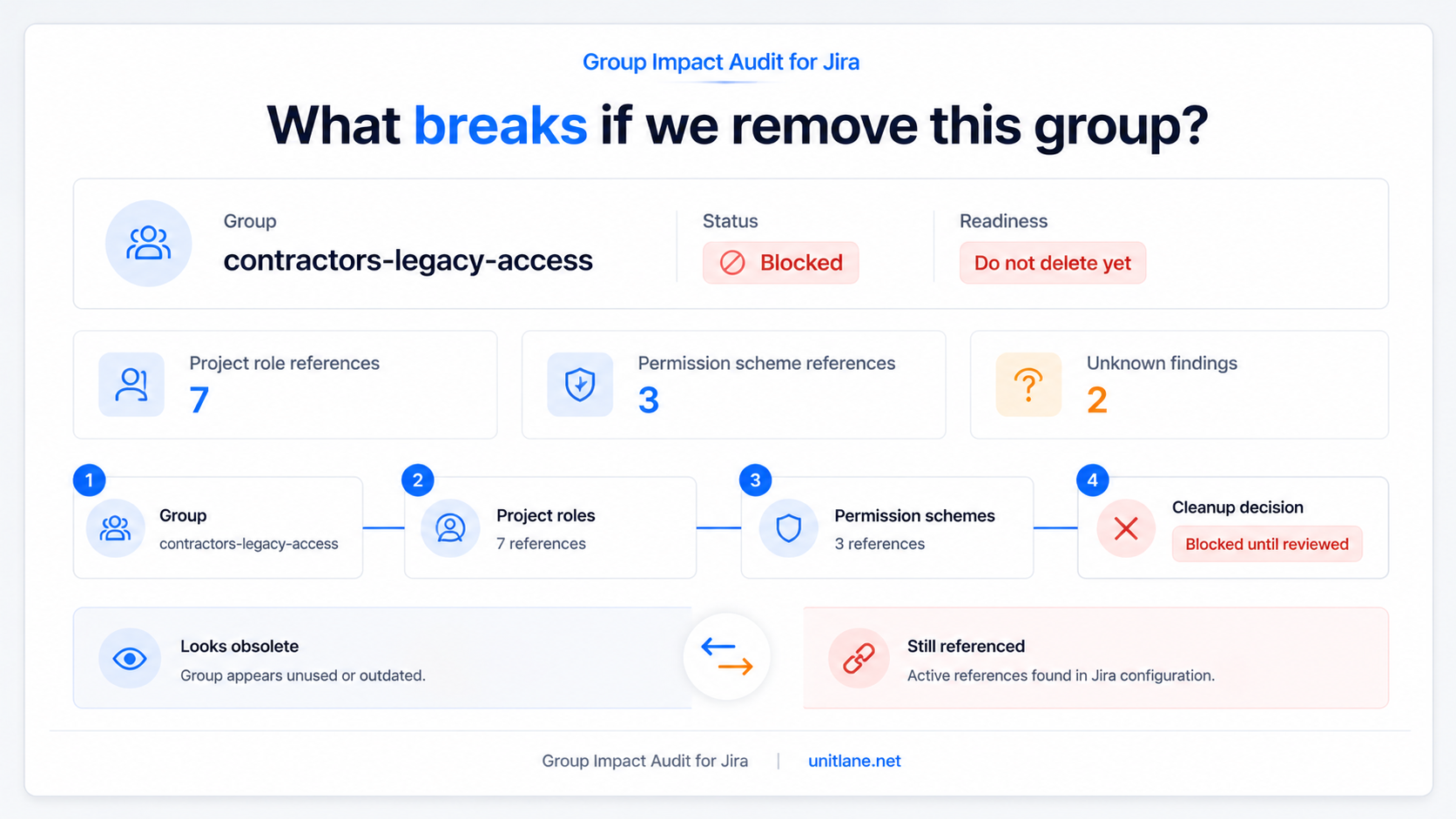
Caption:
Group cleanup is not just about whether a group looks old. It is about whether the group is still referenced in places that control access.
The delete button is not the scary part
The scary part is not clicking delete.
The scary part is approving the change without knowing what the group still controls.
A group can look unused and still be referenced inside:
- Project roles
- Permission schemes
- Access patterns that nobody has reviewed in years
- Old admin shortcuts that became permanent
- Legacy project configurations nobody wants to touch
That is why Jira group cleanup often stalls.
Not because admins cannot delete groups.
Because nobody wants to approve a blind change.
And honestly, they should not.
Old groups survive because they are hard to explain
Most Jira sites collect old groups over time.
A team changes name.
A contractor group is no longer active.
A project is archived.
A migration leaves behind old access structures.
Someone creates a temporary group during a rollout and it becomes permanent by accident.
Months or years later, the group is still there.
Maybe it has few members.
Maybe it has no obvious owner.
Maybe the name looks outdated.
But if the admin cannot clearly explain where the group is still referenced, the safest decision is often to leave it alone.
That is how stale groups survive.
Not because they are useful.
Because they are ambiguous.
“Looks unused” is not proof
This is the trap.
A group can look inactive from the outside and still matter inside Jira configuration.
Before renaming or deleting it, I would not want to rely on:
- The group name
- The number of members
- Someone’s memory
- A quick visual check
- A Slack message saying “I think it is fine”
That is not enough.
Because if something breaks later, the question will not be:
Did the group look old?
The question will be:
What did we check before we changed it?
That is the part many cleanup processes do not capture well.
A better group cleanup workflow
Before deleting or renaming a Jira group, a safer workflow should look more like this:
- Search for the group by exact name
- Check whether it is referenced in project roles
- Check whether it is referenced in permission schemes
- Separate ready, blocked, and unknown findings
- Review the exact projects, roles, schemes, and permissions involved
- Decide whether the group can be changed safely
- Export evidence before making the change
That turns group cleanup from:
This group looks old. Can we delete it?
Into:
This group has been checked against the key Jira admin references we care about. Here is the evidence.
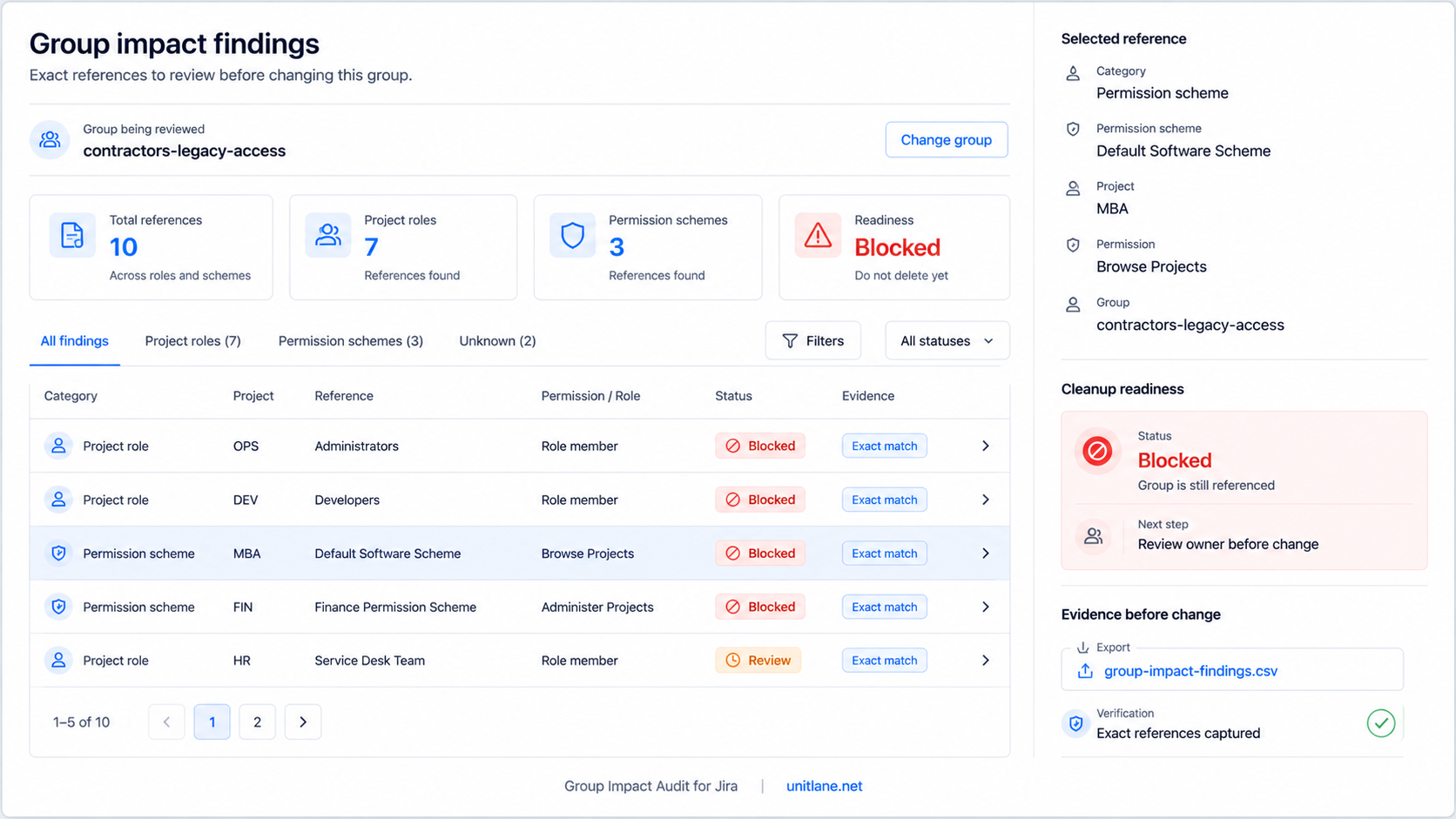
Caption:
Example: Group Impact Audit shows exact project role and permission scheme references before an admin approves a group change.
The real risk is approval without evidence
In Jira administration, the riskiest changes are often the ones that look small.
Deleting a group sounds small.
But if that group is referenced in the wrong place, the effect can be bigger than expected.
A project role may lose expected members.
A permission scheme may no longer behave the way people expect.
A team may suddenly lose access.
An admin may have to reconstruct what happened after the fact.
That is the bad version of cleanup.
The group is gone.
The evidence is unclear.
The reasoning lives in someone’s memory.
Now the team has to investigate backward.
That is exactly what a good cleanup process should avoid.
What I would check before deleting a Jira group
Before approving a group deletion or rename, I would want clear answers to these questions:
- Is this group still referenced in any project roles?
- Is this group still referenced in any permission schemes?
- Which projects are involved?
- Which roles or permissions depend on it?
- Are the findings ready, blocked, or unknown?
- Can another admin verify the result?
- Can we export evidence before making the change?
That is the difference between:
We think this group is safe to delete.
And:
We checked the references and can prove what we found.
This is why I built Group Impact Audit for Jira.
It is a read-only Jira Cloud app for admins who want to check group impact before they rename, clean up, or delete a group.
The app focuses on the places where group references can make cleanup risky:
- Project roles
- Permission schemes
- Exact references
- Blocked, unknown, and ready states
- Exportable evidence before change
The goal is simple:
Help Jira admins prove what still depends on a group before they approve a risky cleanup change.
Not guess.
Not rely on memory.
Not hope an old group is safe because the name looks obsolete.
Check the references first.
Then decide.
Product page:
https://unitlane.net/products/group-impact-audit-jira/
Atlassian Marketplace:
https://marketplace.atlassian.com/apps/3693921448/group-impact-audit-for-jira
Practical takeaway
Before deleting or renaming a Jira group, do not stop at:
Does this group look old?
Ask:
What still depends on it?
Check the exact references.
Separate blocked from ready.
Keep evidence before the change.
That is how group cleanup becomes safer, easier to approve, and much easier to defend later.

