While I have known about Forge for quite some time now; if I remember correctly it was introduced around 2020. I only started using it more seriously around January 2026. I wrote about that experience in another article.
When you first step into the Forge ecosystem, you quickly realize something important: building the app is the easy part. Understanding the platform constraints and operational metrics is what really determines whether your app will perform reliably in production.
And if you’re building apps intended for the Atlassian Marketplace, this becomes even more important.
Let’s talk about one of the most misunderstood parts of Forge: invocations and metrics.
Understanding the Constraints of Forge
Forge is essentially a serverless hosting platform managed by Atlassian. Your backend logic runs as functions inside a managed runtime environment.
Because of that, your app operates within certain limits such as:
-
Hosting infrastructure limits
-
API rate limits
-
Function memory limits
-
Persistent storage limits
-
Key-value storage limits
-
SQL limits
-
Payload sizes
-
Performance and execution duration
These constraints exist to ensure fair usage and platform stability across all apps.
Understanding them early will save you from serious headaches later.
Forge Runtime and Infrastructure
Every Forge function runs inside a managed runtime powered by Node.js.
Each invocation receives:
Forge executes these functions inside secure cloud infrastructure managed by Atlassian. From a developer perspective, you don’t manage servers, containers, or scaling. Forge handles all of that automatically. That convenience, however, comes with limits you must design around.
What is a Forge Invocation?
An invocation happens whenever Forge executes one of your app functions.
Examples include:
-
UI actions calling a resolver
-
Web triggers
-
scheduled triggers
-
event listeners
-
background queue consumers
-
functions invoked via "<a href="https://community.atlassian.com/forums/user/viewprofilepage/user-id/4918321">@Forge</a>/bridge"
Each of these executions counts as a function invocation.
Forge records these invocations to monitor:
-
success rates
-
errors
-
execution time
-
resource consumption
These metrics are visible in the Developer Console.
The importance of Invocations
Forge operates on a consumption-based model. Atlassian provides a free tier, but usage beyond that can incur additional costs.
Because of this, every invocation matters.
Things that increase invocation usage include:
If your app is poorly optimized, invocation counts can spike very quickly.
The Forge Metrics Dashboard
Inside the Forge Developer Console, Atlassian provides a metrics dashboard where vendors can monitor app performance.
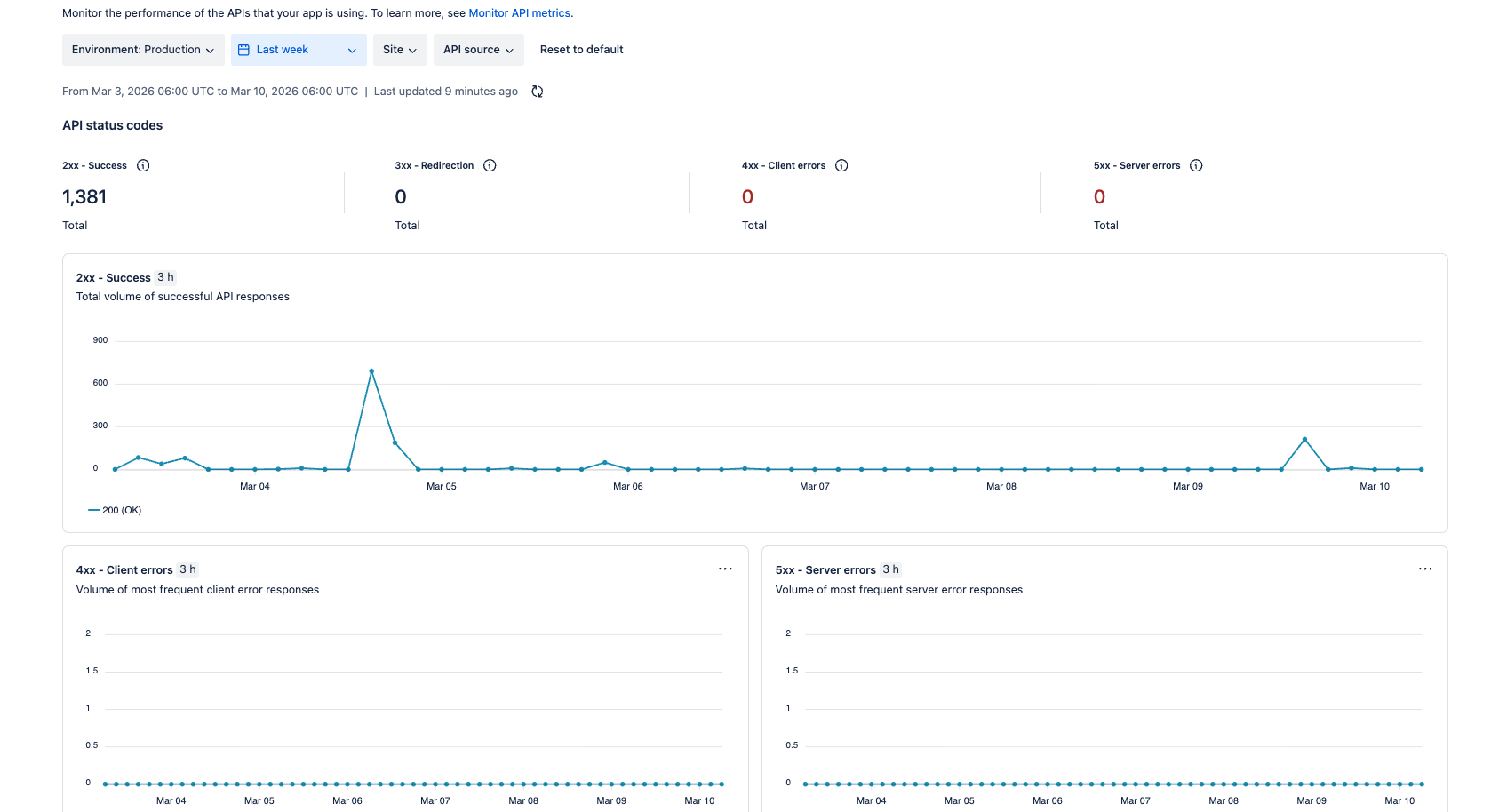
You can view:
These metrics help you understand how your app behaves across all installations.
Invocation metrics specifically show:
-
successful vs failed function executions
-
error types such as memory exhaustion or timeouts
-
execution duration of functions
For vendors building production apps, this dashboard is essential.
Understanding Invocation Errors
The console groups invocation failures into categories such as:
-
Out of memory
-
Timeouts
-
Unhandled exceptions
-
Deprecated runtime usage
If your function fails for any of these reasons, the failure appears in the metrics dashboard.
This allows you to quickly identify problematic functions across installations.
Understanding Latency Percentiles
Forge metrics also display latency percentiles, which show how fast your functions execute.
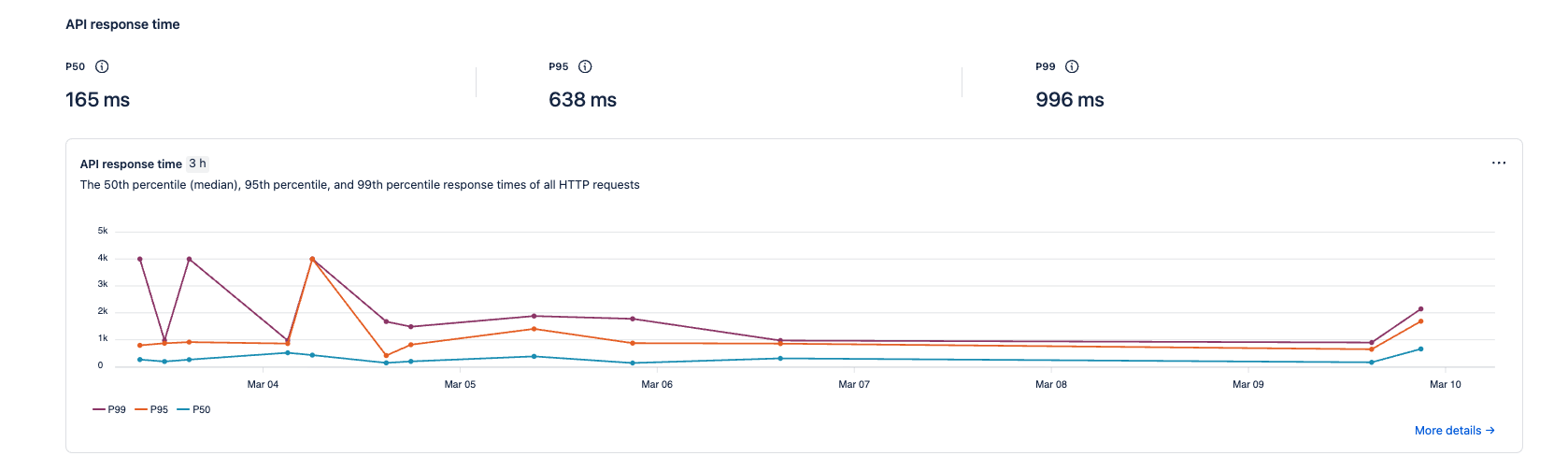
These are commonly shown as:
P50 - Median Response Time
P50 represents the median execution time.
This means:
50% of all function invocations complete faster than this 165ms.
This metric represents the typical performance of your app.
For Forge apps:
P95 - Heavy Execution Range
P95 means:
95% of all invocations complete within a certain time.
Only 5% of requests take longer.
Higher P95 values usually indicate:
P99 - Worst Case Performance
P99 represents the slowest executions.
Only 1% of requests are slower than this value.
These often occur during:
When Performance Becomes a Problem
As a general guideline for Forge apps:
Performance may need investigation when:
-
P50 > 500 ms
-
P95 > 2 seconds
-
P99 > 5 seconds
When these numbers increase consistently, it usually means the app has:
How Retries Can Affect Invocation Costs
One of the easiest ways to accidentally inflate invocation usage is through retry logic.
For example, if you have a queue consumer processing jobs and something fails, Forge may retry that job automatically depending on your architecture.
Without safeguards, retries can run repeatedly.
If a job processes large data sets say a JQL query returning thousands of issues; each retry can trigger additional function invocations. Over time, this can significantly increase compute usage.
A simple defensive pattern is limiting retry attempts.
Example:
const jobId = event.jobId;
const retryContext = event?.retryContext;

if (retryContext?.retryCount > 2) {
   // the logic to handle retries
   await jira.cancelJob(jobId);
}
This prevents runaway retries and protects both performance and invocation costs.
Why Vendors Should Monitor Metrics Regularly
Metrics are not just diagnostic tools.
They are one of the best ways to improve your app architecture.
With the Forge metrics dashboard you can detect:
-
performance regressions
-
API bottlenecks
-
inefficient queries
-
cold start issues
-
scaling problems
You can also filter metrics by:
-
environment
-
site installation
-
time range
-
function handler
This makes it possible to track performance across multiple customers.
Final Thoughts
Forge removes a lot of operational complexity for developers. You don’t manage servers, scaling, or infrastructure.
But that does not mean infrastructure concerns disappear.
Understanding invocations, metrics, and platform limits is critical if you want your app to scale reliably.
The Forge metrics dashboard is one of the most powerful tools available to vendors. Used correctly, it allows you to identify issues early, optimize your functions, and deliver a much more reliable experience to your customers.
And if you’re building Marketplace apps, reliability is not optional, it’s expected.

