The API response contains two locations where the same value exists:
In the customFields definition object.
In the virtualVersions.customFields map, where the key is the custom field ID.
Example structure from the response:
"customFields": [
  {
    "id": "69a18668c0386b0f42a6cbb5",
    "options": [
      {
        "id": "69a1866ec0386b0f42a6cbb6",
        "label": "yes"
      }
    ]
  }
]And in the virtual version object:
"virtualVersions": [
  {
    "id": "694561558c4ed6a5f5230139",
    "customFields": {
      "69a18668c0386b0f42a6cbb5": "69a1866ec0386b0f42a6cbb6"
    }
  }
]So the option ID (69a1866ec0386b0f42a6cbb6) appears in both places.
Smart values used
To extract the option ID for label yes:
{{#webResponse.body.customFields}}
  {{#if(equals(id,"69a18668c0386b0f42a6cbb5"))}}
    {{#options}}
      {{#if(equals(label,"yes"))}}
        {{id}}
      {{/}}
    {{/options}}
  {{/}}
{{/webResponse.body.customFields}}To extract the value from the virtual version:
{{#webResponse.body.virtualVersions}}
  {{#if(equals(id,"694561558c4ed6a5f5230139"))}}
    {{customFields.69a18668c0386b0f42a6cbb5}}
  {{/}}
{{/webResponse.body.virtualVersions}}The problem
Both values appear identical in logs:
69a1866ec0386b0f42a6cbb6
However, when I use an Advanced compare condition:
{{value1}} equals {{value2}}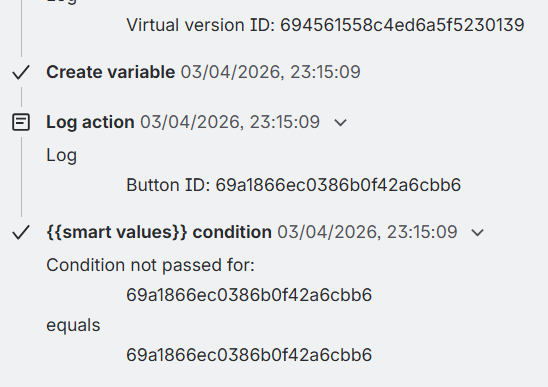
the condition fails.
Troubleshooting already attempted
I tried several approaches to normalize the values:
None of these resolved the comparison failure.
Additional observation
The value from customFields is stored under a dynamic key (custom field ID):
"customFields": {
  "69a18668c0386b0f42a6cbb5": "69a1866ec0386b0f42a6cbb6"
}So I suspect Automation may be treating this value differently (e.g., JSON node vs string), even though the output appears the same.
Question
Has anyone encountered this behavior when comparing values retrieved from:
in Jira Automation smart values?
If so, what is the best way to normalize or reliably compare these values?
Any guidance would be greatly appreciated, as this comparison is a critical step in my automation workflow.
Thanks in advance!

