If Marketplace apps don't exactly fit your Jira process and your team's needs, you don't have to choose between "live with it" or "open a dev ticket. With an AI Apps Builder for Jira, your teams get another option: build internal Jira tools themselves, securely and quickly, while keeping control over governance and risk.
When Marketplace apps aren’t enough
If you’re responsible for keeping Jira operations running smoothly, you’ve probably heard something like: “We just need a small custom tool…”. It might be a slightly different dashboard, an SLA-focused workflow helper, or a report that combines Jira data in a unique way. You try a few apps and realise they cover most of the need, but not the last 20% that actually matters for your team.
Jira efficiency leaders don’t really need “more apps”; they need a safe, fast way to shape Jira around real workflows without adding to the dev backlog or introducing new security risks. This is where AI Apps Builder changes the challenge by giving PMs, team leads, and service managers a way to build internal Jira tools in minutes without code, and still fully inside Atlassian’s security and governance model.
A third option: build exactly what you need
Marketplace apps are powerful, but they’re designed for many teams, not your exact process. When an app almost fits, teams often end up:
-
Exporting Jira data to spreadsheets for extra calculations
-
Maintaining parallel tools “just for reporting.”
-
Accepting SLAs or cycle times that aren’t quite accurate
For a lead focused on efficiency, those are red flags: manual work increases risk, inconsistent metrics break trust, and “small” inefficiencies scale painfully across teams. Hiring developers for every internal report or helper app isn’t realistic either, especially when engineering is already committed to core product work.
With an AI Builder for Jira, you describe what you need in plain English, and the AI generates a secure Forge app for you in minutes. You’re not bending your process to fit an app—you’re shaping a small, internal app around how your teams actually work.
How AI Apps Builder works
You can think of AI Apps Builder as a small virtual team—a PM, developer, designer, architect, and DevOps engineer working together behind a chat interface. In simple terms, the flow looks like this:
-
Understands your request
-
Shapes the solution
-
Builds the app
-
AI generates Forge app code, including the manifest, UI, and business logic, using an LLM (via Anthropic Connect) that’s guided by Atlassian’s public Forge documentation.
-
Delivers it into Jira
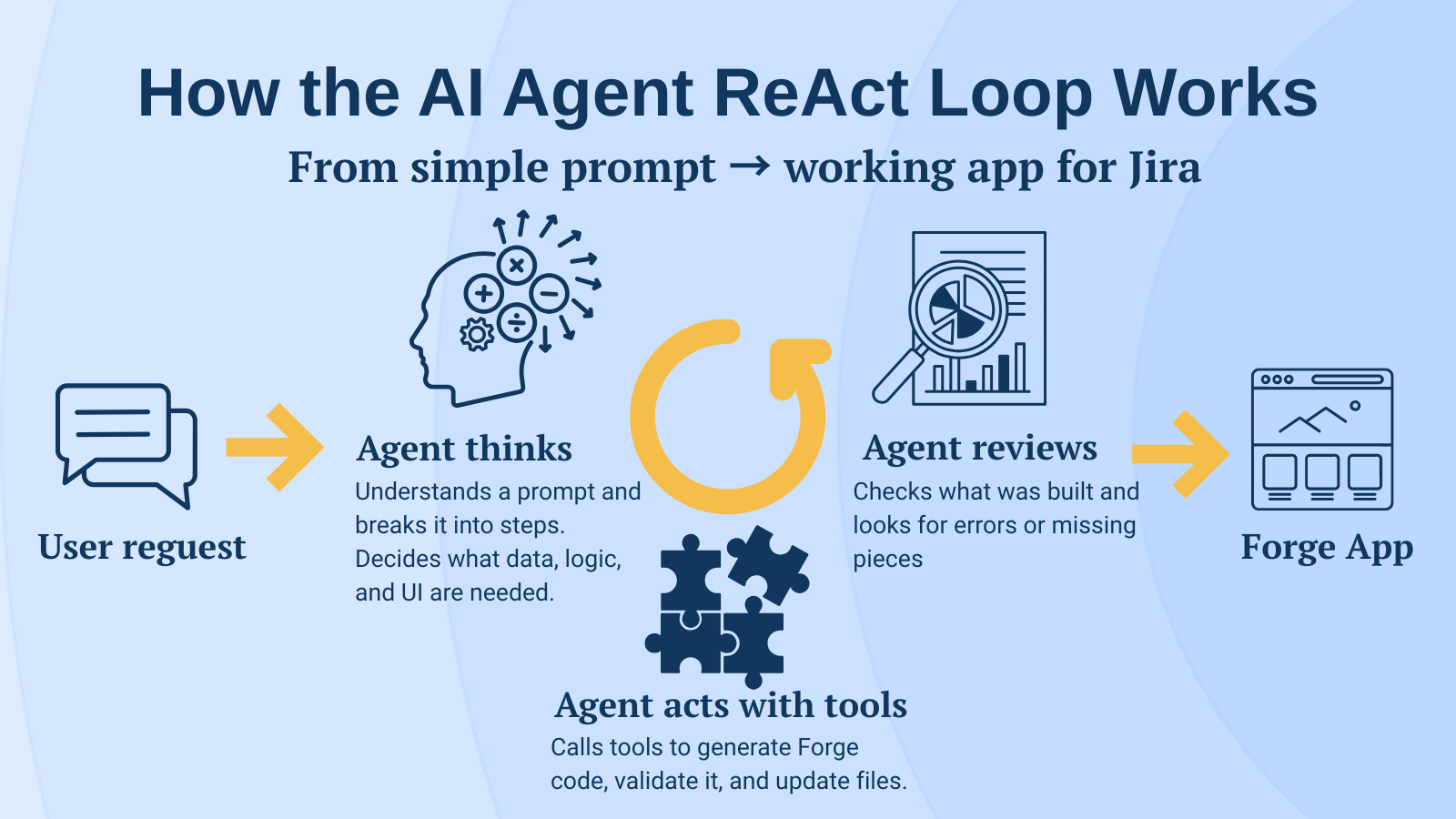
Under the hood, AI Apps Builder doesn’t just “generate once and hope it works.” It follows an agent-style, ReAct loop: plan → take an action (like generating code or fixing an error) → review → repeat until the app is ready. That’s why you can get usable apps from a single, well-written prompt instead of manually tweaking code or constantly regenerating.
Security: The Part That Usually Stops AI Tools
Security is where many AI tools fall short for enterprise teams. AI Apps Builder for Jira relies on Forge rather than bypassing it. All generated apps run entirely on Atlassian Forge, so they inherit the same security model that already protects Jira Cloud.
Key guarantees for internal tools:
In short, your data stays where Jira data is supposed to stay, which makes this approach suitable even for regulated or security-sensitive teams.
Who gets the most value
Anyone who can describe a problem clearly can use AI Apps Builder for Jira, but a few roles see the biggest impact.
-
Jira admins and developers
-
Project managers and team leads
-
Spin up dashboards, risk logs, capacity planners, or release trackers that match how your team actually works, instead of waiting for the next sprint slot or a custom dev task.
-
Analysts and business users
-
Turn Jira into a live reporting surface for KPIs, OKRs, risk matrices, or content calendars without touching SQL, BI tools, or scripts.
-
Cross-functional and regional teams
Example: Worklog summary reporter app
Here’s a real example created with AI Apps Builder. Worklog Summary Reporter is a small internal Jira Cloud app (built on Forge) that generates a time-based worklog report for selected users, projects, and a specific date range. It helps answer a simple question without exporting anything from Jira: who worked on what, when, and for how long.
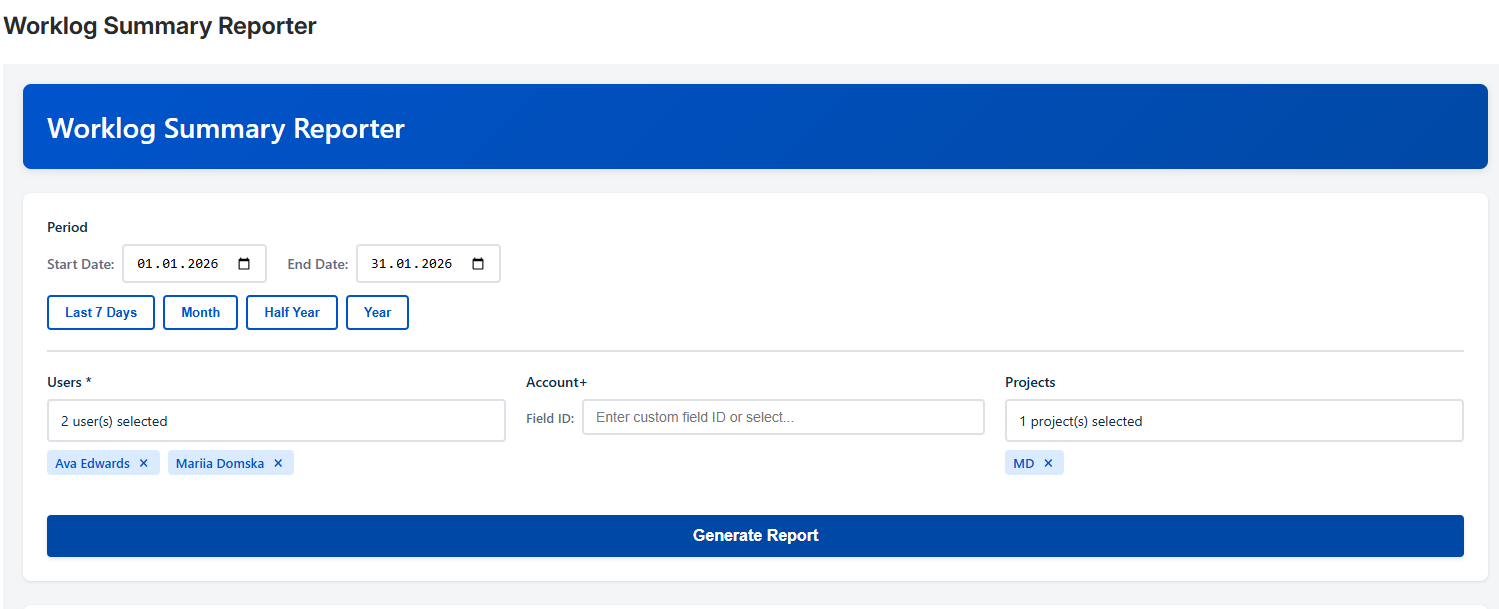
At the top of the page, the app asks you to configure a report: time period, users, account and projects. You click “Generate report” and see everything on a single page, inside Jira.
The report shows:
-
User name, grouping issues per person
-
Account
-
Issue summary
-
Issue key, as a clickable link back to Jira
-
Total hours logged on that issue for the selected period
-
Daily breakdown in a calendar-like table, with one column per day and the hours logged on that day.
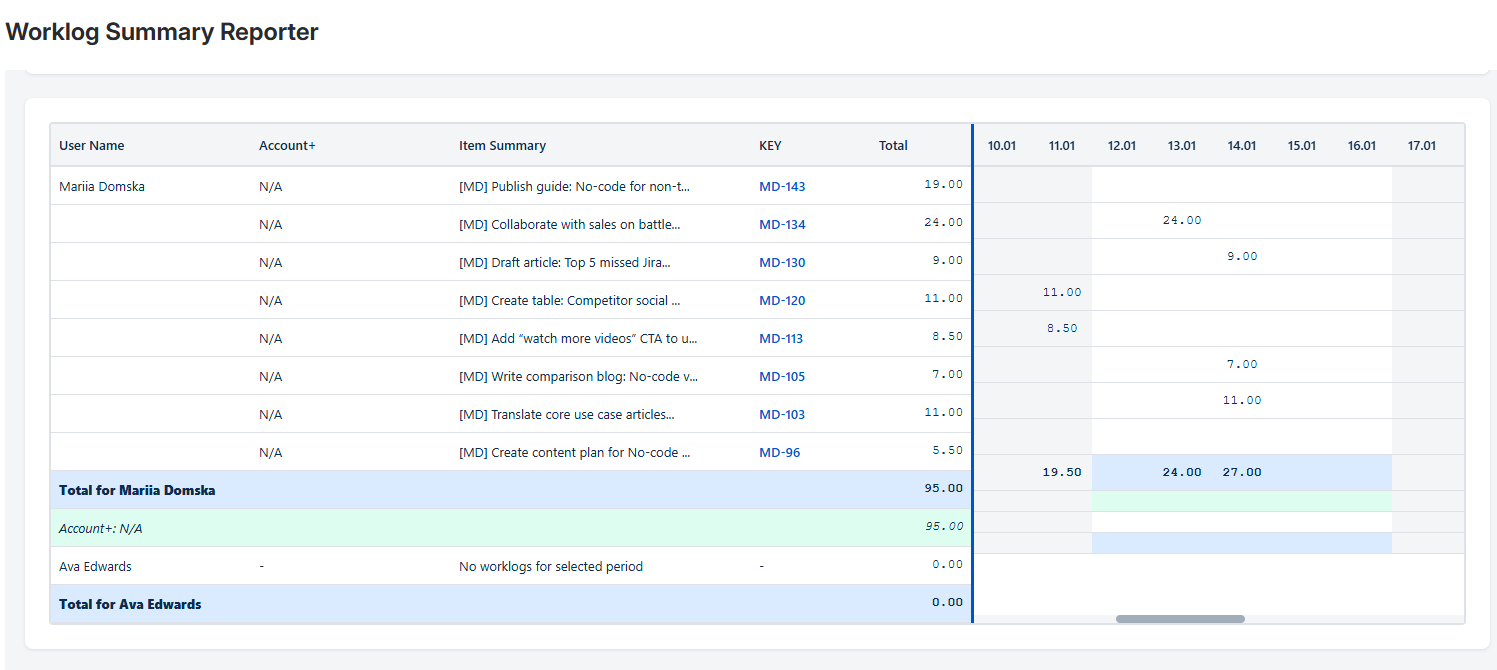
Before this app, managers had to switch between Jira screens, run filters for each user, export CSV files, and rebuild pivot tables in spreadsheets every week. The goal was to replace that manual process with one consistent report that works the same way every time, directly in Jira.
For efficiency leaders and team managers, this worklog app:
-
Provides one consolidated view of worklogs for a chosen period
-
Removes the need for ad-hoc spreadsheet reporting
-
Makes it easy to review individual contributions, validate time tracking, and jump straight into the underlying issues via the issue key links.
It's helpful for weekly check-ins, monthly summaries, and audit-style reporting, without the usual copy-paste work. In practice, this means you spend less time preparing reports and more time understanding what happened during the sprint or month.
Quick start with AI Apps Builder
-
Check that AI Apps Builder is installed.
-
Pick one high-friction workflow.
-
Draft a clear prompt.
-
Be specific: describe what you want to see, which data to use, how you want to interact with it (such as filters, charts, or alerts).
-
Generate → deploy → share
If Marketplace apps don't fit your process, you're not limited to doing nothing or asking developers for help. With AI Apps Builder Jira teams can safely build the internal tools they need themselves, while you keep control over risk, governance, and engineering time.

