Quarterly planning is the strategic ritual where product teams translate high-level goals into actionable commitments. It is the moment to pause, assess what was learned in the previous quarter, and decide where to invest resources next.
This Quarterly Planning example view below provides dedicated space to prioritize opportunities and define the roadmap with your team.
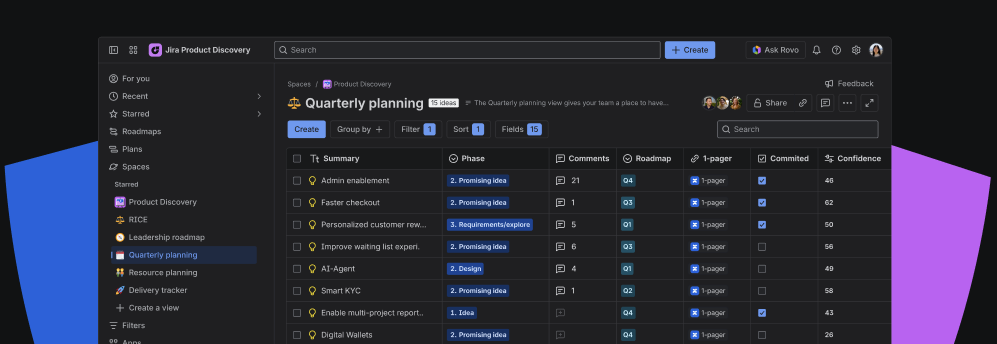
Use this view to debate trade-offs and clearly mark items as "Committed." Once finalized, you can publish this live view to align stakeholders on the quarter's plan without relying on static, outdated slide decks.
How to set it up
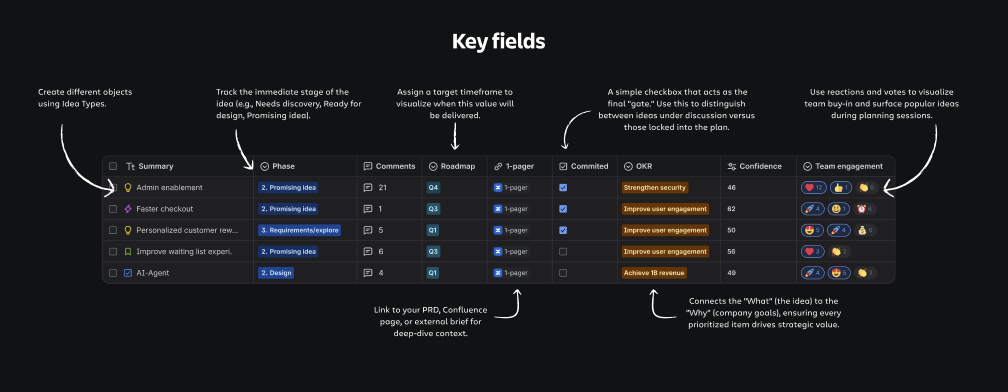
To support effective planning, ensure you have the following data points set up to tell the full story of an idea:
- OKR / Goal: use the native Goals field (or a custom select field) to connect every idea to a company goal.
- Phase (select): Create a specific field to track the discovery lifecycle. We recommend the following flow:
- Idea; Promising idea; Requirements/explore; Design; Ready for make; Make; Running/impact; Analyzing; Done
- Roadmap (select): discuss the time horizon for the work (eg. Q1, Q2, Q3, Q4)
- 1-pager (hyperlink): a field to link deep-dive on context (Confluence, GoogleDocs etc)
- Comments: Enable the comments column to allow for async team discussion directly on the line item.
Quick tips
- Review top priorities with your team and lock in commitments with stakeholders. Add a custom field for 'dependencies' to visualise high level dependencies.
- Publish this view to generate a live, read-only link. This gives stakeholders a bookmarkable roadmap that stays up-to-date automatically.
- When you're ready to populate a roadmap, use 'connections' to build hierarchies. Link granular ideas to high-level goals and opportunities to visualize exactly how your quarterly work rolls up to the product strategy.
See this example in action
Not sure where to start? Create a dedicated space with pre-built views to explore a real-life example for quarterly planning.
Note:
