|
Category
|
What's Measured
|
Free Monthly Allowance
|
Price Beyond Free Tier
|
|---|
|
Compute
|
Function execution time
|
100,000 GB-seconds
|
$0.000025/GB-second
|
|
KVS Read
|
Reading from Forge Storage
|
0.1 GB
|
$0.055/GB
|
|
KVS Write
|
Writing to Forge Storage
|
0.1 GB
|
$1.09/GB
|
|
Logs
|
App log output
|
1 GB
|
$1.005/GB
|
|
SQL Compute
|
SQL execution time
|
1 hour
|
$0.143/hour
|
|
SQL Requests
|
Number of SQL queries
|
100,000
|
$1.929/million requests
|
|
SQL Storage
|
Stored SQL data
|
730 GB-hours
|
$0.00076850/GB-hour
|
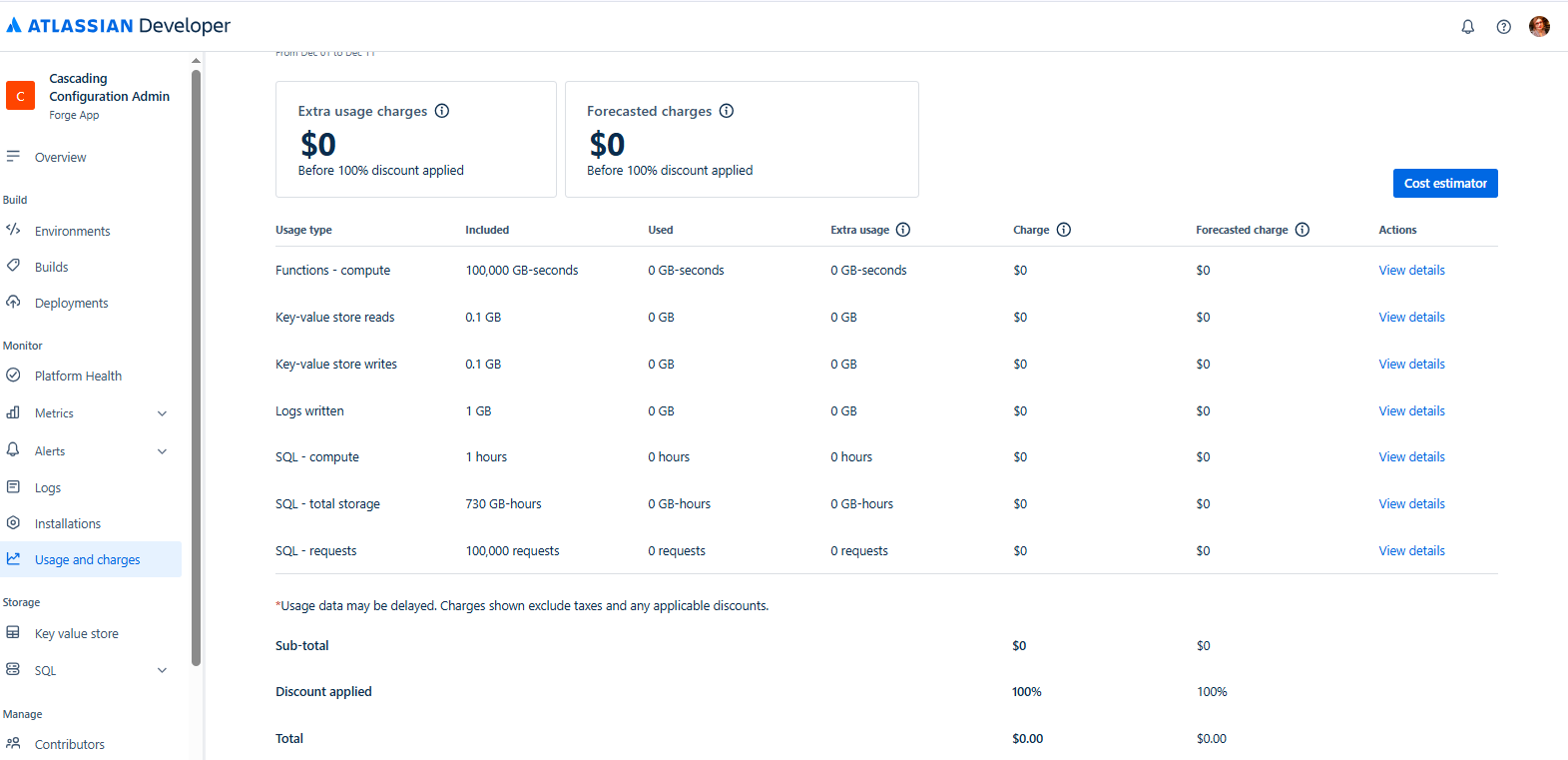
To view the cost dashboard, go to Usage and costs in the Developer Console.
How to Build a Forge App: Code vs. No-Code
Forge lets you build custom apps the traditional way (with code). But you also have the alternative developed by SaaSJet: the AI Apps Builter for Jira, an AI-powered app. Here’s how they compare.
Building with Code:
-
Write JavaScript for UI, logic, and API calls
-
Use Forge CLI and edit manifest.yml
-
Requires developer skills
-
Full control and flexibility
Building with AI Apps Builter:
-
Just describe your app in a natural language prompt (AI-powered)
-
AI generates the code for you.
-
No JavaScript or API knowledge needed.
-
Ideal for Jira admins, PMs, or business analysts—the efficiency leaders without technical skills.
You can also download the generated code to share it with a developer or edit it yourself.
What Kind of Jira Solutions Can You Build with Forge?
Forge enables you to build a wide range of solutions—from lightweight workflow automations to complex enterprise-grade tools. Here's what you can create:
-
Custom Workflow Enhancements: Add buttons, validations, or triggers on issue transitions.
-
UI Extensions: Display contextual panels, buttons, or modals on issues, boards, or project pages.
-
Automation and Event Handling: Automatically react to issue updates, comment creations, or project changes using Forge Triggers.
-
Data Enrichment: Pull in data from external systems (CRMs, databases) and display it inside Jira issues.
-
Approval Workflows: Implement logic-based approval steps with visibility into status and history.
-
Integrations: Connect Jira with internal tools or third-party apps securely using external fetch capabilities.
-
Reporting and Dashboards: Build custom reporting interfaces using Custom UI and Forge storage or SQL.
-
Request Portals: Create interactive forms and workflows for internal teams or clients directly inside Jira.
Whether you're solving a narrow team need or rolling out a cross-organization solution, Forge gives you the control and performance to do both.
Real Examples Built with AI Apps Builder
Thanks to the AI Apps Builder, many Jira users are already building powerful custom solutions without writing any code. Here are a few examples:
Worklog Summary Report
-
What it does: Generates a detailed time-tracking report by user, issue, and day.
-
Features: Table with columns like User Name, Project Name, Worklog Summary, Issue Key, Total Hours, and a day-by-day grid.
-
Use case: See who worked on what and how long it took—with full detail and quick links to issues.
-
Value: Replaces multiple exports or dashboards with one clear, aggregated view.
-
What it does: Automates the assignment of issues based on rules, availability, and vacation status.
-
Modules:
-
Manual Assignment Page with JQL-based filters
-
Rule-based auto-assignment by project/type/days
-
Vacation tracking and backup assignee logic
-
Dashboard with metrics, filters, and audit logs
-
Use case: Removes the manual work of assigning tasks and ensures fairness and team balance.
-
Value: Automates a high-friction process that usually requires coordination and time.
Issue Status Duration Tracker
-
What it does: Analyzes how much time issues spend in each status.
-
Modules:
-
Global JQL-based report with issue insights
-
Issue context panel showing status history and custom metrics
-
Custom settings for working hours and holidays
-
Use case: Helps track SLA compliance, bottlenecks, and process health.
-
Value: Provides data-driven insights into execution speed and delays, respecting work calendars.
These examples show how everyday Jira users can build custom solutions tailored to their exact needs—no developers required.
Bottom Line: We are now in Phase Two of the Forge transition.
Starting September 17, 2025, the Atlassian Marketplace will stop accepting new Connect apps. From that point, only Forge apps can be published. This means all vendors need to begin or continue moving to Forge. Jira users can expect apps to be more secure, faster, and better integrated in the future.
I hope this article has explained what Forge is, how it works, why it is an important upgrade for both vendors who build apps and teams who use them, and how it helps to build custom Jira solutions.


