As Jira instances scale, one of the first areas that becomes messy is the inconsistent use of Jira link types. Because issue link types in Jira are global, every project can use every link type even when it does not align with their workflow or governance model.
Over time, this leads to confusing dependencies, unreliable reporting, and cross-project inconsistencies that are difficult to clean up later.
Below are the most common problems teams face and the best practices that help maintain clean, meaningful, and scalable relationships between work items.
Common Misuse of Jira Link Types
1. “Is Blocked By” used for soft or optional dependencies
Instead of representing a real blocker, teams sometimes use this for anything related. This makes true blockers hard to detect and skews planning.
2. “Relates To” becomes a dumping ground
This link type often gets used for vague relationships, partial dependencies, similar topics, or even tasks that simply “touch the same area.”
Soon it loses all meaning.
3. “Duplicates” used for similar items instead of identical ones
This leads to incorrect backlog cleanup, confusing triage, and unreliable duplicate reports.
When each team interprets link types differently, dependencies become impossible to trust.
📉 Why inconsistent link usage becomes a problem
Without governance, teams face:
-
Hidden blockers
-
Broken dependency chains
-
Automation rules misfiring
-
Incorrect program-level reporting
-
Weak visibility for scaling teams
-
Growing technical debt and cleanup costs
For scaling Jira environments, link governance becomes essential.
📘 What Effective Jira Link Governance Looks Like
A mature governance model includes:
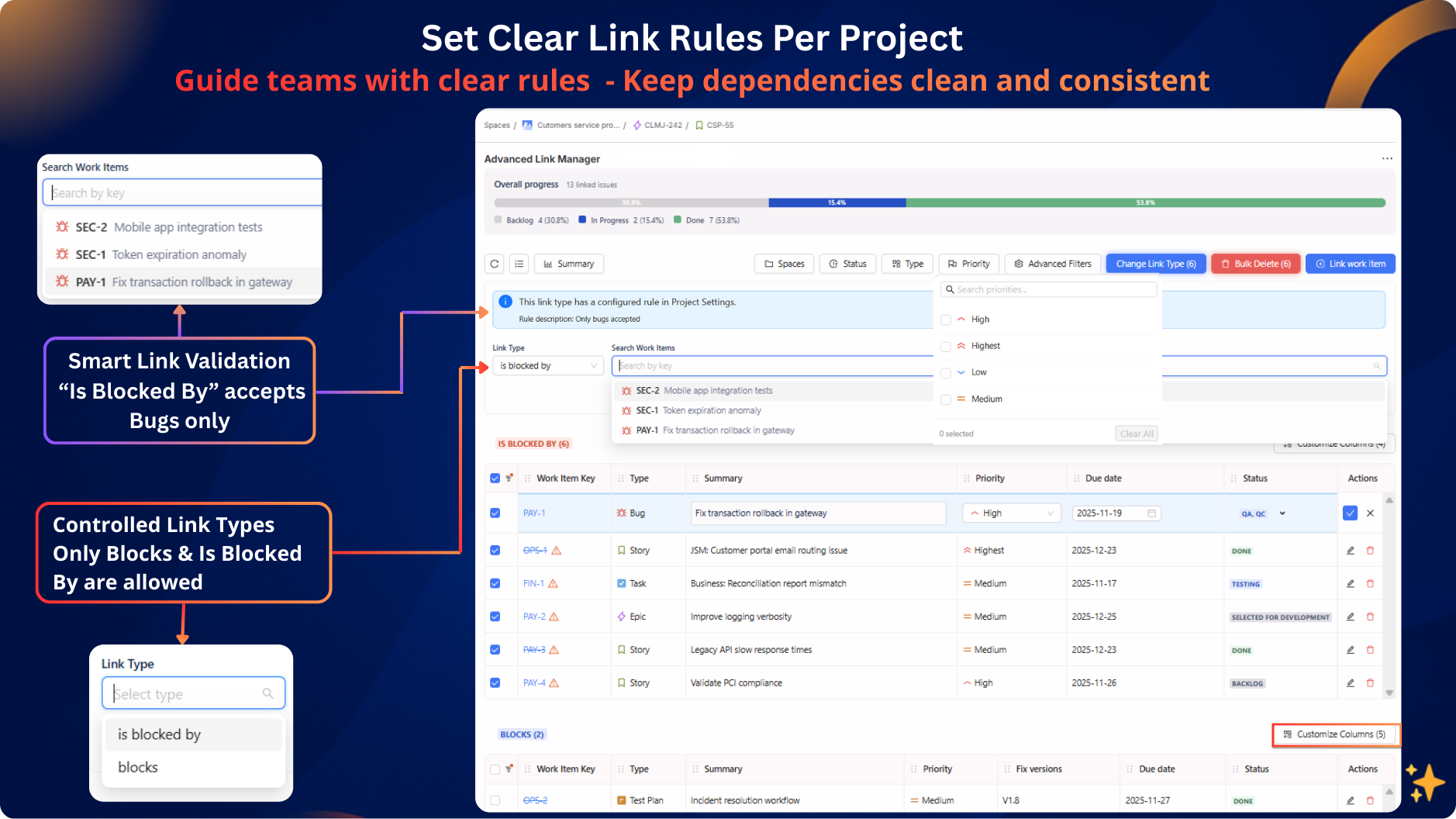
1. Defining allowed link types per project
Not every project needs every link type.
Controlling the available set reduces misuse dramatically.
2. Restricting which work item types can link
Examples:
-
Only Stories can “block” Bugs
-
Only Requirements can be “implemented by” tasks
-
Only Tests can be linked via “tests / is tested by”
This prevents illogical relationships.
3. Reviewing and correcting historical misuse
Over time, Jira accumulates incorrect relationships.
A periodic cleanup keeps reports reliable.
4. Visualizing dependencies in matrix or graph views
Visual approaches make it easy to detect:
-
incorrect links
-
deep blockers
-
dependency hotspots
-
risk chains
This is especially useful for project leads and PMOs.
👉 Advanced Link Manager (Atlassian Marketplace)
📈 The Impact of Clean, Governed Link Types
When link types are standardized and controlled:
-
Blockers become clear
-
Dependencies become meaningful
-
Reporting becomes accurate
-
Cross-team planning improves
-
Automation becomes more reliable
-
Teams gain confidence in the data
Issue links evolve from “visual hints” into a trusted planning asset.
🛠️ If you want to enforce this governance inside Jira
We built a solution that helps implement this structured approach directly inside the issue view, including:
-
project-level link type control
-
rules for allowed item-to-item linking
-
detection of invalid or unauthorized link types
-
cleanup of historical issues
-
matrix and graph-style dependency views
-
enhanced link display for clarity
Happy to answer questions, share governance templates, or provide implementation tips based on real customer examples.

